Why is lead lifecycle changing for closed leads? | Community
Skip to main content
Becky_Schroeder
Level 2
June 15, 2017
Solved

Why is lead lifecycle changing for closed leads?

  • June 15, 2017
  • 2 replies
  • 4141 views

Why would the lead lifecycle field change from Customer to MQL after sales has closed the lead and marked it as customer/sold? This is causing my nurture campaigns to resume for leads that are already sold.

This post is no longer active and is closed to new replies. Need help? Start a new post to ask your question.
Best answer by

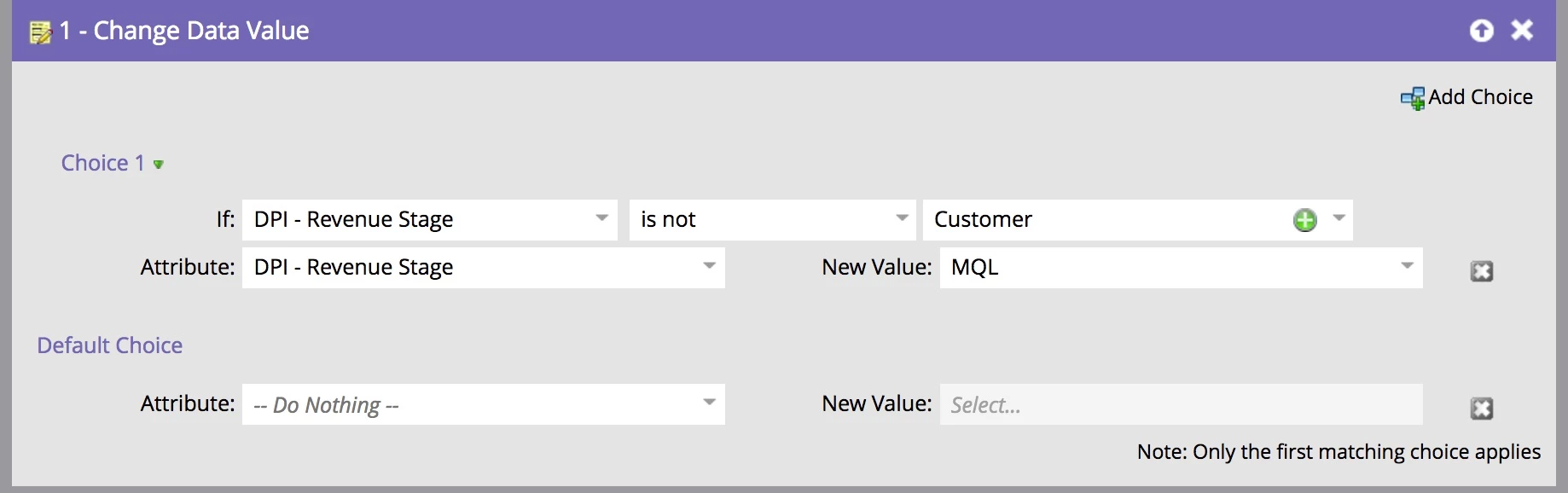
Your screenshot shows Change Data Value, but because your question is about a lifecycle I would expect to see Marketo changing a revenue stage in a Revenue Cycle Model.  Curious if you are changing data values to drive a Marketo RCM, or if you're simply tracking a lifecycle using only custom fields. 

Either way, if you don't want the data value to change to MQL after field named "Changed Lead Lifecycle - TR" has a value "Customer," you can use a Choice in the Change Data Value Flow step that prevents it from changing to MQL if the current value is "Customer."


2 replies

Grégoire_Miche2
Level 10
June 15, 2017

Hi Becky,

Technically, hard to answer without looking at you lead lifecycle program.

But sometimes, when a contact becomes a customer, to may make sense to send it back to nurturing in order to prepare up-sell or cross-sell. But usually, this happens after a while, not within the same minute . So the usual cycle will be:
Customer -> recycled -> wait (a few weeks or months) -> MQL

-Greg

Harish_Gupta6
Level 6
June 16, 2017

Hi Greg,

What should be the ideal wait time you suggest?

Thanks

Harish Gupta
Accepted solution
June 16, 2017

Your screenshot shows Change Data Value, but because your question is about a lifecycle I would expect to see Marketo changing a revenue stage in a Revenue Cycle Model.  Curious if you are changing data values to drive a Marketo RCM, or if you're simply tracking a lifecycle using only custom fields. 

Either way, if you don't want the data value to change to MQL after field named "Changed Lead Lifecycle - TR" has a value "Customer," you can use a Choice in the Change Data Value Flow step that prevents it from changing to MQL if the current value is "Customer."

Harish_Gupta6
Level 6
June 16, 2017

Hi Tom,

You can add the filter in the smart list tab of smart campaign that if Revenue Stage is not customer then only implement the flow step.

Thanks

Harish Gupta