
Where is the body in a 2.0 form? | Community
Skip to main content
Cecile_Maindron
Level 10
May 23, 2014
Question

Where is the body in a 2.0 form?

  • May 23, 2014
  • 7 replies
  • 1708 views

Hello,

I want to add a javascript in order to be able to add bold font inside a hoover text (see '?' below) inside a rich text field in my 2.0 form... that was long!

I have tried to add the <SCRIPT SRC=http://info.talend.com/rs/talend/images/wz_tooltip.js></SCRIPT> to the rich text but MKTO automatically delete the line. I have tried to add it to an html block inside LP but this hoover text doesn't work.
I know that I need to add the line right after the <body> tag but I cannot find it!
Do you know where I can locate it? Or do you have an idea how can I amend font and add "bold" to the text inside bubble?


Thanks

Cécile

This post is no longer active and is closed to new replies. Need help? Start a new post to ask your question.

7 replies

May 23, 2014
I would try dragging a HTML element into the LP, where you'll need something like this:

<SCRIPT SRC=http://info.talend.com/rs/talend/images/wz_tooltip.js></SCRIPT>
<SCRIPT> onmouseover="Tip(FONTWEIGHT, 'bold')"; </SCRIPT>

Then approve the LP, and see if that works. If not, view its source code to try to work out why it's not working. You'll at least be able to see where Marketo is inserting the HTML element this way!
Cecile_Maindron
Level 10
May 23, 2014
it doesn't work
May 23, 2014
have you tried tieing it in the form's CSS? Use a CSS hover code similar to this one

May 23, 2014
You'll need to give a bit more information then Cécile, so that the community can help :). Perhaps you could post the LP URL for us to have a look at?
Cecile_Maindron
Level 10
May 23, 2014
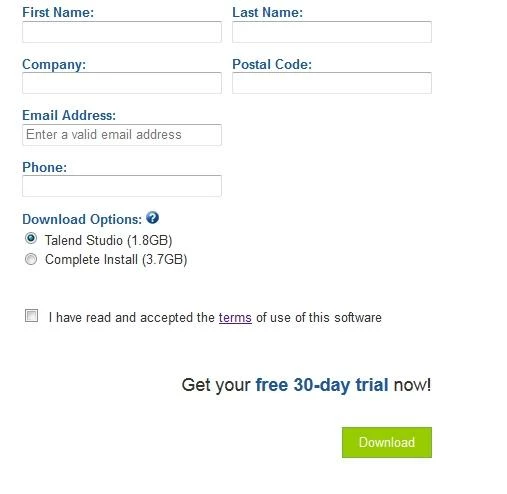
ok so let me try to recap. I have created a 2.0 form (see screenshot at beginning of the thread). As form is embedded on a Drupal form and I needed pre-filled fields; I have decided to use an iFrame https://info.talend.com/productevaluationtedi20.html.
So far so good. I first did a very basic .html hover text using <title=>. BUT my product manager wants a tooltip with regular & bold text and space between paragraphs

title

aaaaaaaaaaaaaaaaaaaaaaaaaaaaaaaaaaaaaaaaaaaaaaaaaaaaaaaaaaaaaaaaa

aaaaaaaaaaaaaaaaaaaaaaaaaaaaaaaaaaaaaaaaaaaaaaaaaaaaaaaaaaaaaaaaa

I have been told that I can only achieve this with javascript. I have looked on forums and for instance found script mentioned above but what I have noticed is that MKTO 2.0 form automatically delete any script or html code; I cannot find where the <body> is. I have tried to add script on landing page: didn't work. I have tried to add script on Drupal page: didn't work.
I'm a marketer w/ 0 knowledge in javascript so ideally I would like a model where I just need to replace dummy picture url by mine and dummy text with my content :)

Cécile
Cecile_Maindron
Level 10
May 26, 2014
ok so I have managed to customize my pop-up using CSS and html only. I'll post my tip in a separate thread in case so people are interested.
May 27, 2014
Good job Cécile! Here is the thread if anyone's interested.