
Denise_Greenb12
Level 6
April 5, 2019
Question

What does "System Mapping" mean in a Channel Tag

  • April 5, 2019
  • 1 reply
  • 3316 views

I feel like I should know this already but I don't. I'm working in a Marketo instance new to me and any event channel pre-existing or that I create has this "System Mapping" column:
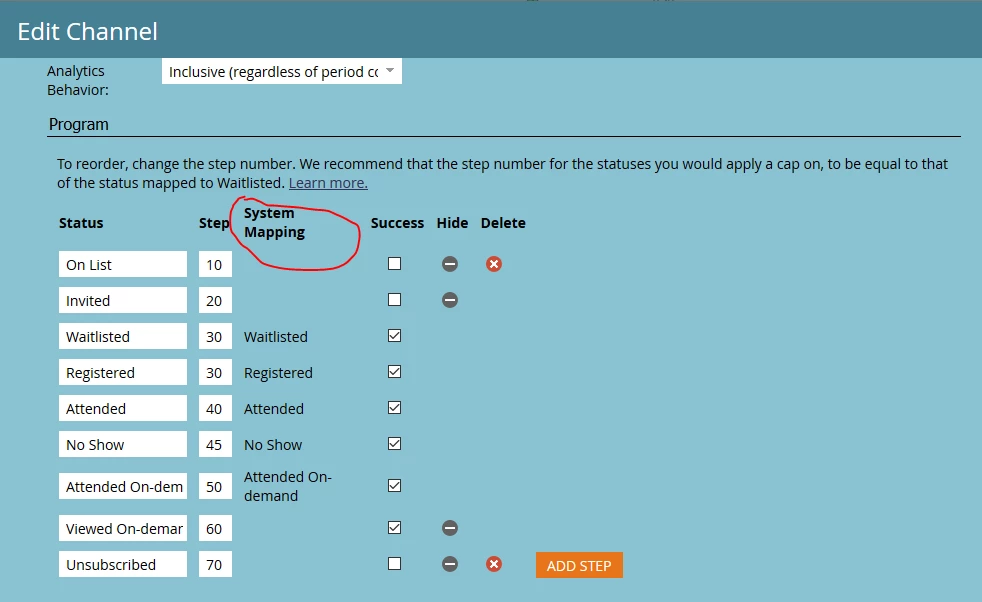
And notice that I can't delete any statuses other than the first and last. What does this mean and where does it come from?

Thank you!

Denise

This post is no longer active and is closed to new replies. Need help? Start a new post to ask your question.

1 reply

Jay_Jiang
Level 10
April 6, 2019

Not a Marketo engineer so I don't have the official explanation but using reasoning...

Regarding the name "System mapping", it looks like a name change/standardisation across event programs. It used to be "Mobile Check-In Status" for non-webinar events (click the Learn More link and you'll see in the docs screenshots it still shows Mobile Check-In Status).

Regarding its purpose, we know that for an event program (non-webinar), the Registered status under Mobile Check-In Status (System Mapping) meant that the member would show and be available for checking-in in the Marketo Event app . So... it seems that the system mapping has a back-end use.

Another observation is that all system mapping statuses must be used. For non-webinar programs, there are 3 - waitlisted, registered and attended, and while you can map these for non-webinar programs, you have to map all 3. For webinar programs, there are a few additional statuses and you can't edit the statuses. As these statuses must be used, you're not able to delete them.

It looks like... Marketo has, essentially, enforced a foundation webinar event program en masse. Why? If system mapping statuses are linked to back end operations then it's probably to allow various webinar vendors' integrations to understand a common Marketo system status so that integrations will work out of the box