weird symbol on the smart list | Community
Skip to main content
Arthur_Aronov
Level 2
November 22, 2018
Solved

weird symbol on the smart list

  • November 22, 2018
  • 1 reply
  • 2590 views

hey there,

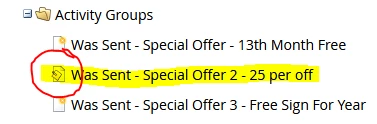
can anyone tell me what this symbol means?
This post is no longer active and is closed to new replies. Need help? Start a new post to ask your question.
Best answer by karanhari-1

Hi @Arthur Aronov​,

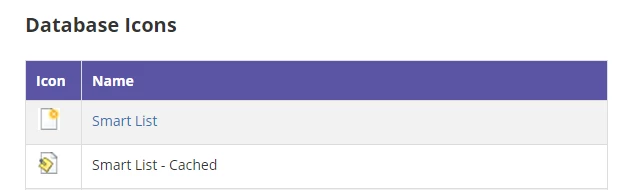
After you export a smart list to Excel, Marketo will automatically cache the list.  You'll notice a little paper clip and sticky note on the smart list icon the next time you log-in or refresh your browser. You can undo the caching of the list simply by pressing the list's refresh button. Here is the specific link for Marketo product Docs​ which explains the details on this. Also here is the product docs link for Icon Glossary for your reference.This contains all the icons that are there in Marketo. (Reference Snapshot attached below)
Hope this helps.

Best Always,

Karan Hari

1 reply

karanhari-1Accepted solution
Level 7
November 22, 2018

Hi @Arthur Aronov​,

After you export a smart list to Excel, Marketo will automatically cache the list.  You'll notice a little paper clip and sticky note on the smart list icon the next time you log-in or refresh your browser. You can undo the caching of the list simply by pressing the list's refresh button. Here is the specific link for Marketo product Docs​ which explains the details on this. Also here is the product docs link for Icon Glossary for your reference.This contains all the icons that are there in Marketo. (Reference Snapshot attached below)

Hope this helps.

Best Always,

Karan Hari

Level 7
November 22, 2018

Hi @Arthur Aronov​,

Kindly let me know if I can help you with anything else regarding your above question. If you think the above reply has answered your question, request you to kindly mark it as correct/answered. It helps refine future searches.

Best Always,

Karan Hari