Webpage Visit Scoring Campaign not Triggering | Community
Skip to main content
October 19, 2016
Question

Webpage Visit Scoring Campaign not Triggering

  • October 19, 2016
  • 5 replies
  • 4656 views

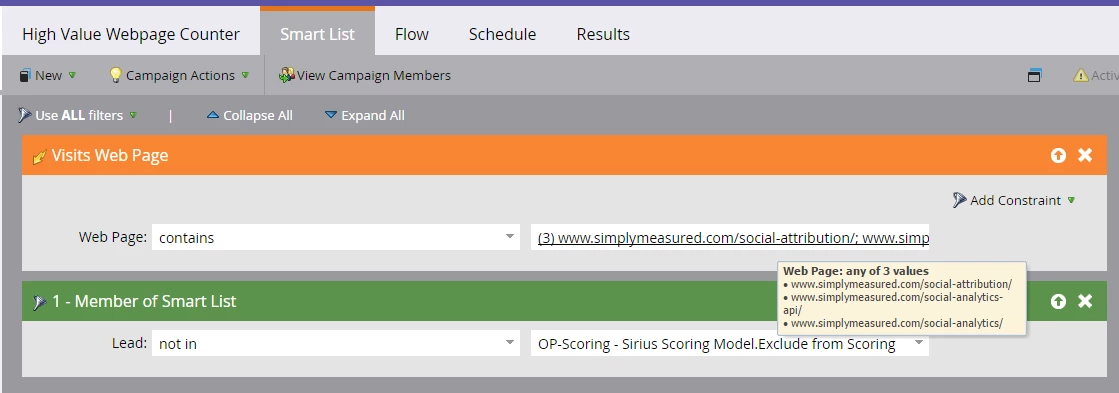
I have a campaign set up to score leads based on visits to certain high value pages on our website.  For some reason, the campaign is not triggering as expected.  I have tried different qualifiers (webpage "is", "contains", "starts with", etc), and I have tried listing the 3 pages in different ways "http", "https", "www", "simplymeasured.com", etc.  I haven't stumbled on the right combination to get this campaign to trigger.  I've also tried opening the Multiple Value Chooser window and adding my pages from there, but our webpages are not populating in the drop down.  Any ideas?
This post is no longer active and is closed to new replies. Need help? Start a new post to ask your question.

5 replies

October 20, 2016

We got it to work finally.  It wanted the "www" removed, and the "contains" qualifier.

SanfordWhiteman
Level 10
October 23, 2016

Make sure to post your questions to Products. A mod just moved your thread today. That's why nobody responded originally.

Glad you figured it out. The solution makes sense, because your website uses the zone apex (simplymeasured.com) as the canonical (i.e. "true" hostname of the website, steering all visitors there after their first pageview.  (In contrast to other sites who use www.example.com as the canonical host and will redirect example.com to www.example.com.)

Thomas_Morgadin
Level 3
June 25, 2018

Hi,

I have the exact same issue.

I'm trying to update scores on Marketo landing page visits, and I set a smart list similar to what is shown here. Here is mine :

Though, when I run the test I do not notice any scoring variation. Any ideas why ?

Grégoire_Miche2
Level 10
June 25, 2018

Bonjour Thomas,

The problem is probably how you entered the URLs. But as they are hidden, we cannot hep you there

-Grégoire

Grégoire_Miche2
Level 10
June 25, 2018

And also,

It's always better to open a new thread that comment on an old one. More likely to get some help.

-Greg

Thomas_Morgadin
Level 3
June 25, 2018

My bad, also thanks for the advice Grégoire.

Here is a sample of the links I'm using on that SC :

  • go.comap-group.com/Memo-diametres-nominaux-CoExpert.html
  • go.comap-group.com/vehicule-checklist-coexpert.html
  • go.comap-group.com/coexpert-fr-ebook-gain-temps-chantier.html

URLs are entered that way, without the subdomain (Web page contains...) :

  • /Memo-diametres-nominaux-CoExpert.html
  • /vehicule-checklist-coexpert.html
  • /coexpert-fr-ebook-gain-temps-chantier.html

As for the Activity Logs, I'm positive, they are definitely showing out there.

Grégoire_Miche2
Level 10
June 25, 2018

Hi Thomas,

Remove the "date of activity" constraint. You are on a trigger, it's real time. This constraint only makes sense with a"min number of time" constraint.

Have you double checked that your test leads are not members of the "Leads a exclure" smart list ?

-Greg

Thomas_Morgadin
Level 3
June 26, 2018

Grégoire,

I removed the "date of activity" constraint.

And I'm positive, my tests leads aren't members of the "Leads a exclure" SL.

Additional information on that configuration :

  • Each person can run through flow once every 1 hour(s)
  • Some of the target pages are set on robots : nofollow (but there are exceptions...)

I do have similar configurations but targeting other domains :

  • Visit key pages on www.comap.fr => Configuration is similar and it is working, I notice score variations.

I wonder if the issue is coming from the subdomain go.comap-group.com but that would be weird because it is only hosting our Marketo landing pages.

Thomas_Morgadin
Level 3
June 26, 2018

Grégoire,

It is a no go... I will contact support right away.

For the LPs, it has been set like that because the objective was to follow leads on more than one domain : comap.fr, comap.be...

Grégoire_Miche2
Level 10
June 26, 2018

Hi Thomas,

You can setup Marketo so that the LP's show in every of these domains. That would be a much better choice, as for the moment, the munchkin on the .fr or .be sites is useless.

We operate out of France, so do not hesitate to contact me directly if you need some help.

-Greg

Thomas_Morgadin
Level 3
June 28, 2018

Hi all,

I figured the problem out with support's help.

I'll share with you all for posterity Here is supports insights :

The Landing pages you are referring to are Marketo Landing pages.

Therefore, the Visit Web page Filter will not accept URLs as valid value, instead it will look at the title of the Landing page in Marketo. It only accepts a URL in the case of a non-marketo Landing page.

To explain further with an example:

‘’go.comap-group.com/Memo-diametres-nominaux-CoExpert.html’’ will not be seen as a valid value for the Filter because it is a Marketo Landing page.

Instead it will look at ‘’WJ.2017-10.FR.diametres-nominaux.LP-Diametres.nominaux’’ as the valid value because that is the Landing page’s title in Marketo.

I had to change the smart list configuration to "Web page is" + Marketo Landing page's titles and it is working. It was not working with the "contains" filter.

Thank you for your help.

@Grégory : The alternative would be to add Marketo contact forms on our websites though, right ? What would be the best case scenario ? I'm guessing personnalization of LP domains + Marketo contact forms on every websites ?