Webinar registration confirmation email wont send. | Community
Skip to main content
October 14, 2015
Solved

Webinar registration confirmation email wont send.

  • October 14, 2015
  • 3 replies
  • 3002 views

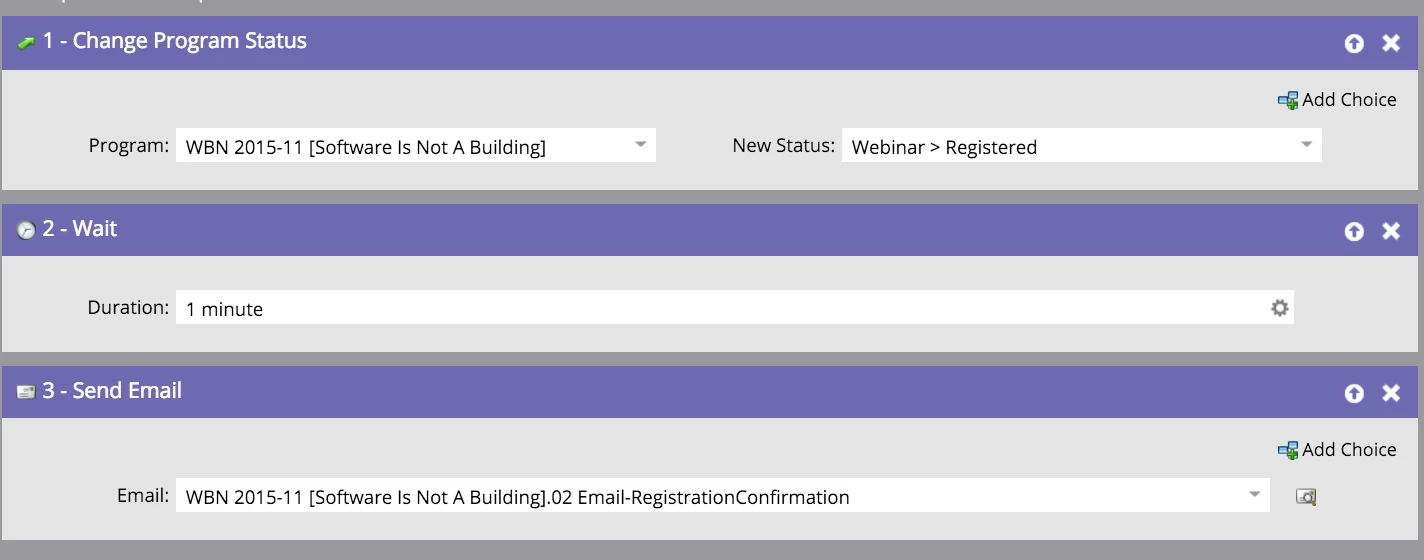
Here is a screenshot of the flow.

The campaign is activated.

This post is no longer active and is closed to new replies. Need help? Start a new post to ask your question.
Best answer by

Found a fix.

I removed everything from the flow tab and then added it back in.

Seems to be working as expected now.

Thanks everyone for the help!

3 replies

Adobe Employee
October 14, 2015

Hi Clark,

What does your smart list look like?  Also, if you look at Marketing Activities > Campaign Queue (at the top) are there any other campaigns waiting to process?

John

October 14, 2015

No other campaigns in the queue.

Smart list is any form on this page: pages.cantina.co/webinar-software-is-not-a-building-registration.html

Inline image 1

I cloned it's from a past webinar we did and try to start from scratch.

I can see in the "results" tab that the change program status worked but no email deliver or send.

Josh_Hill13
Level 10
October 14, 2015
  1. make sure it is the Form = Webinar Form on Page Y don't leave marketo any chances to do whatever there with IS ANY.
  2. is the campaign every time?
  3. are you sure you connected to the correct, active webinar with your provider? Does the lead show up there?
  4. check the lead's log to see if the Status changed.
Grégoire_Miche2
Level 10
October 14, 2015

HI Clark,

is you email Operational? If not, email sent might be prevented by either communication limit or unsubscription.

Look at the lead activity log an see what the error is on the flow step.

-Greg

October 14, 2015

Double checked that my email is operational.

How can I see my lead activity log?

Adobe Employee
October 14, 2015

If you look at the Result tab of the campaign you can see the activities, or you can search a specific lead's email address in the Lead Database.  Are the other flow steps getting executed?

John

Accepted solution
October 14, 2015

Found a fix.

I removed everything from the flow tab and then added it back in.

Seems to be working as expected now.

Thanks everyone for the help!