Webhook to Create a new Salesforce Lead. | Community
Skip to main content
Level 7
July 8, 2015
Question

Webhook to Create a new Salesforce Lead.

  • July 8, 2015
  • 2 replies
  • 6869 views

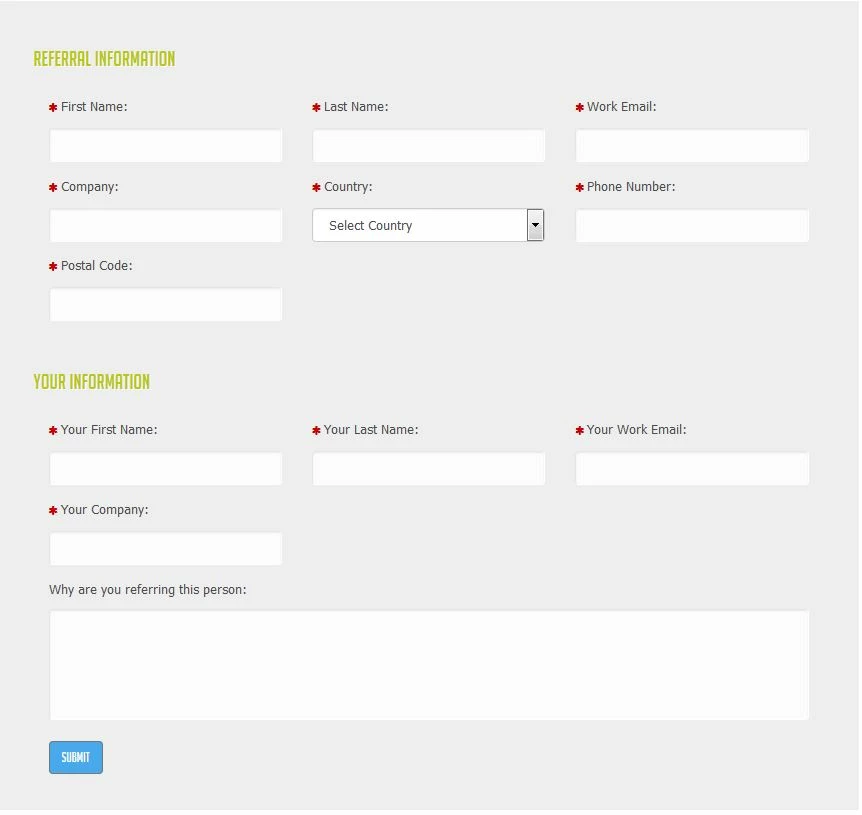
We have a referral form and would like to create a new lead in Salesforce with fields populated on a referral form.  Does anyone know how to accomplish this?

Our Form's Fields:

REFERRAL INFORMATION (we would like to use these fields to create a new lead in salesforce)

  • These are custom Salesforce fields:
    • Referral First Name
    • Referral Last Name
    • Referral Email Address
    • Referral Company
    • Referral Country
    • Referral Phone
    • Referral Postal Code

YOUR INFORMATION (this is the person referring the lead and who Marketo tracks as the person who filled out the form)

  • These are the standard Salesforce fields:
    • First Name
    • Last Name
    • Email Address
    • Company

This post is no longer active and is closed to new replies. Need help? Start a new post to ask your question.

2 replies

Josh_Hill13
Level 10
July 8, 2015

There is a similar thread earlier.

I suggest doing a search for "referral form" in the community. you will find a lot of detail on what others have done.

Also, I'm not sure why you mention a webhook here. You would want to use jquery most likely and then pass the information to Marketo first.

Level 7
July 8, 2015

I have searched the community and can't find anything to accomplish what I am looking for.  I do not know where to start using jquery.

SanfordWhiteman
Level 10
July 9, 2015

I think what Josh is getting at here is you may have an X-Y problem: asking how to do X before researching to find out Y is a better goal.

In this case, you can use SFDC Web-to-Lead directly from the page with the Marketo form, when the form submits. Then you kill both birds from the browser, no webhook necessary.

Jep_Castelein2
Level 10
July 10, 2015

The easiest way to do this without "coding" is to create the new "referred" Lead in Marketo, then sync it to SFDC. Submit the form to Marketo as seen above. The referred Lead's data is stored in the custom Fields. Now you have to use a Webhook in a creative way: use it to submit a Form on your own Marketo instance to create the new Lead. To do so, you need to pass in the "referred" email address in the normal Marketo email field, that will cause a new Lead to be created.

Details:

  • URL: localhost/index.php/leadCapture/save
  • Payload template: munchkinId=AAA-000-BBB&formid=000&Email={{lead.Referral Email Address}}&FirstName={{lead.Referral First Name}} etc.
    • Make sure to put in your own munchkinId, create a new Form and put in the right formid (look at the URL to find the ID)
  • Request Type: POST
  • Request Token Encoding: Form/Url
  • Response Type: none

Also make sure that you add a field that indicates the source of this Lead. You need to trigger a Smart Campaign that then syncs this new Lead to SFDC. If you want, you can also push in an SFDC Campaign ID or other information that you want to push to SFDC for this new Lead.

Level 7
July 15, 2015

Thanks Jep!  I have it all working except one more thing I am trying to figure out.  In the webhook I am trying to set the Referral's lead owner the same as the Referrer's lead owner.  Is there anyway to accomplish this?  I have been trying multiple ways to get this to work but it hasn't been working.