
Web page visit trigger based on lead token value | Community
Skip to main content
Ilana_Guilfoyle
October 15, 2015
Solved

Web page visit trigger based on lead token value

  • October 15, 2015
  • 3 replies
  • 2049 views

I'm trying to create a smart campaign that is triggered when a lead visits a web site for the first time. The issue is that each lead has a unique url associated with their record.

For some reason this does not work:
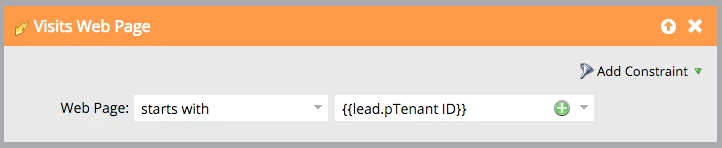
But this does, as long as the lead's pTenant URl = daqi.jamacloud.com
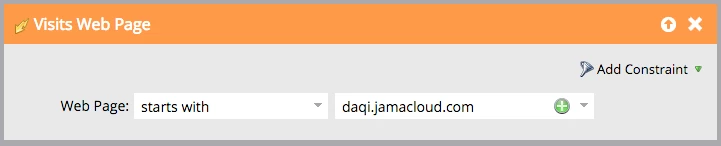
Without the ability to use wildcards (example: *.jamacloud.com), this is the only other conceivable way I can trigger this campaign, and i am at a loss.

Any help is much appreciated.

Note: I also tried using "contains" with jamacloud.com (the only constant in this equation), but that does not seem to work either, does anyone know the rules associated with "contains", can it be anywhere in the url with values before and after it, because that doesn't seem to be the case.

This post is no longer active and is closed to new replies. Need help? Start a new post to ask your question.
Best answer by JohnCl9

Hi Ilana,

A token cannot work in a trigger this way because tokens depend on knowing who a lead is in order to populate.  The trigger wouldn't be able to fire because there wouldn't be any leads associated with it until it fired, and it can't do that until it has a lead associated with it, etc etc.

John

3 replies

SanfordWhiteman
Level 10
October 15, 2015

A contains trigger should work fine for a parent domain match.  Works for me.  I wish we had ​more ​control over what it would match, in fact.

JohnCl9Adobe EmployeeAccepted solution
Adobe Employee
October 15, 2015

Hi Ilana,

A token cannot work in a trigger this way because tokens depend on knowing who a lead is in order to populate.  The trigger wouldn't be able to fire because there wouldn't be any leads associated with it until it fired, and it can't do that until it has a lead associated with it, etc etc.

John

Justin_Norris1
October 16, 2015

@John Clark​ A very sensible explanation of why triggers won't work in tokens! Now I know.

Justin_Norris1
October 15, 2015

@Ilana Mullin​

Interesting problem.

I believe tokens will not work in this trigger -- or any trigger for that matter.

Use Tokens in Flow Steps - Marketo Docs - Product Docs

I am surprised that a "contains" trigger with part of the URL string is not working though. I'm pretty sure I've done this so I'd take that one up with support.