Viewing Smart List Subscriptions when created in Marketing Activities | Community
Skip to main content
Level 5
May 20, 2020
Solved

Viewing Smart List Subscriptions when created in Marketing Activities

  • May 20, 2020
  • 2 replies
  • 7324 views

I am creating several smart list subscriptions within certain programs under Marketing Activities.  Problem is, they are not showing up under the Subscription Tab in the Database area.  If I need to manage them, it seems I need to create a new subscription under Marketing Activities, then update what I needed and delete the new one.  There has to be a simpler way...any ideas???
This post is no longer active and is closed to new replies. Need help? Start a new post to ask your question.
Best answer by Darshil_Shah1

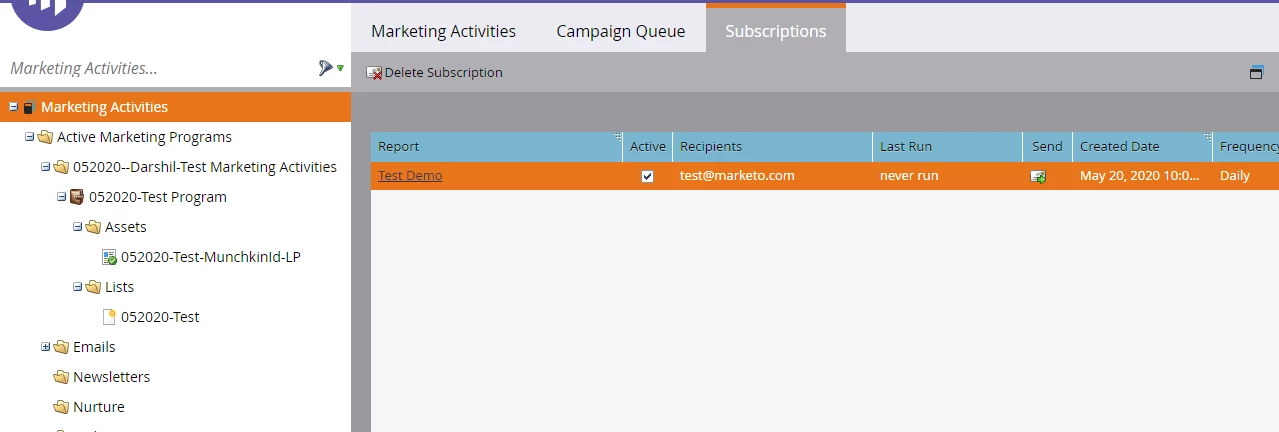
Select Marketing Activities -> Select Subscription Tab form the right panel. 

Ref. Below


2 replies

Darshil_Shah1
Community Advisor and Adobe Champion
Darshil_Shah1Community Advisor and Adobe ChampionAccepted solution
Community Advisor and Adobe Champion
May 20, 2020

Select Marketing Activities -> Select Subscription Tab form the right panel. 

Ref. Below


KARENBLAuthor
Level 5
May 20, 2020

Thank you - thought it would be something simple, just couldn't figure it out!!!

Josh_Hill13
Level 10
May 20, 2020

You will also have to look at the correct workspace, if you have more than one.


Marketo generally limits this to 100 per Instance.

KARENBLAuthor
Level 5
May 20, 2020

Thanks Josh - really appreciate it!