Velocity script support - Personalisation tokens from Custom Object entries. | Community
Skip to main content
Level 2
February 29, 2024
Solved

Velocity script support - Personalisation tokens from Custom Object entries.

  • February 29, 2024
  • 4 replies
  • 4768 views

Hello - Thank you for reading. Any support would be very much appreciated. 


Background:

We are a housing development business, building and selling plots/houses on housing developments in the UK.

We have a unique, proprietary CRM that is very difficult to influence hence, the seemingly "roundabaout" solution I am about the explain.


Solution summary:

When a customer enquired/expresses interest about a housing development, a unique Custom object entry is created in our Marketo instance, linked to the person record. 
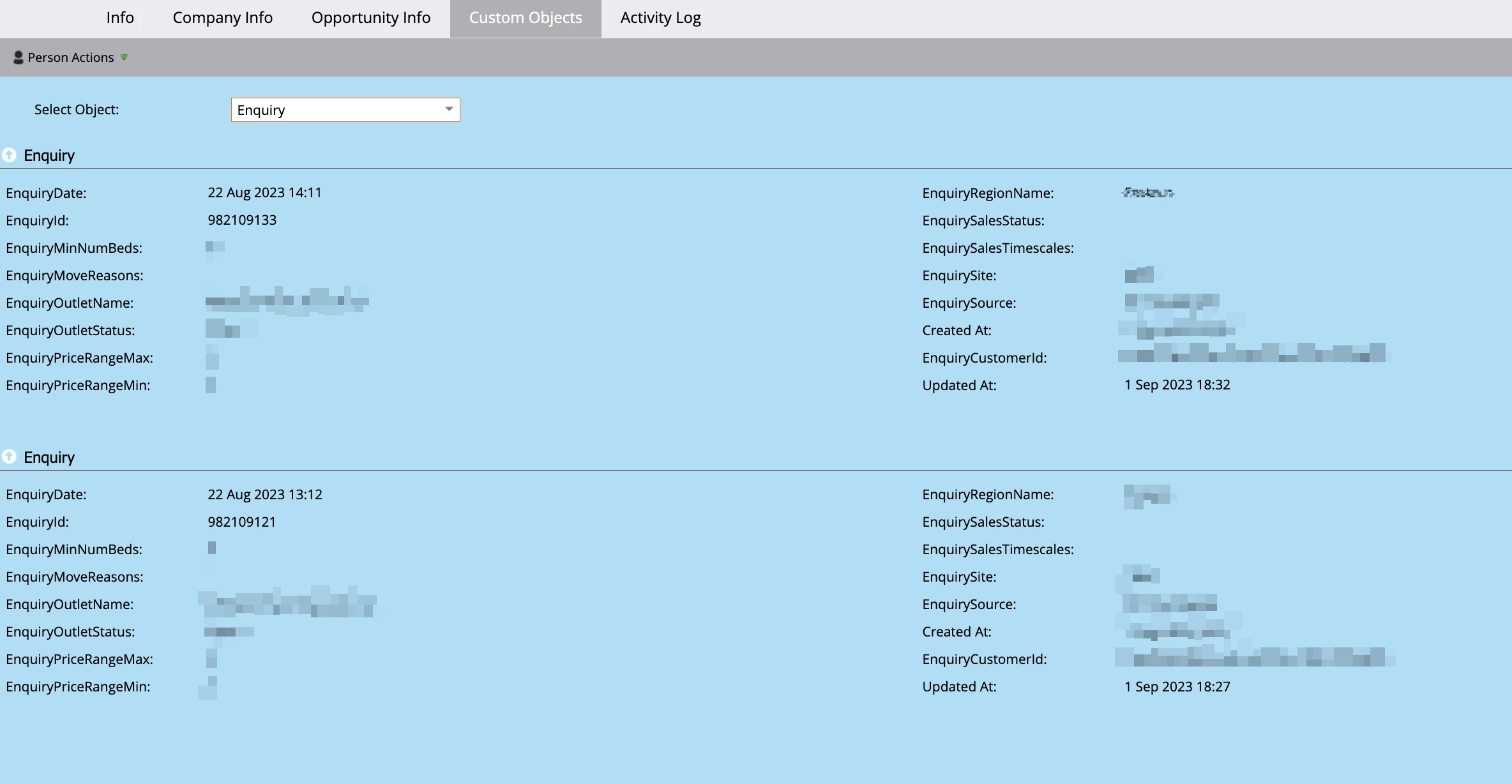
We would like to personalise a range of emails with contextualised information based on these enquiries. 

Our solution is to use velocity script to populate tokens within a high-level folder, that can then be inherited and utilised within the subsequent emails. 
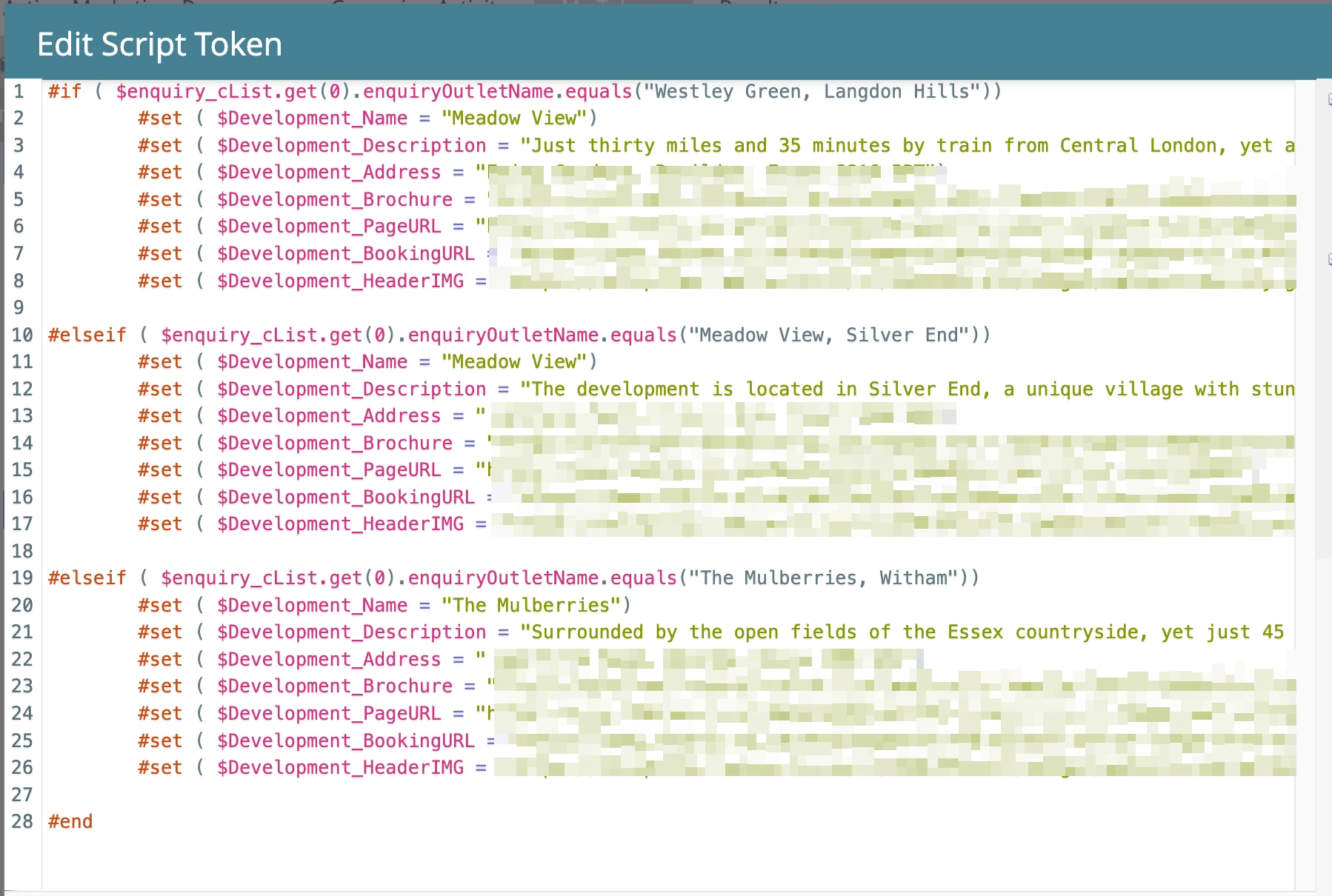
This simple script is essentially, updating the token with the information of that specific development based on the "EnquiryOutletName" field.


Issue summary:

This is working great for us! However, there are two key flaws:

1. A customer will often have multiple enquiries linked to their record. Over time, these enquires can be updated so that the "EnquiryOutletStatus:" field shows a value other than "Open". We would like to velocity, to only select an enquiry IF that field equals "Open".

2. When the above update is made, the custom object is updated and brought to the top of the list. it appears that the velocity script is currently selecting the most recently updated entry based on this  "Updated at" field. We would like to stipulate that the script selects the entry with the most recent "EnquiryDate:" field instead. 


To summarise the required script criteria, I would like
IF "EnquiryOutletName" equals "XXX", SET tokens as "XXX  IF  "EnquiryOutletStatus:" Equals Open AND  "EnquiryDate:" is the most recent from all entries.


The issue is that I do not know, and cannot find, how to write that script correctly. 

I would REALLY appreciate any help to do so!


This post is no longer active and is closed to new replies. Need help? Start a new post to ask your question.
Best answer by Jo_Pitts1

@paddyrr ,

Here is a consolidated version taking the sorted list approach, and a method of controlling the number of open enquiries to display.


#set ($maxDevelopmentToDisplay = 2) #set ($displayCounter = 0) #set( $allDevelopments = { "Westley Green, Langdon Hills" : { "Development_Name":"Westley Green", "Development_Description":"XXX", "Development_Address":"XXX", "Development_Brochure":"XXX", "Development_PageURL":"XXX", "Development_BookingURL":"XXX", "Development_HeaderIMG":"XXX" }, "Meadow View, Silver End" : { "Development_Name":"Meadow View", "Development_Description":"XXX", "Development_Address":"XXX", "Development_Brochure":"XXX", "Development_PageURL":"XXX", "Development_BookingURL":"XXX", "Development_HeaderIMG":"XXX" }, "The Mulberries, Witham":{ "Development_Name":"The Mulberries", "Development_Description":"XXX", "Development_Address":"XXX", "Development_Brochure":"XXX", "Development_PageURL":"XXX", "Development_BookingURL":"XXX", "Development_HeaderIMG":"XXX" } } ) #set($enquiryListSorted = $sorter.sort($enquiry_cList, ["EnquiryDate:desc"])) #foreach($enquiry in $enquiryListSorted ) #if($enquiry.EnquiryOutletStatus.equals("Open")) #set($aDevelopment = $allDevelopments[$enquiry.enquiryOutletName] ) <table> <tr> <td>Welcome to ${aDevelopment.Development_Name}</td> </tr> <tr> <td>${aDevelopment.Development_Description}</td> </tr> <tr> <td>We're located at:<br>${aDevelopment.Development_Address}</td> </tr> </table> #set ($displayCounter = $math.add($displayCounter ,1)) #if ( $displayCounter.equals($maxDevelopmentToDisplay) ) #break #end #end #end


Let me know if this suits.


Cheers

Jo

4 replies

ShannonKelly
Level 3
February 29, 2024

Hi @paddyrr , I think Darshil's response here might be helpful to you. He references Sandy's blog post Sorting objects and lists in Velocity

SanfordWhiteman
Level 10
February 29, 2024

Please replace that screenshot with actual code, using the Java syntax highlighter so it’s readable.


PaddyRRAuthor
Level 2
March 4, 2024

Sure @sanfordwhiteman - See here:

Thank you for your support


#if ( $enquiry_cList.get(0).enquiryOutletName.equals("Westley Green, Langdon Hills")) #set ( $Development_Name = "Westley Green") #set ( $Development_Description = "XXX") #set ( $Development_Address = "XXX") #set ( $Development_Brochure = "XXX") #set ( $Development_PageURL = "XXX") #set ( $Development_BookingURL = "XXX") #set ( $Development_HeaderIMG = "XXX") #elseif ( $enquiry_cList.get(0).enquiryOutletName.equals("Meadow View, Silver End")) #set ( $Development_Name = "Meadow View") #set ( $Development_Description = "XXX") #set ( $Development_Description = "XXX") #set ( $Development_Address = "XXX") #set ( $Development_Brochure = "XXX") #set ( $Development_PageURL = "XXX") #set ( $Development_BookingURL = "XXX") #set ( $Development_HeaderIMG = "XXX") #else ( $enquiry_cList.get(0).enquiryOutletName.equals("The Mulberries, Witham")) #set ( $Development_Name = "The Mulberries") #set ( $Development_Description = "XXX") #set ( $Development_Description = "XXX") #set ( $Development_Address = "XXX") #set ( $Development_Brochure = "XXX") #set ( $Development_PageURL = "XXX") #set ( $Development_BookingURL = "XXX") #set ( $Development_HeaderIMG = "XXX") #end


Darshil_Shah1
Community Advisor and Adobe Champion
March 4, 2024

@paddyrr, you should ideally not reference the 0th or the first element of the custom object list without sorting. You should ideally sort the custom object list based on your field of interest, and then pick the custom object record. You should check out Sandy’s blog on sorting custom object here.


Moreover, you should also take care of normalizing/settling the null values for the field you are using to sort the list. This isn’t required if you are using any of the system fields, such as UpdatedAt or CreatedAt, but required for the non-system custom object fields. 

SaurabhGoyal_GN
Level 4
March 12, 2024

Hi @paddyrr - 

Please review the solution provided below:

In order to achieve the desired outcome, we are implementing the following steps:
1. Sorting the custom object records based on enquiryDate in ascending order.
2. Utilizing a for loop to iterate through the records.
3. On the first instance where EnquiryOutletStatus is identified as "open," we will evaluate the conditions specified for enquiryOutletName to determine the desired outcome.

Here is the code for your reference - 


#set( $alloulets = { "Westley Green, Langdon Hills" : { "outlet_Name":"Westley Green", "outlet_Description":"XXX", "outlet_Address":"XXX", "outlet_Brochure":"XXX", "outlet_PageURL":"XXX", "outlet_BookingURL":"XXX", "outlet_HeaderIMG":"XXX" }, "Meadow View, Silver End" : { "outlet_Name":"Meadow View", "outlet_Description":"XXX", "outlet_Address":"XXX", "outlet_Brochure":"XXX", "outlet_PageURL":"XXX", "outlet_BookingURL":"XXX", "outlet_HeaderIMG":"XXX" }, "The Mulberries, Witham":{ "outlet_Name":"The Mulberries", "outlet_Description":"XXX", "outlet_Address":"XXX", "outlet_Brochure":"XXX", "outlet_PageURL":"XXX", "outlet_BookingURL":"XXX", "outlet_HeaderIMG":"XXX" } } ) #set($enquiry = $sorter.sort(${enquiry_cList}, ["EnquiryDate:desc"])) #foreach($enq in $enquiry) #if($enq.EnquiryOutletStatus.equals("Open")) #set($aOutlet = $alloutlets[$enq.enquiryOutletName] ) <table> <tr> <td>Name - to $aoutlet.outlet_Name</td> </tr> <tr> <td>Description - $aOutlet.outlet_Description</td> </tr> <tr> <td>Location - $aOutlet.outlet_Address</td> </tr> <tr> <td>Brochure - $aOutlet.outlet_Brochure</td> </tr> </table> #break #end #end


If this solution meets your requirements, please mark it as the solution.
SanfordWhiteman
Level 10
March 12, 2024

Please use the Syntax Highlighter (“Insert/Edit Code Sample”) when posting code so it’s readable. I edited your post this time.


There are some fundamental errors in your code:

1. using the == operator instead of .equals() (as discussed in the past, == can cause hard-to-find bugs because of the way it coerces its operands)

2. incorrect use of #break (the OP didn’t yet indicate that only one open record should be output)


Check@jo_pitts1’s answer above for some hints and the recommended config-first approach.

SaurabhGoyal_GN
Level 4
March 12, 2024

@sanfordwhiteman - Thanks for the suggestions. Made the required changes. 

@paddyrr - You can remove #break if you want multiple entries in the output. With break statement it will stop on the first encounter. 


#set( $alloutlets = { "Westley Green, Langdon Hills" : { "outlet_Name":"Westley Green", "outlet_Description":"XXX", "outlet_Address":"XXX", "outlet_Brochure":"XXX", "outlet_PageURL":"XXX", "outlet_BookingURL":"XXX", "outlet_HeaderIMG":"XXX" }, "Meadow View, Silver End" : { "outlet_Name":"Meadow View", "outlet_Description":"XXX", "outlet_Address":"XXX", "outlet_Brochure":"XXX", "outlet_PageURL":"XXX", "outlet_BookingURL":"XXX", "outlet_HeaderIMG":"XXX" }, "The Mulberries, Witham":{ "outlet_Name":"The Mulberries", "outlet_Description":"XXX", "outlet_Address":"XXX", "outlet_Brochure":"XXX", "outlet_PageURL":"XXX", "outlet_BookingURL":"XXX", "outlet_HeaderIMG":"XXX" } } ) #set($enquiry = $sorter.sort(${enquiry_cList}, ["EnquiryDate:desc"])) #foreach($enq in $enquiry) #if($enq.EnquiryOutletStatus.equals("Open")) #set($aOutlet = $alloutlets[$enq.enquiryOutletName] ) <table> <tr> <td>Name - to $aoutlet.outlet_Name</td> </tr> <tr> <td>Description - $aOutlet.outlet_Description</td> </tr> <tr> <td>Location - $aOutlet.outlet_Address</td> </tr> <tr> <td>Brochure - $aOutlet.outlet_Brochure</td> </tr> </table> #break #end #end


Changed the code in original reply as well. 

Jo_Pitts1
Community Advisor
Community Advisor
March 13, 2024

@paddyrr ,

Can you check back in and let us know if the solutions proposed are fit for purpose.  There has been quite a lot of effort gone in here.


Cheers

Jo

Jo_Pitts1
Community Advisor
Jo_Pitts1Community AdvisorAccepted solution
Community Advisor
March 13, 2024

@paddyrr ,

Here is a consolidated version taking the sorted list approach, and a method of controlling the number of open enquiries to display.


#set ($maxDevelopmentToDisplay = 2) #set ($displayCounter = 0) #set( $allDevelopments = { "Westley Green, Langdon Hills" : { "Development_Name":"Westley Green", "Development_Description":"XXX", "Development_Address":"XXX", "Development_Brochure":"XXX", "Development_PageURL":"XXX", "Development_BookingURL":"XXX", "Development_HeaderIMG":"XXX" }, "Meadow View, Silver End" : { "Development_Name":"Meadow View", "Development_Description":"XXX", "Development_Address":"XXX", "Development_Brochure":"XXX", "Development_PageURL":"XXX", "Development_BookingURL":"XXX", "Development_HeaderIMG":"XXX" }, "The Mulberries, Witham":{ "Development_Name":"The Mulberries", "Development_Description":"XXX", "Development_Address":"XXX", "Development_Brochure":"XXX", "Development_PageURL":"XXX", "Development_BookingURL":"XXX", "Development_HeaderIMG":"XXX" } } ) #set($enquiryListSorted = $sorter.sort($enquiry_cList, ["EnquiryDate:desc"])) #foreach($enquiry in $enquiryListSorted ) #if($enquiry.EnquiryOutletStatus.equals("Open")) #set($aDevelopment = $allDevelopments[$enquiry.enquiryOutletName] ) <table> <tr> <td>Welcome to ${aDevelopment.Development_Name}</td> </tr> <tr> <td>${aDevelopment.Development_Description}</td> </tr> <tr> <td>We're located at:<br>${aDevelopment.Development_Address}</td> </tr> </table> #set ($displayCounter = $math.add($displayCounter ,1)) #if ( $displayCounter.equals($maxDevelopmentToDisplay) ) #break #end #end #end


Let me know if this suits.


Cheers

Jo

SaurabhGoyal_GN
Level 4
March 14, 2024

@jo_pitts1 - Thanks for the suggestions, Got to learn new things.