April 25, 2016
Question

UTM program set up?

  • April 25, 2016
  • 3 replies
  • 3265 views

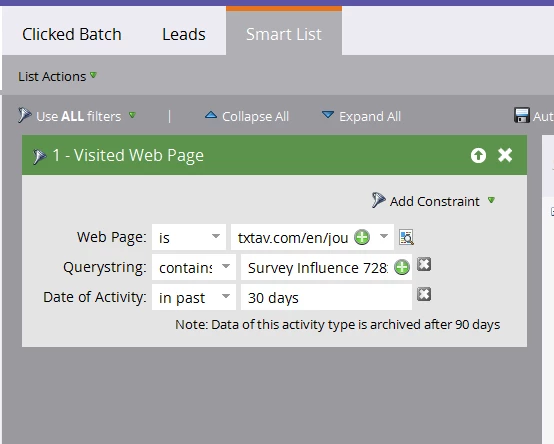
Getting quite frustrated with setting up programming to track banner click throughs to a web page using UTM codes. It seems very simple but I must be doing something wrong as my testing is not working. I'm using Visits trigger or Visited filter, entering page URL, adding Querystring constraint stating Contains: UTM data. Where am I going wrong?
This post is no longer active and is closed to new replies. Need help? Start a new post to ask your question.

3 replies

Josh_Hill13
Level 10
April 25, 2016

looks like your querystring has spaces, which would always not work. Look at your original string from the URL and match that.

Also, there are tons of UTM threads; please review them.

Tim_Langlois1
Level 4
April 25, 2016

Hi Mike - Could you paste in one of your links with a querystring on it? I agree with Josh that it might be spaces.

To have spaces in your Querystring constraint you'll need to use a "+" character or "%20"  - it depends on what your link is.

HTML URL Encoding Reference

April 26, 2016

Tim:

This is the URL: Taking Service to the Next Level . Looks like the email editor is converting it this text but rolling over you can see the URL. We do have spaces with the %20 in place of the space. I've tried using coding with and without the %20 without success. The string of numbers at the end of the URL is a code that our Sitecore app uses.

Josh_Hill13
Level 10
April 26, 2016

Did you try dashes instead of spaces?

May 3, 2016

We were having an issue with our instance where the Activity Log data was not updating in a timely fashion - in the order of a 6-8 hour delay! Therefore, the campaigns couldn't run and nothing was working. In our case, because our URLs are set up using spaces with %20 representing that space, the query parameter set up must use spaces (i.e. banner 728x90). The program is functioning now. Thanks everyone.

Tim_Langlois1
Level 4
May 9, 2016

Glad it was resolved