Your custom JS is glaringly broken (to be frank, if your developer felt up to the task of writing the code they should've been able to debug it as well!).
This section is the main offender, though the design as a whole is offbase:
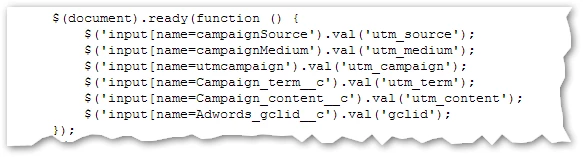
[a] You should never use ready (i.e. native DOMContentLoaded) to manage Marketo forms. This will not work reliably, as Marketo forms are loaded asynchronously and pay no regard to DOM events. They have their own event model for this reason, and only that model (whenReady/whenRendered) should be used. Using DOM events will give you the false impression that your code works, because under certain network timing, cache, and browser conditions it will. In the real world, it won't.
[b] You should never use DOM setters to set values on Marketo forms. They have their own accessors (setValues/addHiddenFields) and unless you are totally certain of what you're doing, you should only use those Marketo methods.
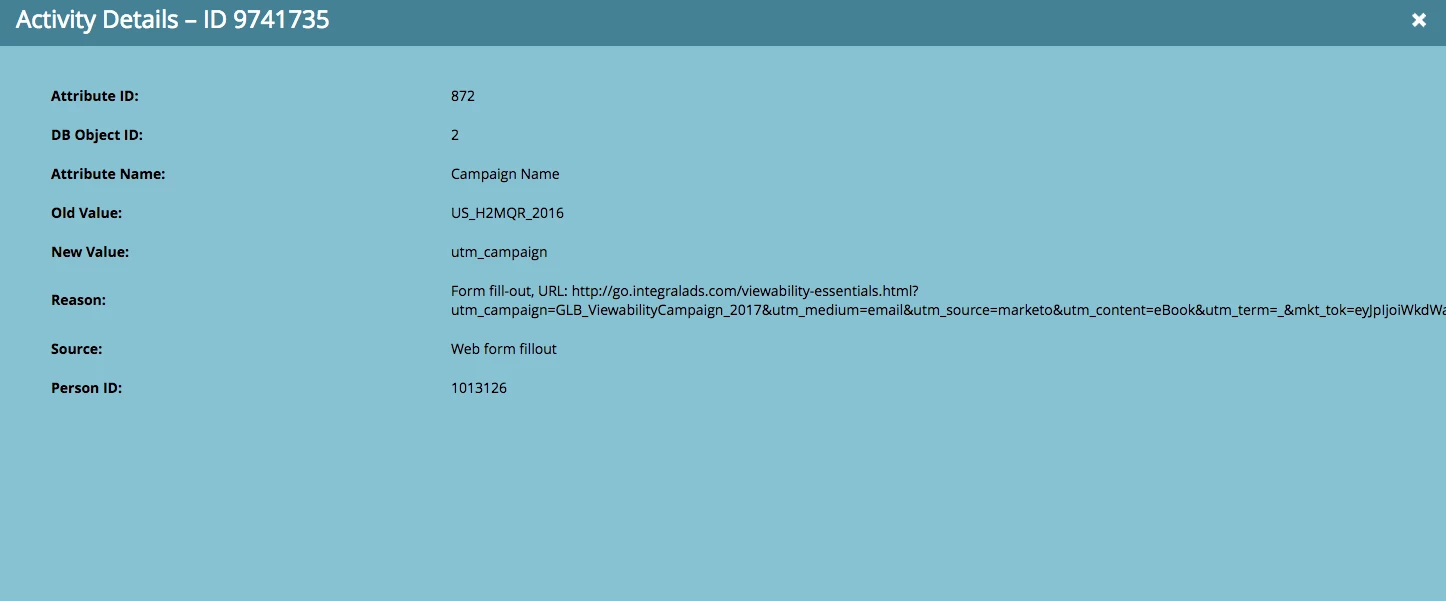
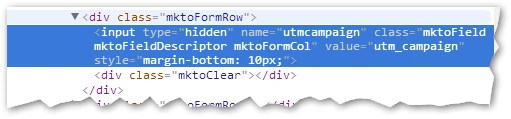
As a result of the unsynchronized code paths, what's happening is cookies are being set before the form is injected into the page, but the code above is attempting to overwriting the values on DOMContentLoaded. When DOMContentLoaded fires before the form is in the page, the code still (by pure luck) works. When DOMContentLoaded fires after the form is in the page, the code overwrites the values with the placeholder names, like the literal string "utm_campaign":
The correct way to implement this is to synchronize with Marketo form events. When there's no Marketo form, store the values in your cookie(s). When there is a Marketo form and there are interesting values in the current query string, store the values in cookies and also set the values on the form using whenReady...setValues.
(Actually in our attribution library we don't even add the fields to the form in Form Editor. We only add them programmatically using addHiddenFields, giving us complete control.)