Using Velocity Script token in Email Alert to Trust Pilot | Community
Skip to main content
Level 6
July 13, 2026
Question

Using Velocity Script token in Email Alert to Trust Pilot

  • July 13, 2026
  • 4 replies
  • 166 views

Hi Community,

I am working with our team to implement a very simple trigger-based email that includes a single Velocity script token.

The purpose of this email is to trigger a second email from Trust Pilot that grabs the data from the first email (sent by Marketo) and uses this to request an online review from the recipient.

This VS token looks for the most recent cruise booking opportunity on a contact record, grabs the booking id from the opportunity, and populates it in the email. The email then gets sent to Trust Pilot’s Automatic Feedback Service (AFS) via a Send Alert smart campaign flow step.

When I initially tested this using only my account, the token was populating just fine:
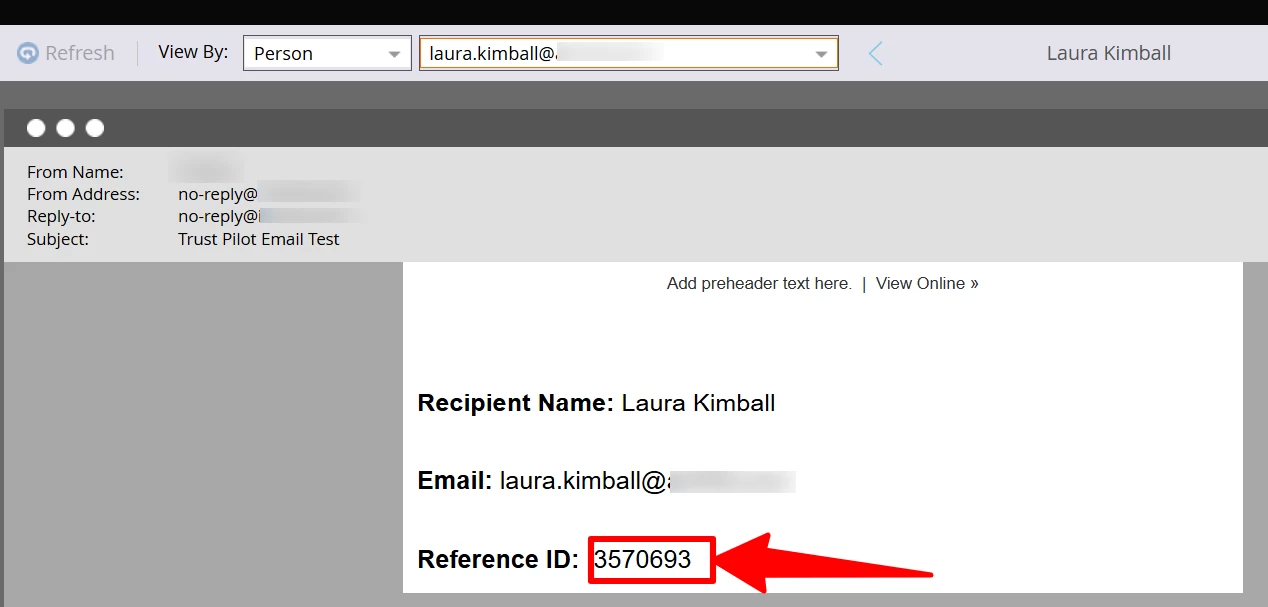
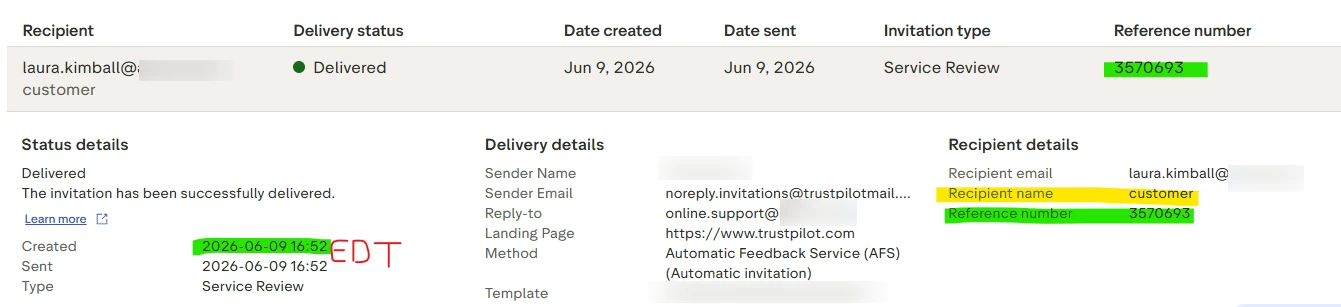
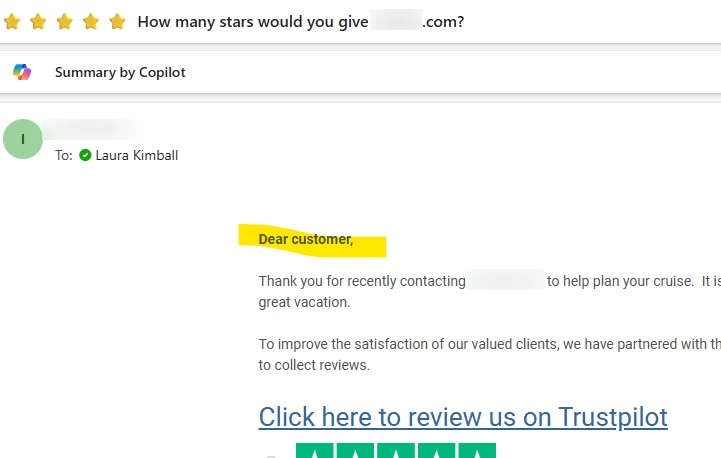
And the email successfully created a record in Trust Pilot that included my email address and the booking ID number. Plus I received an email from TP asking for a review:
 

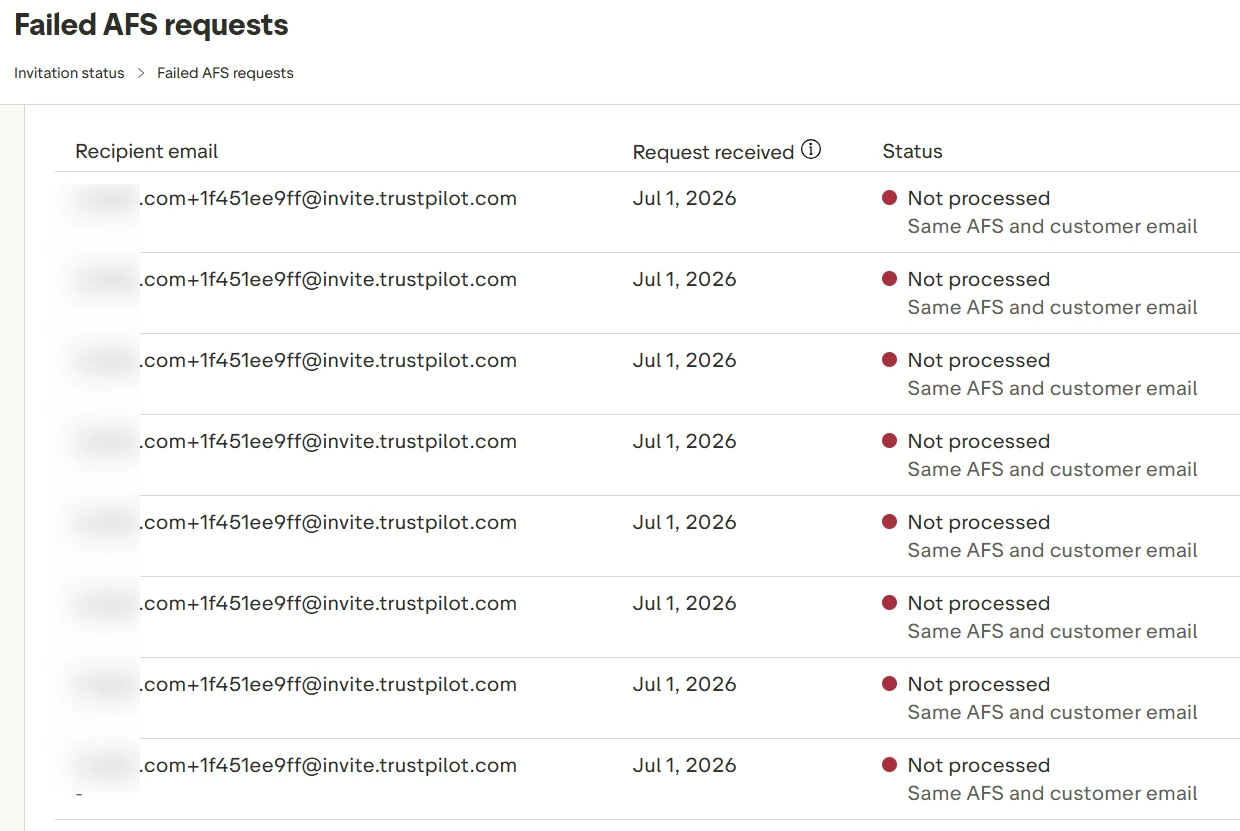
However, when I tried to send the alert email via both a batch and trigger campaign, with multiple people qualifying (23 ppl), this resulted in multiple failures where the requests were received, but were not processed, resulting in no profile data coming through.


We can’t determine if this is due to an issue with the Velocity script tokens or if there is something else going on.


Does anyone have any experience with using TP’s AFS process?


Thank you!

Laura Kimball


Velocity Script code:

#**
* @version v1 2026-06-08
* @author Laura Kimball
* @requires-objects
* Opportunity ($OpportunityList)
* @requires-object-fields
* Opportunity.Item Type Key (itemTypeKey)
* Opportunity.Date (date)
* Opportunity.CRBK (cRBK)
*#
## Find the most recent cruise opportunity (itemTypeKey = "5")
## based on Opportunity.date
#if( $TriggerObject )
#set( $focusedOppty = $TriggerObject )
#else
#set( $focusedOppty = {} )
#set( $datedCruiseOpportunities = [] )
#foreach( $oppty in $OpportunityList )
#if( $oppty.itemTypeKey.equals(5) && !$display.alt($oppty.date,"").isEmpty() )
#set( $void = $datedCruiseOpportunities.add($oppty) )
#end
#end
#end
#set( $focusedOppty = $sorter.sort($datedCruiseOpportunities,"date:desc").get(0) )
## Output cRBK if present
#if( !$display.alt($focusedOppty.cRBK,"").isEmpty() )
${focusedOppty.cRBK}
#end


4 replies

SanfordWhiteman
Level 10
July 14, 2026

You’re setting $focusedOppty to $TriggerObject if it exists (which is good, the trigger object should be used in trigger mode) but then resetting $TriggerObject to the latest dated oppty in the list, which means there’s a race condition. The same oppty can rise to the top multiple times.

Level 3
July 14, 2026

Based on the code review, few observations: 

  • Line 24 — The Logical Overwrite (Fatal Bug):

    #set( $focusedOppty = $sorter.sort($datedCruiseOpportunities,"date:desc").get(0) )
    • Cause: This line runs unconditionally right after the #if/#else block. If the email is triggered via a smart campaign, Line 14 sets $focusedOppty = $TriggerObject, but Line 24 immediately overwrites it. Because the #else block was skipped, $datedCruiseOpportunities is completely uninitialized, wiping out your data.

  • Line 19 — String vs. Integer Type Mismatch:

    #if( $oppty.itemTypeKey.equals(5) ... )
    • Cause: The script checks for a strict integer 5. Marketo Custom Object data pulled via Velocity is routinely stored as a string ("5"). Because a string cannot equal an integer via .equals(), the loop evaluates to false and ignores valid records.

  • Line 24 — Unprotected Array Indexing:

    ... .sort($datedCruiseOpportunities,"date:desc").get(0)
    • Cause: The script attempts to grab .get(0) without checking if any matching records exist. If a lead in a batch campaign has zero opportunities matching the criteria, this throws an out-of-bounds index error, crashing the token execution for that lead.

Found this helpful? Mark the thread as solved so other community members can quickly locate the answer.
SanfordWhiteman
Level 10
July 14, 2026
  • Line 19 — String vs. Integer Type Mismatch:

    #if( $oppty.itemTypeKey.equals(5) ... )
    • Cause: The script checks for a strict integer 5. Marketo Custom Object data pulled via Velocity is routinely stored as a string ("5"). Because a string cannot equal an integer via .equals(), the loop evaluates to false and ignores valid records.

No.  This is unadulterated nonsense. Opportunity fields are not all converted to Strings. This is an Integer field and will be a java.lang.Integer in the Velocity context.


Please don’t spread FUD. 


  • Line 24 — Unprotected Array Indexing:

    ... .sort($datedCruiseOpportunities,"date:desc").get(0)
    • Cause: The script attempts to grab .get(0) without checking if any matching records exist. If a lead in a batch campaign has zero opportunities matching the criteria, this throws an out-of-bounds index error, crashing the token execution for that lead.

Only true if the Smart List doesn’t have a filter so it only sends to people with > 0 dated Opportunities. No need for extra guards if the audience is already filtered, and no evidence such a filter isn’t in place.


Also note this is for a trigger campaign; batch mode, where the whole list is consulted, is intended only for testing.

Level 3
July 14, 2026

Thank you ​@SanfordWhiteman  for the sharp correction and for setting the record straight on how Marketo handles java.lang.Integer types in the Velocity context. I appreciate you calling that out—definitely a misstep on my end regarding the field casting, and I'm glad to stand corrected to keep the technical info here accurate.

Moving the Line 24 sorter inside the #else block is exactly what clears up the logical overwrite that was breaking the trigger context. 

Found this helpful? Mark the thread as solved so other community members can quickly locate the answer.
Level 6
July 14, 2026

Thank you ​@SanfordWhiteman and ​@adesrala1! ​@adesrala1 Any suggestions for how I can fix this?

SanfordWhiteman
Level 10
July 14, 2026
#**
* @version v2 2026-07-14
* @author Laura Kimball
* @requires-objects
* Opportunity ($OpportunityList)
* @requires-object-fields
* Opportunity.Item Type Key (itemTypeKey)
* Opportunity.Date (date)
* Opportunity.CRBK (cRBK)
*#
## Find the most recent cruise opportunity (itemTypeKey = 5)
## based on Opportunity.date prefer $TriggerObject if present
#if( $TriggerObject )
#set( $focusedOppty = $TriggerObject )
#else
#set( $datedCruiseOpportunities = [] )
#foreach( $oppty in $OpportunityList )
#if( $oppty.itemTypeKey.equals(5) && !$display.alt($oppty.date,"").isEmpty() )
#set( $void = $datedCruiseOpportunities.add($oppty) )
#end
#end
#set( $focusedOppty = $sorter.sort($datedCruiseOpportunities,"date:desc").get(0) )
#end
## Output cRBK if present
#if( !$display.alt($focusedOppty.cRBK,"").isEmpty() )
${focusedOppty.cRBK}
#end

Now the $TriggerObject is focused if it’s present.


Level 6
July 14, 2026

Thank you ​@SanfordWhitema1! Confirming that I’m all good to test using a batch campaign based on your comment below? Just want to make sure this trigger-based VS will still function as needed.


Level 6
July 16, 2026

Hi ​@SanfordWhiteman! I hope you’re doing well. I went to approve the email in which I’ve added the my token and I got the error message below:


Any idea what is causing this and how to fix?


Thank you,

Laura

Level 2
July 17, 2026

That’s because you don’t have placeholder data for the list.


You should have a token like {{my.sample data}} with:

#set( $OpportunityList = $display.alt($OpportunityList, [{ "itemTypeKey" : 5, "date": "2026-01-01", "cRBK": "sample" }] ) )


That’ll always let you approve (in fact, you can update the token code after approving with no problem — it’s just for the moment of approval that you often need sample data).