Using Q code of emoji in Subject-line cause issue in gmail | Community
Skip to main content
Level 2
February 3, 2022
Solved

Using Q code of emoji in Subject-line cause issue in gmail

  • February 3, 2022
  • 1 reply
  • 2705 views

Hi Guys,

I used an emoji in our subject line, using Q-code (after reading Stanford's blog).
The emoji is rendering properly in all email clients, however, in Gmail mobile, it is adding extra space in the subject line.
See the below example:
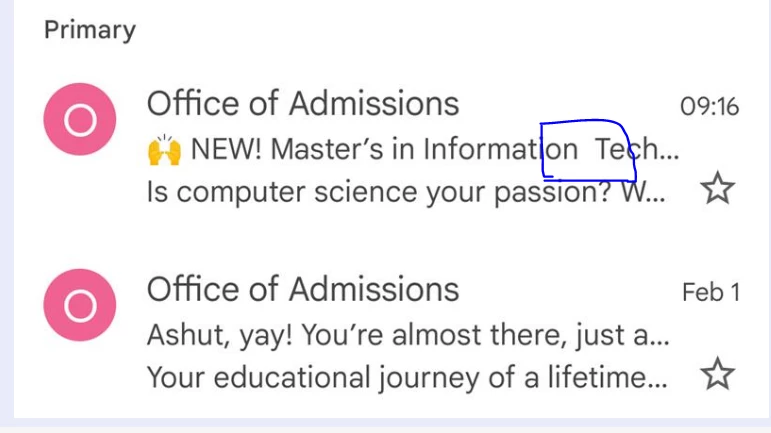


I am using the below code in the subject line
=?UTF-8?Q?=F0=9F=99=8C?= NEW! Master's in Information Technology


Anyone has experienced this before? please let me know a way aound.

This post is no longer active and is closed to new replies. Need help? Start a new post to ask your question.
Best answer by SanfordWhiteman

Only put characters that require Q-encoding between opening =?UTF-8?Q? and closing ?= sequences (i.e. only the emoji and the apostrophe).


1 reply

SanfordWhiteman
Level 10
February 3, 2022

I am using the below code in the subject line

=?UTF-8?Q?=F0=9F=99=8C?= NEW! Master's in Information Technology


I don’t think you are. 🙂


I think that single straight quote is actually a curly quote, i.e. apostrophe. Which means it too needs to be Q-encoded. If you have one manually Q-encoded non-ASCII character, they all need to be manually encoded or Marketo... reacts poorly. Apostrophes are not allowed without encoding.

Level 2
February 7, 2022

Hi @sanfordwhiteman ,

I have encoded the curly apostrophe in the subject line (=?UTF-8?Q?=F0=9F=99=8C NEW! Master=E2=80=99s in Information Technology?=) attached a screenshot of the preview also. Still, I can see the same output in Gmail mobile


I also tried removing the apostrophe altogether. 

Thanks!

SanfordWhiteman
SanfordWhitemanAccepted solution
Level 10
February 8, 2022

Only put characters that require Q-encoding between opening =?UTF-8?Q? and closing ?= sequences (i.e. only the emoji and the apostrophe).