Using Parentheses in Advanced Filters | Community
Skip to main content
Level 2
September 3, 2024
Solved

Using Parentheses in Advanced Filters

  • September 3, 2024
  • 1 reply
  • 1330 views

Hi all,


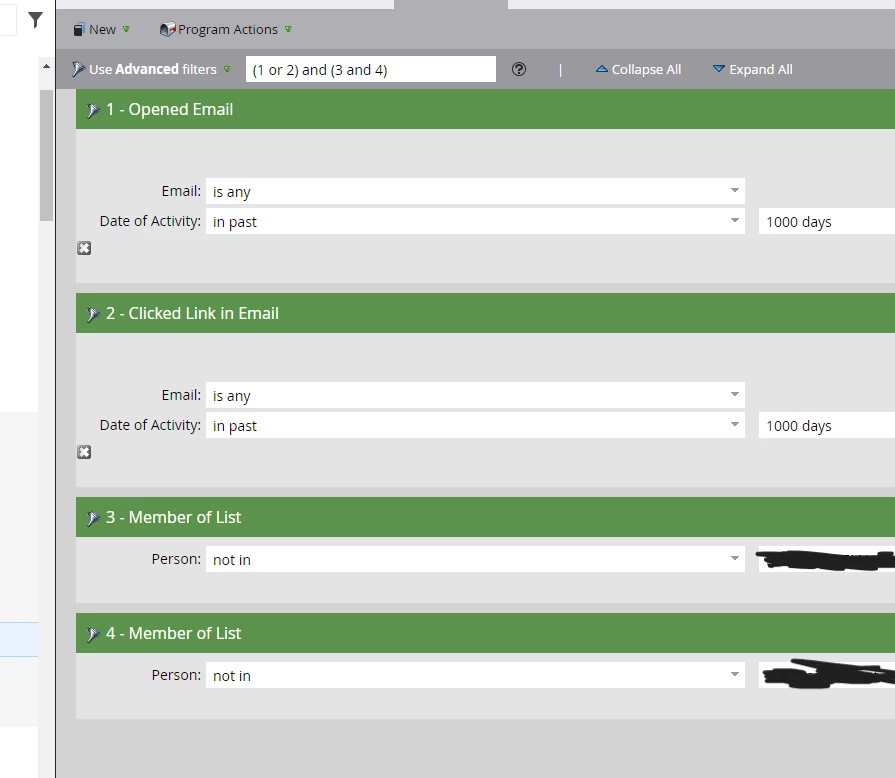
Can someone please verify that I am using the correct formula for the advanced filter (see screenshot attached).


I want the following:

- they must have opened an email in the last 1000 days 

OR 

- clicked a link in an email in the last 1000 days

AND 

- they must NOT be apart of list 3 or 4 (blurred list names for obvious reasons)


Right now, this is the formula I have: (1 or 2) and (3 and 4)


I know when using the "NOT IN Member of List" filter i have to use the logic "and".


I just want to be safe and make sure the formula suppresses the correct records.


Thanks in advance!

This post is no longer active and is closed to new replies. Need help? Start a new post to ask your question.
Best answer by BekahWalters

I would update to the following:

(1 OR 2) AND 3 AND 4

The parenthesis around 3 and 4 are not necessary.

Also, as far as "last 1000 days", Marketo data retention policy states that Email Opens and Email Clicks are retained for 25 months (~760 days). You can use "past 25 months" here as well. 

Here's the article: https://nation.marketo.com/t5/knowledgebase/marketo-activities-data-retention-policy/ta-p/251480

1 reply

BekahWaltersAccepted solution
Level 2
September 3, 2024

I would update to the following:

(1 OR 2) AND 3 AND 4

The parenthesis around 3 and 4 are not necessary.

Also, as far as "last 1000 days", Marketo data retention policy states that Email Opens and Email Clicks are retained for 25 months (~760 days). You can use "past 25 months" here as well. 

Here's the article: https://nation.marketo.com/t5/knowledgebase/marketo-activities-data-retention-policy/ta-p/251480

ACPMPrAuthor
Level 2
September 4, 2024

Thank you so much, I have updated it on my end. 

I have also changed the requirements for Email Opens and Email Clicks to 25 months.