Using Multiple Email Addresses in a Token | Community
Skip to main content
Level 6
March 24, 2016
Question

Using Multiple Email Addresses in a Token

  • March 24, 2016
  • 3 replies
  • 4647 views

We have white papers, webinars, free trials, etc. that, when requested on our website, trigger alerts that send to a hand full of internals, depending on the country that the request comes from. For example, if someone in Russia requests a free trial, then an alert gets sent to John and Ellen. However, if a free trial or white paper request comes in from India, then Sally and Joe get the alert. The problem is that whenever there is turnover or a change in who the alerts should send to, it requires us to update the email address of the alert recipient(s) in many different places. I want to tokenize this at the folder level, so it is captured in the various localized programs under the folder and only needs to be updated in one place.

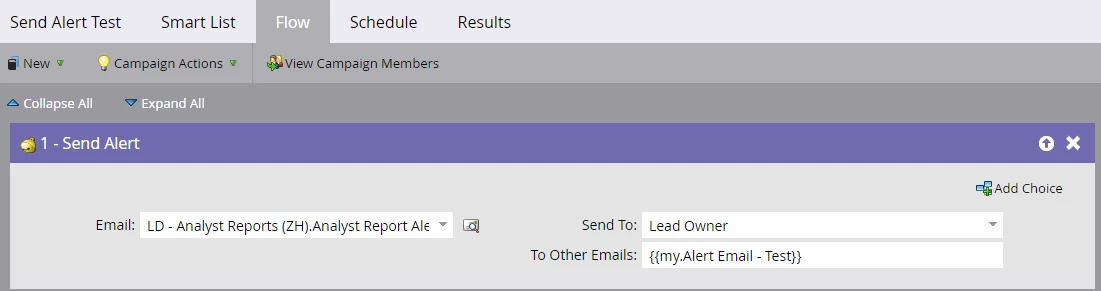
Can this be done with tokens? I assumed so, but after testing with a couple of my own email addresses in a token, I never received the alert. I first used a text token with email addresses separated by a comma, but when that didn't work I tried the same thing with a rich text token...still nothing. The activity log of my records, though, shows the send alert activity, but it didn't make it to either of my inboxes. The smart list is my email addresses, and the flow is shown below. Any advice on how this can be accomplished?
This post is no longer active and is closed to new replies. Need help? Start a new post to ask your question.

3 replies

March 24, 2016

Hi Jeff,

In your testing did you use a 'trigger' smart campaign or tried to test it using a 'batch' smart campaign?

@Dan Stevens pointed out on another thread this morning that merging of tokens do not work if that is a batch campaign.

Rajesh

JeffSm6Author
Level 6
March 24, 2016

Rajesh Talele​ That's a really interesting point that I wasn't aware of. Normally, it's for a Fills Out Form trigger, but in my testing I used the "Email Address is..." filter and ran a batch. Let me go back and try the testing as a trigger. Thank you!

JeffSm6Author
Level 6
March 24, 2016

Rajesh Talele Just did some testing using the trigger, and I did receive the alert this time. However, the other email address I included in the token (a co-worker) did not receive it. I tried using a semicolon instead of a comma in the token and also putting his name first in the token, but in both instances I was still the only one to receive it still.

Milena_Mitova
Level 2
August 13, 2019

HI, not sure if this is helpful, but I created a text token at the program level, making sure to list email addresses with a comma and space between them. Then I created a send alert campaign and in the flow, selected recipient to "none" and underneath it, under "to other emails" entered the token. It worked like a charm. 

What I am unable however to do is send multiple owner emails in one field, 'email owner list' and then instead of a text program level token listing statically emails, to pull that dynamically from this email owner list. 

Not sure where the issue is, still working on this, haha:). Hope the text field setup is helpful. Best, Milena

Milena_Mitova
Level 2
August 15, 2019

Hi, sorry, just thought it would be helpful to share that I figured out the other way to do it as well:).

Just create a text field, called "Owner Email List" or similar, populate the multiple owner email addresses into it, separated by a comma and space, and then create an alert where you put the token in the following format under "Other": {{lead.ownerEmailList}} - make sure you are using the API name. I am attaching an image as well:). Hopefully it works for you as well. Best, Milena