Using invisible pixel to counter spam filter clicks and workflow starting - filter conditions | Community
Skip to main content
February 20, 2018
Solved

Using invisible pixel to counter spam filter clicks and workflow starting - filter conditions

  • February 20, 2018
  • 1 reply
  • 3156 views

Hi all,

We have a few programs that have workflows in SFDC based on particular link clicks. But recently, we noticed a issue with spam filters clicking on said links and creating false workflows. So we've put in a invisible pixel to verify whether the link clicks are spam filter bots or not but I had a question regarding how to setup our filters to stop the workflow from starting.
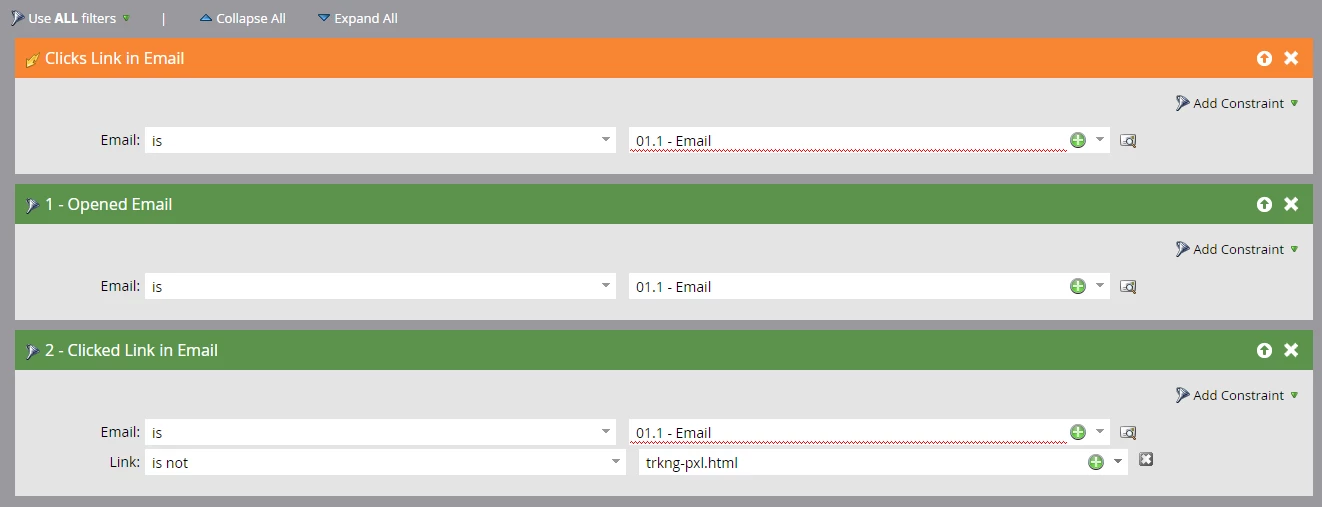
So with the filter setup shown above, if the pixel link is clicked then the workflow will not start, but if any other link is clicked the workflow will start. Is there any way to setup the filter so that if the pixel link + any other link is click on at the same time the workflow will not start?

This post is no longer active and is closed to new replies. Need help? Start a new post to ask your question.
Best answer by SanfordWhiteman

It is not possible to cover this case using Marketo Smart Campaigns. The granularity (timestamp precision) and activity order is not sufficient.

Check out the ongoing discussion [Shared Blog]: I Want to Believe, But: Your Email Link Clicks Aren’t Real​.

1 reply

SanfordWhiteman
SanfordWhitemanAccepted solution
Level 10
February 20, 2018

It is not possible to cover this case using Marketo Smart Campaigns. The granularity (timestamp precision) and activity order is not sufficient.

Check out the ongoing discussion [Shared Blog]: I Want to Believe, But: Your Email Link Clicks Aren’t Real​.

February 20, 2018

Thank you for the response! I had hoped otherwise but it is what it is I guess. Love your blog btw!

SanfordWhiteman
Level 10
February 20, 2018

Love your blog btw!

Thanks! Coming soon is a post about the TrueVoyage thing I allude to in that other thread...