Level 3
December 29, 2017
Solved

Use existing Smart List in Report

  • December 29, 2017
  • 1 reply
  • 2204 views

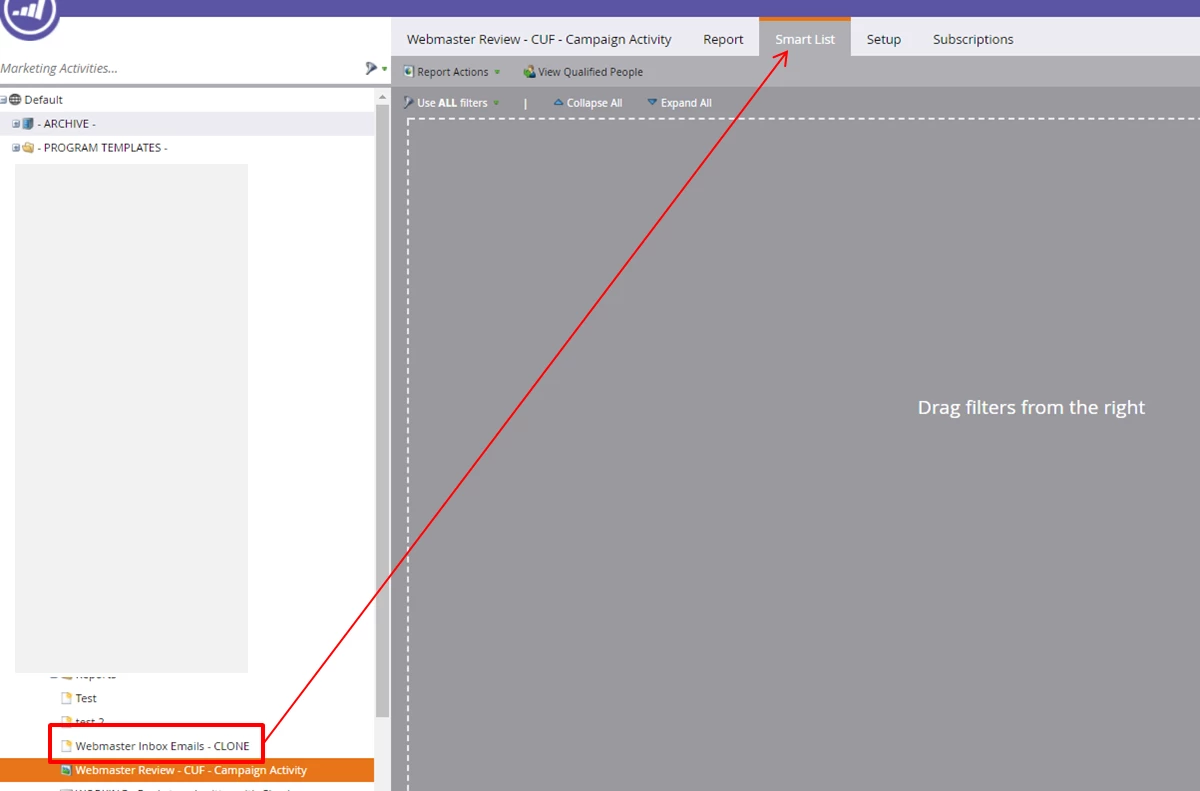
Is it possible to use an existing Smart List as the "Smart List" when creating a new Report?  It seems inefficient to have to recreate the Smart List in the Report setup if such already exists.

In the attached image, I want to use the existing Smart List, "Webmaster Inbox Emails - CLONE" in the report "Webmaster Review - CUF - Campaign Activity"

TIA!

e
This post is no longer active and is closed to new replies. Need help? Start a new post to ask your question.
Best answer by JDNelson1

just add a filter of "member of smart list" and choose the one from the left you have in red

1 reply

JDNelson1Community AdvisorAccepted solution
Community Advisor
December 29, 2017

just add a filter of "member of smart list" and choose the one from the left you have in red

EricaDo4Author
Level 3
December 29, 2017

Thanks, JD!

Community Advisor
December 29, 2017

happy to help -- don't forget to mark as correct and close out the discussion if it resolves it. Thanks.