
Upon auto-conversion from lead to contact fields are erased - Help | Community
Skip to main content
Albert_Li
Level 2
April 7, 2017
Question

Upon auto-conversion from lead to contact fields are erased - Help

  • April 7, 2017
  • 1 reply
  • 4904 views

I am experiencing an issue where a 3rd party program within SFDC helps auto-convert leads to matched target accounts to contacts. Upon conversion a few key fields are overwritten with blank values.

When I look at the reason it states "Synced from salesforce.com Contact ID: XXXXX"
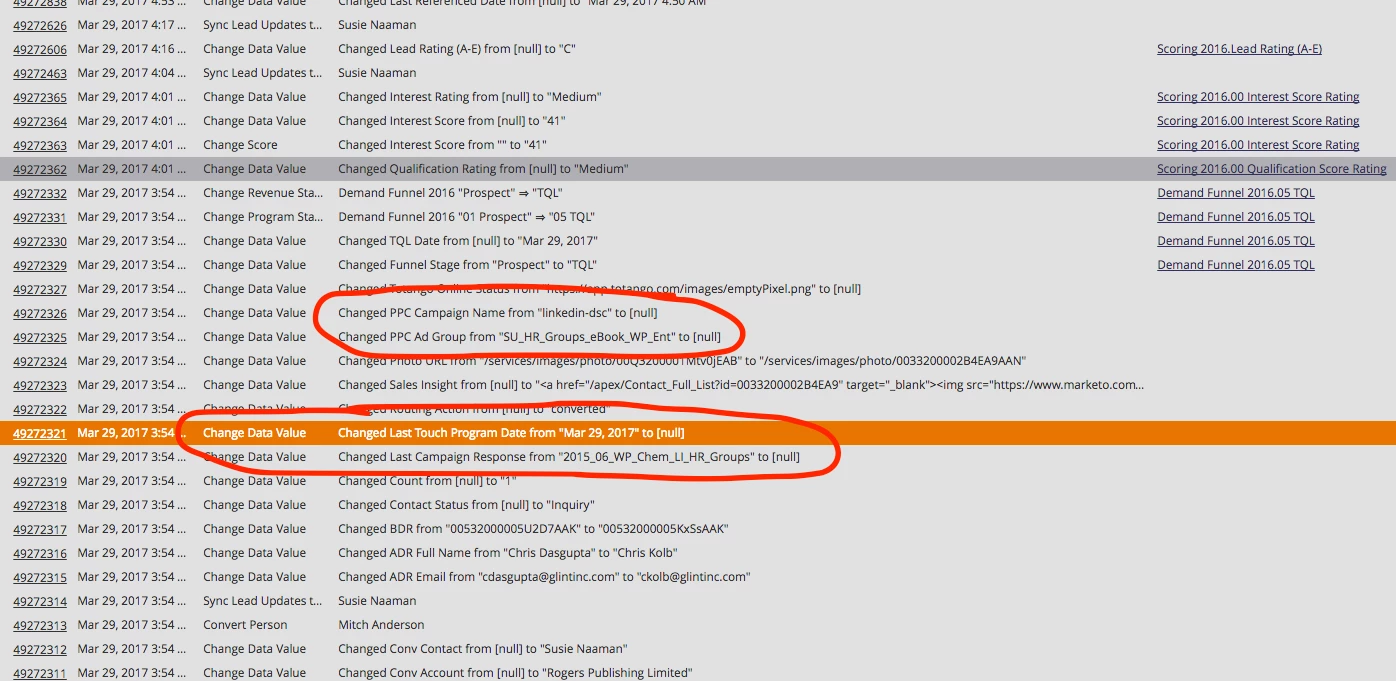
How can I prevent SFDC from overwriting the field value with "null"?

What I tested:

I tried blocking field updates on the field by checking SalesForce Sync but that prevents marketo from updating the field.

I tested the standard conversion of Leads to Contacts within salesforce by clicking the convert button and the field information carries over just fine.

This post is no longer active and is closed to new replies. Need help? Start a new post to ask your question.

1 reply

Grégoire_Miche2
Level 10
April 8, 2017

Hi Albert,

Check in SFDC that the leads fields are correctly mapped with the contact ones so that the lead info is propagated to the contacts upon conversion.

This is done in SFDC setup -> customize -> leads -> fields -> Lead custom fields. There is a button labelled "map lead fields".

-Greg

Albert_Li
Albert_LiAuthor
Level 2
April 8, 2017

Hi Greg,

Yup I double checked the mapping before posting this. I also, ran a test where I created a lead within salesforce and then converted the lead to a contact within salesforce and all fields mapped over correctly.

The issue only happens when marketo syncs over the lead to sfdc and it enters the lead routing 3rd party program, the 3rd party program then auto-converts leads to matched target accounts and only a few key custom fields are erased but other fields are properly populated like lead status to contact status, lead source, inquiry date, etc.

-Albert

Grégoire_Miche2
Level 10
April 9, 2017

Hi Albert,

What is this 3rd party program? It is probably the culprit.

Does this happens when the conversion creates a new contact as well as when the conversion merges with a new contact ?

Is there any options on this 3rd party product about field values ?

-Greg