Update Select Box Dropdown Options in Forms via Update Form API Call | Community
Skip to main content
Level 2
June 29, 2016
Solved

Update Select Box Dropdown Options in Forms via Update Form API Call

  • June 29, 2016
  • 1 reply
  • 1686 views

I am working with the new Forms API and so far it has been pretty great. However, I am running into a problem when I am trying to update a select box's dropdown options via the update form api call. I am able to update the label, labelWidth, fieldWidth, instructions, validationMessage, rowNumber, columnNumber, required, formPrefill, visibileLines, and visibilityRules but I am not able to update anything within the fieldMetaData attribute. Namely the label and value within the values array inside the fieldMetaData attribute.

Does anyone know how to do this?

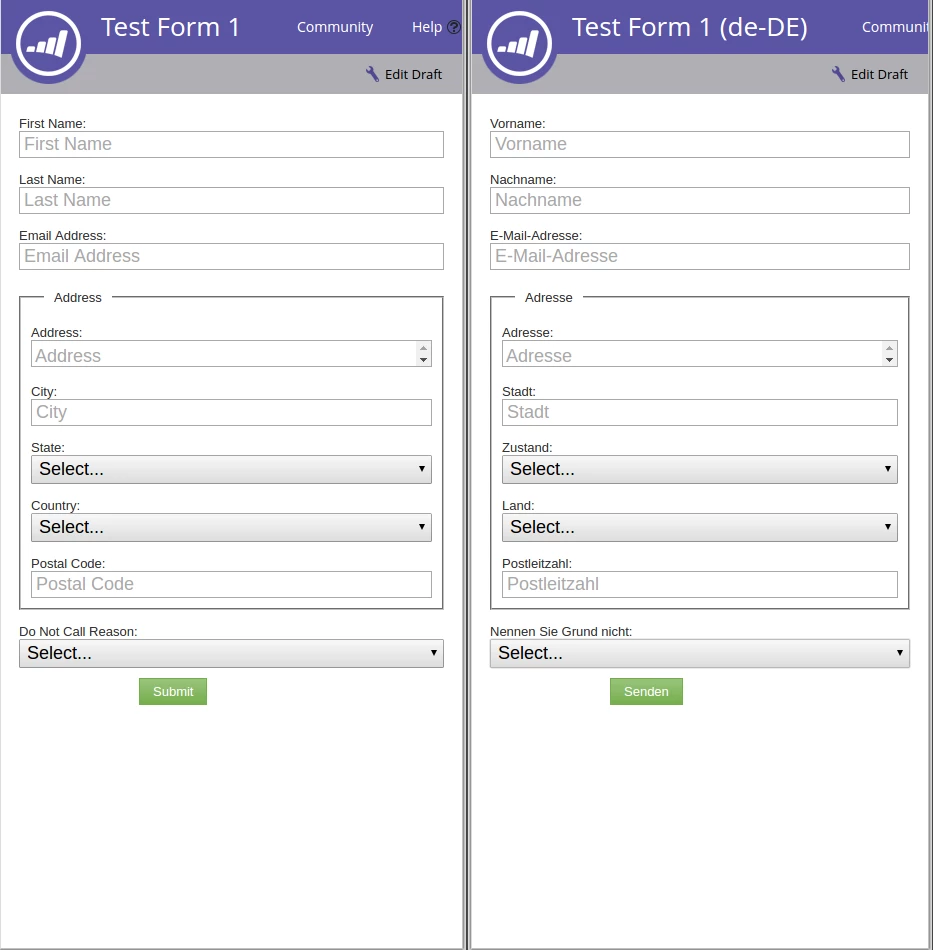
The one on the left is the original, the one on the right is the updated one. I need to update the Select dropdown boxes and their contents.
This post is no longer active and is closed to new replies. Need help? Start a new post to ask your question.
Best answer by Joseph_Wood

I have since figured out how to do this. The API documentation page was not updated with the correct information. If you go to http://developers.marketo.com/documentation/marketo-rest-apis-web-page-objects/update-form-field/  there is enough information to now solve this problem.

1 reply

Joseph_WoodAuthorAccepted solution
Level 2
July 18, 2016

I have since figured out how to do this. The API documentation page was not updated with the correct information. If you go to http://developers.marketo.com/documentation/marketo-rest-apis-web-page-objects/update-form-field/  there is enough information to now solve this problem.