
Unsubscribe Footer Settings for MSI Emails Do Not Work as Expected | Community
Skip to main content
Iryna_Zhuravel4
Level 6
January 16, 2016
Solved

Unsubscribe Footer Settings for MSI Emails Do Not Work as Expected

  • January 16, 2016
  • 2 replies
  • 2849 views

For a small campaign we are running I need one MSI email look like a personal email sent from a sales rep, it's just a text email sales reps will be sending to individual leads, they could've sent it from their inbox but we want to use MSI to make sure the messaging is consistent and to be able to track the activity.

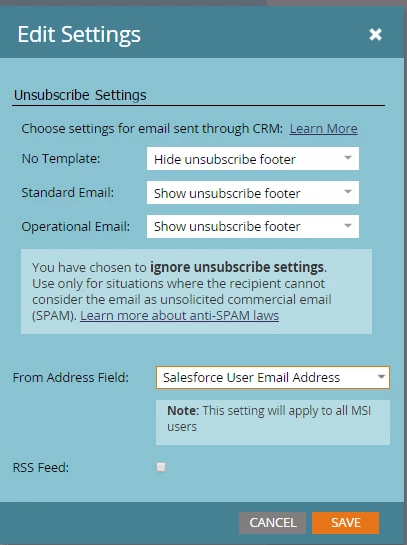
I configured MSI unsubscribe footer settings like so
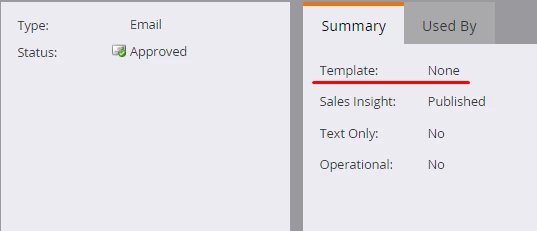
The email doesn't have any template:
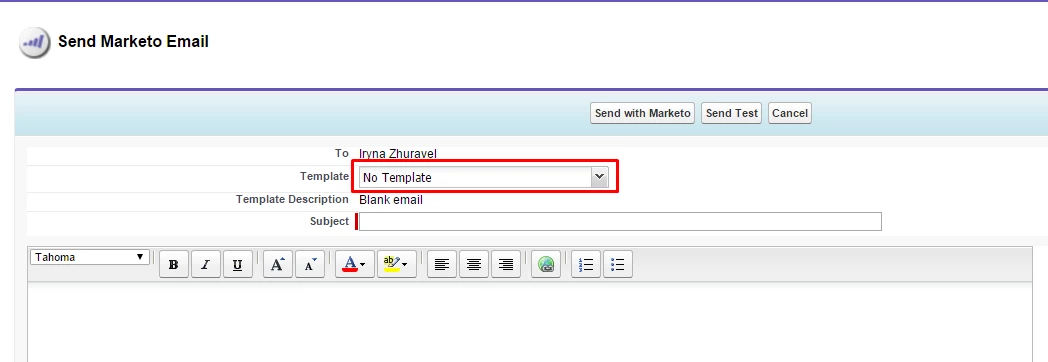
When I try to send an email with no template though MSI to my testing leads in SFDC, however, it gets delivered with the unsubscribe footer. Am I missing something? or is this a glitch I should talk to support about?

I also tried playing with the number of recipients settings and no matter what I tried the email always has an unsubscribe footer.
This post is no longer active and is closed to new replies. Need help? Start a new post to ask your question.
Best answer by Iryna_Zhuravel4

After some more testing I finally found out how to make this feature work, so here are the details for everyone looking to do the same in the future.

So in MSI you can configure to 1) Show; 2) Hide; 3) Show footer if > 1 recipient; 4) Show footer if > 5 recipients for the following email types: 1) No template; 2) Standard Email; 3) Operational email

So I assumed that by "No template" they mean a Marketo email without any Design Studio template published to MSI, however this is not the case.

"No Template" rule only applies if someone is trying to send an email through MSI app without selecting a Marketo email published to MSI. If you select ANY Marketo email from the tree, MSI will apply settings for either standard or operational email.

2 replies

Grégoire_Miche2
Level 10
January 16, 2016

Hi Iryna,

My recommendation would be to stop using Marketo Standard mechanism for unsubscribe footer. We deactivate them and rather use {{system.unsubscribelink}} token.

Using this second mechanism, it's easy to create some emails without an unsubscribe footer and create emails that really look like made by the sales rep (which is a good practice BTW).

-Greg

Grégoire_Miche2
Level 10
January 16, 2016

And if you want to deactivate the standard unsubscribe mechanism, the way to do it is to go to admin -> email and enter the following settings :

-Greg

Iryna_Zhuravel4
Iryna_Zhuravel4AuthorAccepted solution
Level 6
January 26, 2016

After some more testing I finally found out how to make this feature work, so here are the details for everyone looking to do the same in the future.

So in MSI you can configure to 1) Show; 2) Hide; 3) Show footer if > 1 recipient; 4) Show footer if > 5 recipients for the following email types: 1) No template; 2) Standard Email; 3) Operational email

So I assumed that by "No template" they mean a Marketo email without any Design Studio template published to MSI, however this is not the case.

"No Template" rule only applies if someone is trying to send an email through MSI app without selecting a Marketo email published to MSI. If you select ANY Marketo email from the tree, MSI will apply settings for either standard or operational email.