Unable to delete cookie "_mkto_trk" from parent domain | Community
Skip to main content
David_Mezkiriz
Level 2
April 14, 2021
Solved

Unable to delete cookie "_mkto_trk" from parent domain

  • April 14, 2021
  • 2 replies
  • 6139 views

Hi,


I'm trying to delete _mkto_trk cookie when user decides to stop being tracked. I'm under this domain "online.example.com", so the tld is ".com" 

The _mkto_trk cookie has been created under this domain ".example.com"


I don't know if it's a cookie restriction, but when I try to delete it, the cookie remains there and it's not removed. These are the features of the cookie.

Domain: 

.example.com

Path:

Name:

_mkto_trk

HttpOnly:

false


I've tried to do this:

document.cookie = "_mkto_trk=; path=/; domain=.example.com;expires=Thu, 01 Jan 1970 00:00:01 GMT"

but unfortunately it isn't removed.

If I enter this command:

document.cookie

obviously the cookie is not listed, I think because I'm under the "online.example.com" and by cookie restrictions you are not allowed to see cookies of the parent domain "example.com", I don't know if these restrictions are linked to remove them.


My code, initializes the munchkin code "Munchkin.init" , without any domainLevel option.

Munchkin.init('xxx-xxx-xxx');

and it creates the cookie as stated above.


Is there anything I can do to remove the_mkto_trk cookie when customer decides?


Thank you!!

David
This post is no longer active and is closed to new replies. Need help? Start a new post to ask your question.
Best answer by SanfordWhiteman

Hi Sandford,


I see, sorry, but I think I could get the idea.


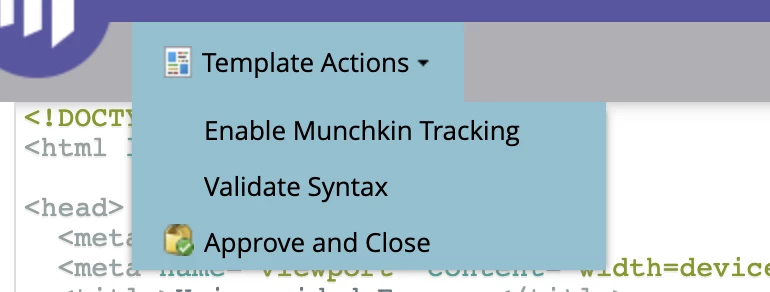
I disabled the Munchkin init code Munchkin.init("ABC-123-456", { marketoPageLevelOptions })  that Marketo executes automatically in my template - see the image below - , because I thought that the only init statement that there should be in my LPs is the Munchkin.init() statement that my code executes conditionally and not the one that Marketo executes automatically.


So, in short, in my LPs, there should be two init statements after "enabling Munchhkin Tracking"


1. My conditional Munchkin.init() statement, part of the "munchkin-beta.js" file

2. The code that Marketo LPs executes (if and if only I enable the munchkin tracking) Munchkin.init("ABC-123-456", { marketoPageLevelOptions }) which is part of the munchkin.js file.


Is that right?


Thank you in advance,

David


1. My conditional Munchkin.init() statement, part of the "munchkin-beta.js" file

2. The code that Marketo LPs executes (if and if only I enable the munchkin tracking) Munchkin.init("ABC-123-456", { marketoPageLevelOptions }) which is part of the munchkin.js file.


Not quite... overall, there are 3 calls to a function called init(), but that isn't the way I'd refer to them.


The 1st is a call to a overridden init()that caches Marketo's page-level options.


The 2nd is a another call to an overridden init()that adds user-level config options.


The 3rd is a call to the actual/original Munchkin init()method that passes in a combo of page-level and user-level options.


The 2nd call automatically makes the 3rd call, you don't make the 3rd call yourself but it's there under the hood.

2 replies

David_Mezkiriz
Level 2
April 14, 2021

and this is the value of the cookie

id:xxx-xxx-xxx&token:_mch-example.com-1618380997622-91394


SanfordWhiteman
Level 10
April 14, 2021

If the cookie was truly set for .example.com — that is, example.com and all subdomains — you could delete it either with

document.cookie="_mkto_trk=;domain=.example.com;path=/;expires=" + new Date(0).toGMTString()

or with

document.cookie="_mkto_trk=;domain=example.com;path=/;expires=" + new Date(0).toGMTString()

since the leading dot is now deprecated.


In fact, it sounds like you are successfully deleting it!


If you don't see it when you output document.cookie — that means, because you also know it's not marked HttpOnly, it isn't accessible to the current page.


Put another way, being in document.cookie is the definition of "existing." You can't have a non-HttpOnly cookie that (a) doesn't appear in document.cookie but (b) is still being used by Munchkin on that page.


And you also can't have a cookie that (a) can be used by JS on a page but (b) can't be deleted by that page.


In contrast, you could have a cookie set only at example.com (not its subdomains) which you wouldn't be able to delete from a subdomain. But it also wouldn't be able to be seen/used by subdomains at all! The delete-ability and use-ability of a cookie go hand in hand.

David_Mezkiriz
Level 2
April 15, 2021

Hi Sandford,


Thank you for your quick answer. What happened is that although in document.cookies I couldn't see any trace of _mkto_trk cookie, if I went to Chrome inspector, in the Cookie section, I could see that the cookie was still there, whose domain setting was ".example.com", so I got confused. I understand from your answer that if I'm not able to see any cookie from document.cookie, even If I can see in the browser cookie inspector, it's not available for the page.


I've followed your post about how to conditionally load munchkin on Marketo LPs,


https://blog.teknkl.com/conditionally-loading-munchkin-on-marketo-lps-for-gdpr-related-policies/?marketo-nation


and I'm a bit confused cause, it's being cached without any domainLevel and any option, as your example on the page, but sometimes after being executed the init method, the _mkto_trk cookie is not created, even putting the below code in the browser console, this is the code I basically use.


[...] <script type="application/javascript" src="//munchkin.marketo.net/munchkin-beta.js"></script> <script> (function munchkinInitDeferred(customOptions){ var nativeMunchkinInit = Munchkin.init; Munchkin.init = function cacheInitOptions(id, options){ if (customOptions) { Object.keys(customOptions) .forEach(function(key){ options[key] = customOptions[key]; }); } Munchkin.init = nativeMunchkinInit.bind(Munchkin, id, options); console.log("Munchkin: Cached options", options); }; })( ); if ( useracceptcookie ) { Munchkin.init('xxx-xxx-xxx'); } </script> [...]


I know that you said that we should call it (init) with no arguments, but I've also tried and the result is the same. Is there anything you might think of I'm doing wrong? The cookie should be created, right?.

As I mentioned, I tried to put the above code in the browser console without success (creation of the cookie).

Thank you in advance.
David

David_Mezkiriz
Level 2
April 15, 2021

the variable useracceptcookie is evaluated as true