Two Form Fields need to aligned left | Community
Skip to main content
December 10, 2013
Solved

Two Form Fields need to aligned left

  • December 10, 2013
  • 6 replies
  • 1474 views
Hi Guys,

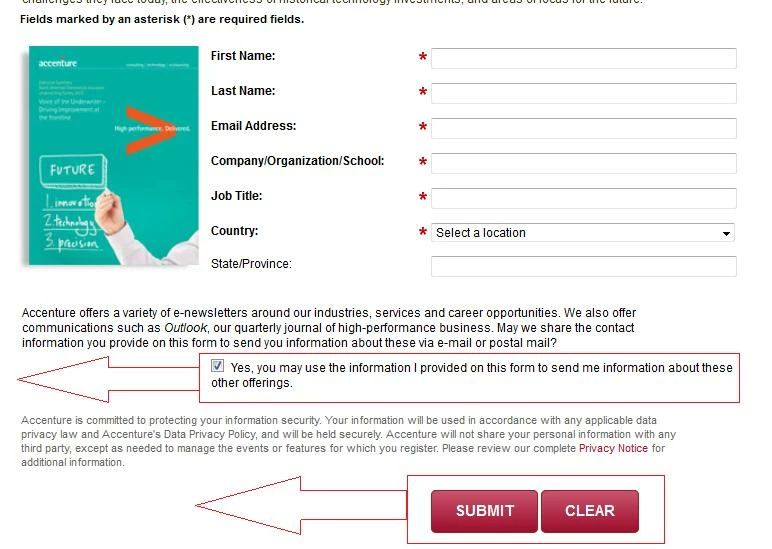
I need your help in a custom code that can aligned left the checkbox and submit button below of my fields. Do you have any idea how can this work? Please see screenshot below. Thanks!


This post is no longer active and is closed to new replies. Need help? Start a new post to ask your question.
Best answer by
Here's one approach to move these elements to where you'd like:

For moving the checkbox & label to the left, try dragging in the following custom HTML element:

<style>
 
span.mktInput.mktLblRight {
margin-left: -187px;
}
 
</style>

and for moving the buttons to the left (center), try this:

<style>
 
#mktFrmButtons {
margin-left: -187px;
}
 
</style>

After making any changes, I recommend thoroughly testing your LP is compatible on multiple devices before going live. Let me know whether this approach proved successful for you or not!

6 replies

December 10, 2013
Weird, your uploaded image loads for me and then disappears! Doesn't matter though as I understand what you mean :)

You could drag a custom HTML code element in like the following example:

<style>
 
#mktFrmSubmit{
    left: 10px;
}

</style>


If you're still having problems, approve the LP then paste the link here and I'll be able to help further.
December 11, 2013
Hi Adam,

Thank you very much.

Can you please take a look of my LP below and let me know if you can fix this. If you cant see my screenshot, I just needt to left aligned the checkbox to the left and center the Submit/clear button. Is this possible?

http://ins.accenture.com/TESTWIMAGENorthAmericanCommercialInsuranceUnderwritingSurvey2013_TEST_NorthAmericanCommercialInsuranceUnderwritingSurvey2013_RegistrationPage.html

I really appreicate your input on this. Thanks!
Accepted solution
December 12, 2013
Here's one approach to move these elements to where you'd like:

For moving the checkbox & label to the left, try dragging in the following custom HTML element:

<style>
 
span.mktInput.mktLblRight {
margin-left: -187px;
}
 
</style>

and for moving the buttons to the left (center), try this:

<style>
 
#mktFrmButtons {
margin-left: -187px;
}
 
</style>

After making any changes, I recommend thoroughly testing your LP is compatible on multiple devices before going live. Let me know whether this approach proved successful for you or not!
December 13, 2013
Hi Adam,

Thank you very much for this! You are awesome!

December 13, 2013
No problem Ian. Did my suggestion work, or at least point you in the right direction? :)
December 16, 2013
Yes, It works perfectly! I just need to do a little adjustment to fit in IE browser. Thanks again Adam!