Question
two column form-- two fieldsets side-by-side
Hello,
I am trying to create the following form on Marketo:
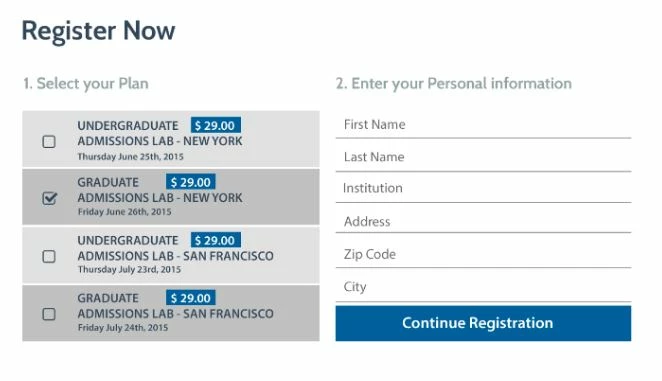
Currently, I have the two columns as fieldsets but they are unable to stay side-by-side as columns. Is there a way to float the second fieldset higher?
If there is also a script to create this form without fieldsets, I'd very much appreciate other suggestions!
Thank you,
Christine
I am trying to create the following form on Marketo:
Currently, I have the two columns as fieldsets but they are unable to stay side-by-side as columns. Is there a way to float the second fieldset higher?
If there is also a script to create this form without fieldsets, I'd very much appreciate other suggestions!
Thank you,
Christine