Trying to link text "hello.world" in email twice to different links but only goes to the 1st link? | Community
Skip to main content
Level 2
December 4, 2023
Solved

Trying to link text "hello.world" in email twice to different links but only goes to the 1st link?

  • December 4, 2023
  • 1 reply
  • 1442 views

I have an email that looks like this where we want "hello.world" hyperlinked (for example):


Please go to the hello.world website to see the buyers guide. You can also check the hello.world website for the sellers guide.


The 1st link should go to 1.com and the 2nd link should go to 2.com. However when I go to link the 2nd instance of "hello.world" it automatically shows the 1.com, but it should go to 2.com. If I change it, it changes both. They appear to be connected even though I want them to go to different links. How do I accomplish this?
Best answer by SanfordWhiteman

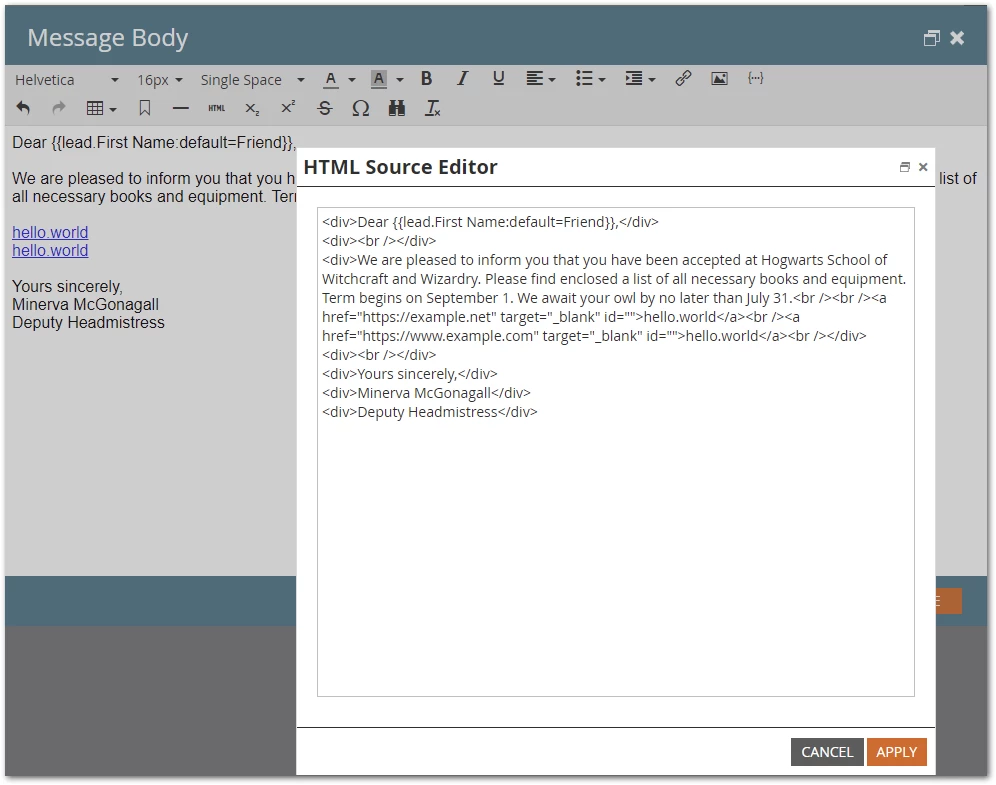
Can’t reproduce anything like this. Here you see 2 different links with the same inner HTML:


Note, separate from this discussion, that you must not use inner HTML that looks like a URL if the URL doesn’t match the actual href. It’s a sign of phishing. So in fact you shouldn’t be hyperlinking the text “hello.world” to any domain outside of literally https://hello.world.  But Marketo won’t stop you from trying. It’s the mail recipient that will think you’re sending a phishing email.


1 reply

SanfordWhiteman
Level 10
December 4, 2023

Please use the standard example domain example.com in the future to avoid accidentally linking to other people’s sites.


In any case, what you’re describing is a bit strange because Marketo doesn’t care if 2 <a href> values are different, regardless of whether the inner HTML of the <a> is the same.


Where are you making these changes? Freeform, i.e. in a Rich Text block? Or in a defined variable?

lindasAuthor
Level 2
December 5, 2023

I am making the changes in the body of the email in the editor by highlighting "hello.world" and clicking on the link button and pasting the "example.com" link there. In the next sentence, I click on the other "hello.world" and when I highlight and click on the "link" button, it already shows "example.com" but I want to change it to "example2.com". If I change it to "example2.com" it changes both.

SanfordWhiteman
SanfordWhitemanAccepted solution
Level 10
December 5, 2023

Can’t reproduce anything like this. Here you see 2 different links with the same inner HTML:


Note, separate from this discussion, that you must not use inner HTML that looks like a URL if the URL doesn’t match the actual href. It’s a sign of phishing. So in fact you shouldn’t be hyperlinking the text “hello.world” to any domain outside of literally https://hello.world.  But Marketo won’t stop you from trying. It’s the mail recipient that will think you’re sending a phishing email.