
Trigger setup based on form response | Community
Skip to main content
Christian_Tovar
Level 3
June 6, 2019
Question

Trigger setup based on form response

  • June 6, 2019
  • 4 replies
  • 5751 views

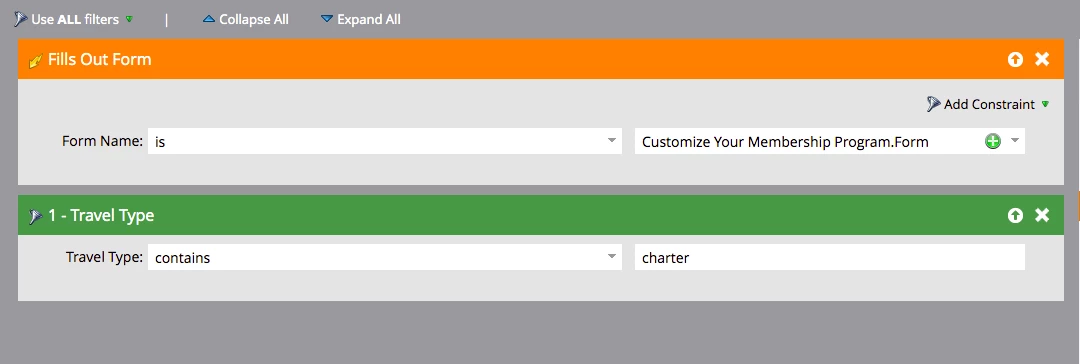
I am trying to setup a trigger email based on the response to the form. Is this the correct setup?
This post is no longer active and is closed to new replies. Need help? Start a new post to ask your question.

4 replies

SanfordWhiteman
Level 10
June 6, 2019

Pls change from Discussion to Question.

Christian_Tovar
Level 3
June 6, 2019

how do i do that?

SanfordWhiteman
Level 10
June 6, 2019

When you open a thread you have the choice (and should pretty much always choose Question). Don't know where it is to change after the fact.

See, now you can't mark Jackie's answer as Correct.

Jackie_Potts
Level 6
June 6, 2019

This looks like it will work. They need to fill out the customize.form and have the travel type data value contain charter the way I understand what you have set up.

Christian_Tovar
Level 3
June 6, 2019

that is exactly how i want it to work. so glad it will work 

Sant_Singh_Rath
Adobe Champion
Adobe Champion
June 17, 2019

This flow will work when someone will fill the added form and travel type value will contain charter. So, flow will be triggered when both condition will be true.

~ Sant Singh Rathaur
Christian_Tovar
Level 3
July 2, 2019

Hi,

Coming back to this. So what if I want to send two different thank you emails? What's the best way to set up and what's the best way to test that it will work.

Right now we have it as smart campaigns in a program. Is that best practice?

I want to send two different thank you emails based on the new leads so it will look like this

New person fills out form and travel type is charter = thank you email for charter

new person fills out form and travel type is per seat = thank you email for per seat

SanfordWhiteman
Level 10
July 2, 2019

You may not need a different email. If the content only differs by a couple of lines, for example, then switching on a single Lead field like this is easier using a single email and a Velocity token. (More email assets mean more housekeeping.)

If you need a different email, then you can have 2 Smart Campaigns, one for each Travel Type value.

Also, if this only for new leads you should use the trigger Person Created with a form constraint, not Fills Out Form (despite people's tendency to use FoF, it cannot directly determine whether someone is net new).

SanfordWhiteman
Level 10
July 21, 2019

Yes, that can work.