Trigger on a data value change after filling out a certain form | Community
Skip to main content
September 11, 2015
Solved

Trigger on a data value change after filling out a certain form

  • September 11, 2015
  • 4 replies
  • 7122 views

Hi guys,

I'm trying to create a flow that is triggered after the change of on data field to "true" after filling out a certain form.

so far I've tried "Trigger:Data value changes (new value is true) and Trigger: Fills out form (for  is blah blah)".
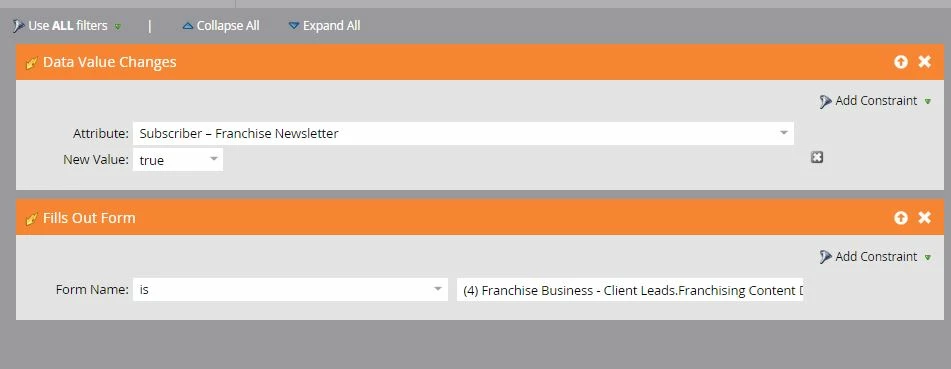
But after testing it seems to be completing the flow action for anyone who has filled out the from introspective of if the fields new value is true. I've also tried was to have a trigger:data value changes (new value true) and filled out form (with constraint= with 1 minute), but that too doesn't seem to be working - and isn't ideal as we potentially have people fill out an inquire form and update their preference centre (data value change) which aren't related.

Any guidance would be greatly appreciated.

Thanks,
Dale
This post is no longer active and is closed to new replies. Need help? Start a new post to ask your question.
Best answer by Darshil_Shah1

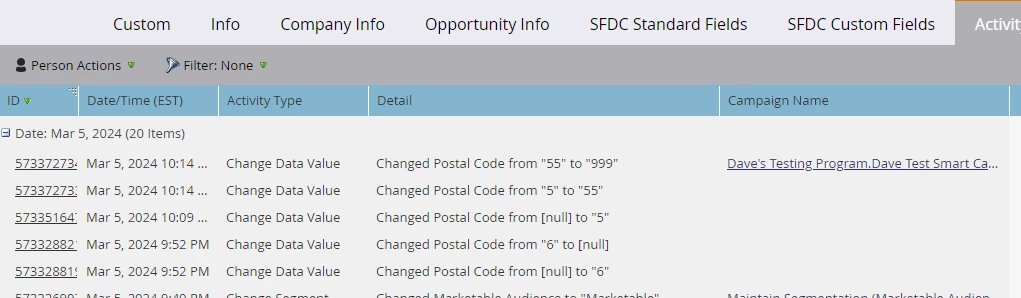
In my testing for an existing lead, any changes that went from [null] to a value were not picked up by the trigger.

You can see it in this activity log, where I've got a program looking for a Postal Code Value Change, but the trigger doesn't activate when going from [null] to 5. It only triggered when it already had a value (5) and I changed it to 55.


Am I missing something here?


@dave-silva-2, Marketo does not log Change Data Value activities for fields that are populated in the creation of a lead. If the value changes after the lead is created, it logs the Data Value Change which would then trigger the appropriate campaign.

If you want to include newly created leads along with existing leads in your campaign:

  1. Add a "Person is Created" trigger to the campaign along with the Data Value Change trigger
  2. Add a filter for the specific field and the desired value.

This will allow the campaign to fire for both new and existing leads.


4 replies

SanfordWhiteman
Level 10
September 11, 2015

Try a trigger Data Value Changes + constraint "Reason contains <URL of form>".

September 14, 2015

Thanks Sanford! this solution seems to be working well!

SanfordWhiteman
Level 10
September 14, 2015

That's great!  If you could mark it as correct, please do, because there seems to be confusion about this objective.

Nicholas_Manojl
Level 8
September 11, 2015

Remove the trigger "fills out form" and replace it with "filled out form"?

Or make it a trigger "fills out form" and a "data value changed" regular constraint.

Level 10
September 11, 2015

Hi Dale,

The "AND" operator applies just on filters, not on the triggers. Here's the workaround, keep just one trigger in the smart list, "Filled out form" - and in your flow action, define a choice to take the action. The choice shall be the attribute data value you want to track. However, this doesn't mean that the data value was changed on filling out the form. If the user fills out the form, and the data value of the attribute is "xyz", the flow will execute.

Though, if you want to tack that the data value was changed, you could have two campaigns - one being triggered on filled out form, and another being requested to check if the data value was changed.

Hope this helps!

September 11, 2015

Hi! Another thing to keep in mind - and I just learned this very recently with a smart campaign that wasn't working quite as expected - is that the Data Value Changes/Changed (trigger/filter) only works if the data value actually changes from one value to another. Marketo doesn't view blank-to-filled - for example when a lead is created - as a change to the value. This is important if you have brand new leads coming in through the form. Example:

We have a data normalization smart campaign that was based on the response they provided to FieldXYZ - depending on what value they entered for FieldXYZ, the smart campaign was set to update their FieldABC field value accordingly. We had this set up as trigger Data Value Changes = FieldXYZ. Here's what was happening:


Known customer fills out form, changes his FieldXYZ value from "cats" to "dogs." Smart campaign changed FieldABC value to "canine." .

New lead fills out form, never had a FieldXYZ value. Selects "dogs." Smart campaign did NOT change FieldABC to "canine."

Helping us solve the issue, Marketo support told us:  "The system doesn’t interpret new values at creation to be changes to existing values, so a Data
Value Change activity isn’t logged for those new values that are input at the time of the lead creation."

So if your form is going to be presented to new prospects, not just existing, I would recommend triggering on Fills out Form and doing one of two things:

  • Additional filter is the Lead(Company) attribute itself. Example: FieldXYZ = "cats" "dogs"
  • Or just use the Fills out Form trigger and then use constraints in the Flow. Example: If Attribute: Field XZY = "cats" Change Data Value FieldABC to "feline". If Attribute: FieldXZY = "dogs" Change Data Value FieldABC to "canine"

Hope this helps!

Level 6
September 11, 2015

Michaela, that's actually a really good point! Data value changing from nothing to something does NOT count as a data value change. Bummer. This adds some complication to things.

September 11, 2015

While I haven't tested it thoroughly, it appears to be true not just for newly created leads but also for existing contacts where a field was never populated (i.e. nothing to something). It's definitely true for new leads, but I think that same nothing-to-something (non)logic also applies to blank fields for existing leads too, based on what I've seen. So yeah, I have come to be rather cautious about using the Data Value Changes trigger or filter. Where I can, I try to find a way around it.