Trigger campaign when company name changes | Community
Skip to main content
September 18, 2013
Question

Trigger campaign when company name changes

  • September 18, 2013
  • 15 replies
  • 1921 views
I'm struggling to get a trigger to work. Basically I want the smart campaign to trigger when a contact is added to a certain company so I can run a flow to put that lead on marketing suspend. Right now I have it set up this way to catch leads when they are created for this account or when a contact is moved to this account from a different one:
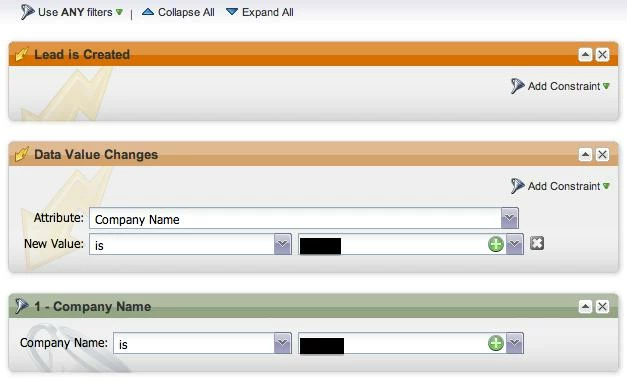

This works when a new lead is created, but I cant get it to run the flow when I change the contact to this company in Salesforce.com. 

Any ideas?
This post is no longer active and is closed to new replies. Need help? Start a new post to ask your question.

15 replies

October 7, 2013
Jason - So Support says you can change the company name of a lead and that will work as a trigger. But using the Marketo Data Value Changed and selected Company Name field will not work? That doesnt make sense (sounds like a bug). Seems like it's more work than it should be too :(

Bob - for campaigns that you want to trigger new and existing, you have to create 2 separate smart campaigns. 1 to address the leads in your system and 2 to address all new leads from that point forward.
October 7, 2013
Christina, do you think i could just have two triggers in one campaign and then a filter. Something like the following:
  • Trigger > Lead is Created
  • Trigger > Data Value Changes > Company Name
  • Filter > Company Name > ABC Company
Then set the campaign filter as "use all filters". Would both triggers work together?

Thanks!
October 7, 2013
Yes - both triggers should work together. But again, if a lead is created, the data value is not technically changing so you really dont need this. The only time you need the trigger for data value changes is for leads you already have - so you would create a campaign with trigger - data value changes to cover any instance where the company name field changes to the desired value. 

However, if you are retro-updating existing records, you want to create another smart campaign with no triggers that will go back and update everything. 
January 29, 2014
To clarify on this discussion, if you have multiple triggers in a campaign, the flow will start when either/any of them occur. If there is also a filter, the filter must be true when one of the triggers occur for the flow to action.

Triggering off a Company Name data change will NOT work, nor will a trigger for a data value change on any other lookup field.
January 30, 2014
To trigger something on a contact record based on a change in the account name, you need to set up a Workflow in SFDC.

For example, I want to update lead status on the contact record based on the account type. I can set up that campaign in Marketo, except it won't work when I'm adding an existing contact to a different account.

I set up a Workflow in SFDC
  • on the contact object
  • evaluate the rule when a record is: created, and ever time it's edited
  • rule criteria:
    • run this rule if the following criteria are met:
    • account: type = Customer
  • Workflow action: field update:
    • object: contact
    • field: Contact: Status
    • new field value: WON - Customer
I then have a campaign in Marketo that triggers when lead status is changed to WON - Customer to suspend marketing (we don't market to customers regularly)