
Trigger a reminder email 1 hour before a webinar | Community
Skip to main content
Dave_Cunningham
Level 4
May 11, 2017
Question

Trigger a reminder email 1 hour before a webinar

  • May 11, 2017
  • 3 replies
  • 5002 views

Is there a way to trigger a reminder email to be sent 1 hour before a certain date? My webinar date is a date program token field and I can easily automate the day prior reminder, but I am wondering if there's a way to do it in hours? Guessing it's a hack, if so.
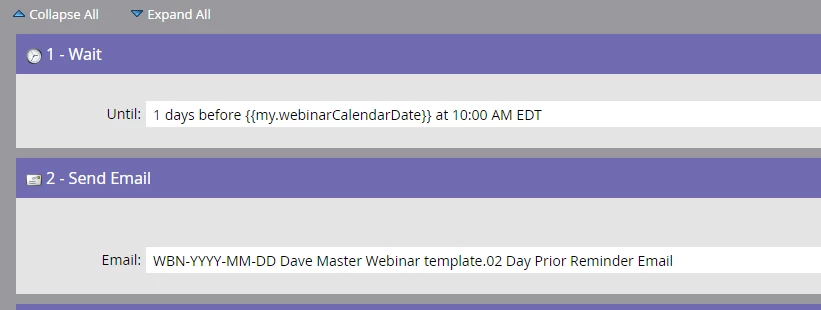
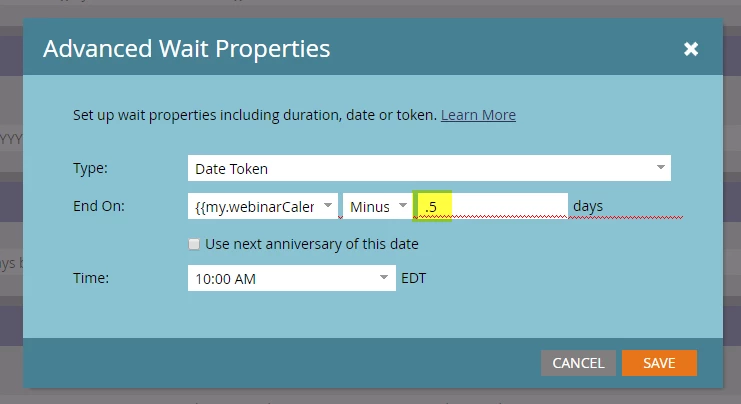
If I wanted to do 12 hours prior I would think it would be like this, but it doesn't look like it will work.
This post is no longer active and is closed to new replies. Need help? Start a new post to ask your question.

3 replies

Devraj_Grewal
Level 10
May 11, 2017

Dave,

If the webinar is at 10a EDT, why not just have a separate batch smart campaign run at 9a EDT? Then you won't need to deal with advanced wait. With long wait steps, you run the risk of not removing leads from the flow if they decide not to attend or cancel the registration. However with a batch campaign at 9a, the smart list will make sure only those registered will receive the reminder.

Dave_Cunningham
Level 4
May 11, 2017

Thanks Devraj. We're trying to automate as much as possible so would like to avoid batch.

You bring up a great point though with the long wait step. I sometimes overlook this. What I'm testing with here is a trigger on the program status changing to "Registered". There could be days/weeks between when someone registers and when the reminder email would be sent. I'm not sure we have a way for registered users to cancel their registration though. I don't think I have ever come across a webinar that has that concept. I feel like users register and then they either join or don't. So this doesn't seem like much of a risk. Maybe we even send the reminder to some who wasn't planning on joining, but it changes their mind

Devraj_Grewal
Level 10
May 11, 2017

A batch will be automated, you just schedule in advance that one hour before the webinar, the flow will run to send the reminder. That way one hour before only those registered and qualifying to receive communication will be sent the reminder.

As for cancelling, I didn't mean those who cancel will need to be removed, rather I just meant as best practice in long wait steps for any campaign is to avoid them. But if they are necessary, to make sure right after the long wait steps, to throw a few remove from flow steps in there to make sure you filter some leads out (ex. Unsubscribed, lead status changed).  In terms of a webinar it's fine, everyone can receive the reminder. But best practice is to remove certain leads you may not want to progress after a long wait step depending on what the rest of the flow steps need to do.

May 11, 2017

What if you just added another date token, such as "my.one hour reminder" and then manually put the reminder date in when you build out the campaign. It is a tiny manual step, but maybe less risky than long wait steps and status changes. Plus, it's easily clonable.

Jessica_Kao3
Level 7
May 11, 2017

Like Devraj said,  the cleanest way is to have a separate smart campaign to send out the reminder 1 hour before and you would just need to schedule it.  You want to use tokens to minimize what needs to be changed but wait steps can cause all kind of issues because when someone is in the middle of the wait step you can't do anything other than shut down the whole program and becomes error prone.  Separate out all the actions,

Have a separate campaign to process registration.

A separate campaign to send reminders.  I have a separate one for 1 day reminder and 1 hour reminder.