Tracking referrer via hidden field and trigger campaign not working? | Community
Skip to main content
May 5, 2016
Solved

Tracking referrer via hidden field and trigger campaign not working?

  • May 5, 2016
  • 3 replies
  • 5107 views

I've attempted to setup a campaign that tracks the referring URL to a Marketo landing page using a UTM to track the original source. So the path would be:

Clicks Twitter Advertisement that has UTM:

godigitalmarketing.com/learn/blog/brand-building-how-to-turn-a-negative-review-into-a-positive-branding-strat?utm_source=twitter&utm_medium=social%20&utm_campaign=BB16Q2

They land on our blog page, if they click the C2A at the bottom of the page they are redirected to a marketo landing page that has a hidden referrer field in the form:
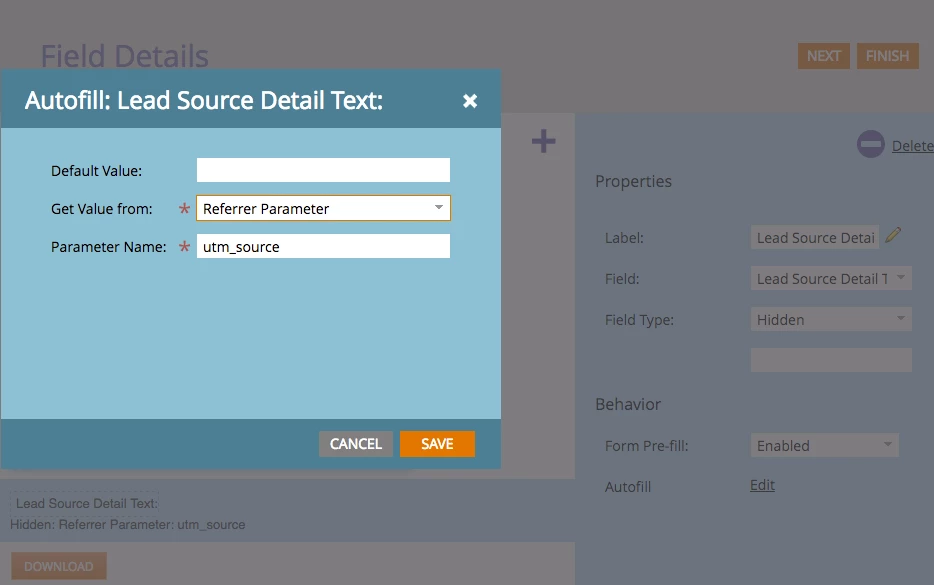
Then I have a campaign set to trigger off of the UTM source in the URL (If referrer contains "twitter" then lead enters campaign flow)
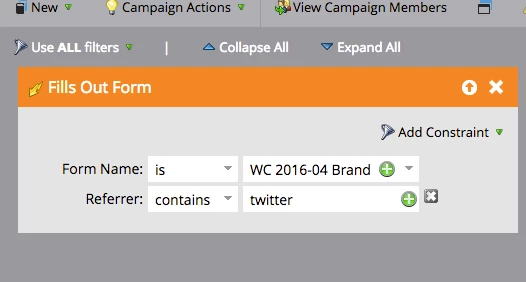
This is not working currently and I feel like I am missing something big, or don't understand something important about UTMs... HELP!

This post is no longer active and is closed to new replies. Need help? Start a new post to ask your question.
Best answer by Grégoire_Miche2

Hi Thomas,

I just ran a  test.

I used first Brand Building: How to Turn a Negative Review into a Positive Branding Strategy - G/O Digital Marketing

Then I clicked the "download ebook" link at the bottom, I got here: Building Blocks For Your Online Brand

Looking at the form, I see the hidden leadsource field with the value "twitter", so the capture of the referrer parameter to the hidden field works as expected.

So you could try to use the "fills out form" without the constraint but with a "lead source = twitter" filter.

Now, your own trigger should work

-Greg

3 replies

Grégoire_Miche2
Grégoire_Miche2Accepted solution
Level 10
May 5, 2016

Hi Thomas,

I just ran a  test.

I used first Brand Building: How to Turn a Negative Review into a Positive Branding Strategy - G/O Digital Marketing

Then I clicked the "download ebook" link at the bottom, I got here: Building Blocks For Your Online Brand

Looking at the form, I see the hidden leadsource field with the value "twitter", so the capture of the referrer parameter to the hidden field works as expected.

So you could try to use the "fills out form" without the constraint but with a "lead source = twitter" filter.

Now, your own trigger should work

-Greg

Josh_Hill13
Level 10
May 6, 2016

Why not use UTM Parameter instead of Referrer? Is that effectively the same?

May 6, 2016

The reason we couldn't set it up with a UTM parameter is due to the path. We have a different UTM for each of our distribution channels:

  • FB
  • TW
  • LI
  • YT
  • Outbrain

Advertisements connect them to our blog post, where the UTM will show in the URL. However, once they click the C2A that redirects them to the landing page with gated content, the UTM disappears. We want to know how effective the path:  Advertisement Source > Post > C2A is at capturing leads. So we're basically tracking two steps instead of one. If we drove them directly to the gated content page, then we could use the UTM parameter alone, but in this instance referrer parameter is needed. (I am new to using UTMs though...)

SanfordWhiteman
Level 10
May 6, 2016

Thomas, the Referrer in a Filled Out Form activity context is not the same as the Referrer of a standard page view (Visited Web Page activity in Marketo).

The FoF Referrer is the page that hosts the form (this may seem counterintuitive, but is equivalent to the way referrers work with iframes, so it is not without precedent).

Grégoire_Miche2
Level 10
May 6, 2016

So my reco above is the best way to go: removing the referrer constraint on the trigger and adding a filter on the leadsource =  twitter

-Greg

May 6, 2016

@@Grégoire Michel

Awesome that worked! Thank you

Grégoire_Miche2
Level 10
May 6, 2016

You are welcome.

-Greg