Track Specific Link Performance | Community
Skip to main content
Level 2
January 19, 2023
Solved

Track Specific Link Performance

  • January 19, 2023
  • 1 reply
  • 2065 views

Hi guys,


Is there a way we can track a single link performance in Marketo?


Like at the moment, we can see through Email Link Performance how all links in a specific email perform, but what if we want to see how a specific link performs (it appears across different emails).


Thanks in advance ^^

This post is no longer active and is closed to new replies. Need help? Start a new post to ask your question.
Best answer by Darshil_Shah1

You could add an Id attribute to the same links in the email and reference it in the Link Id constraint available in the "Clicked Link in Email" smart list filter for focusing only on a specific link/set of links in the link performance report. For distinct links you can directly reference the email link in SL.
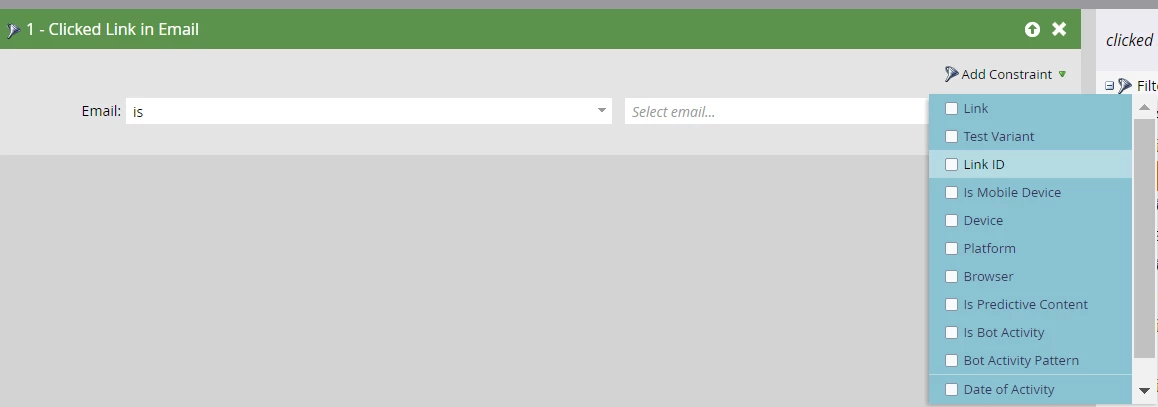
 

Using the Click link activity filter in the SL would reference data from the activity log; hence, the Marketo data retention policy would apply to the results.


If you want more concise link performance results (and not separated per email like in the ELP report, even though the clicks are summed up in the last row of report), you could use the bulk extract API to query the click activities for people who have clicked that particular link, and filter out the click activities on other links and then come up with a count of link clicks (if I'm not wrong, this would also include multiple click link activities done by a single person unlike if we were to just create and find the # of people in the SL with the clicked link in email filter).


FYR, click email activities are highly unreliable due to email scanners.

1 reply

Darshil_Shah1
Community Advisor and Adobe Champion
Darshil_Shah1Community Advisor and Adobe ChampionAccepted solution
Community Advisor and Adobe Champion
January 19, 2023

You could add an Id attribute to the same links in the email and reference it in the Link Id constraint available in the "Clicked Link in Email" smart list filter for focusing only on a specific link/set of links in the link performance report. For distinct links you can directly reference the email link in SL.


Using the Click link activity filter in the SL would reference data from the activity log; hence, the Marketo data retention policy would apply to the results.


If you want more concise link performance results (and not separated per email like in the ELP report, even though the clicks are summed up in the last row of report), you could use the bulk extract API to query the click activities for people who have clicked that particular link, and filter out the click activities on other links and then come up with a count of link clicks (if I'm not wrong, this would also include multiple click link activities done by a single person unlike if we were to just create and find the # of people in the SL with the clicked link in email filter).


FYR, click email activities are highly unreliable due to email scanners.

WoodyAuthor
Level 2
January 20, 2023

Thanks for the reply Darshil,


Yeah I agree. I think using bulk extract API would be more suitable in this case since I want to see the same link's performance across different emails in the past. We have too many links we wanted to track that it's a bit challenging to filter out all the emails they were in to use the "Clicked Link in Email"


By any chance, you have the documents or tutorial videos on how to use the bulk extract API to query the click activities?

Darshil_Shah1
Community Advisor and Adobe Champion
January 20, 2023

@woody, here's the Marketo developer documentation on Bulk Activity Extract APIs. There should be plenty of resources/questions already posted on the marketing nation community that you could go through on the bulk extract API, but I think the developer documentation should probably be sufficient to get you started. Let us know if you have questions. 🙂