


Time Saving Tip for Admins - Generating SSL Certificates Inside of Marketo

Note: This blog is intended for users inside Marketo that have permissions to access the Admin section of Marketo
As an admin, one of the key aspects of getting your Marketo instance up and running is getting your landing page domain aliases (aka "CNAMEs") set up and generating an SSL certificate for each (or even an existing instance - maybe you have brought some new brands on board, for example!) Previously, this was a step that required a support ticket, but now you can self serve and generate the SSL certificate directly in Marketo's UI.
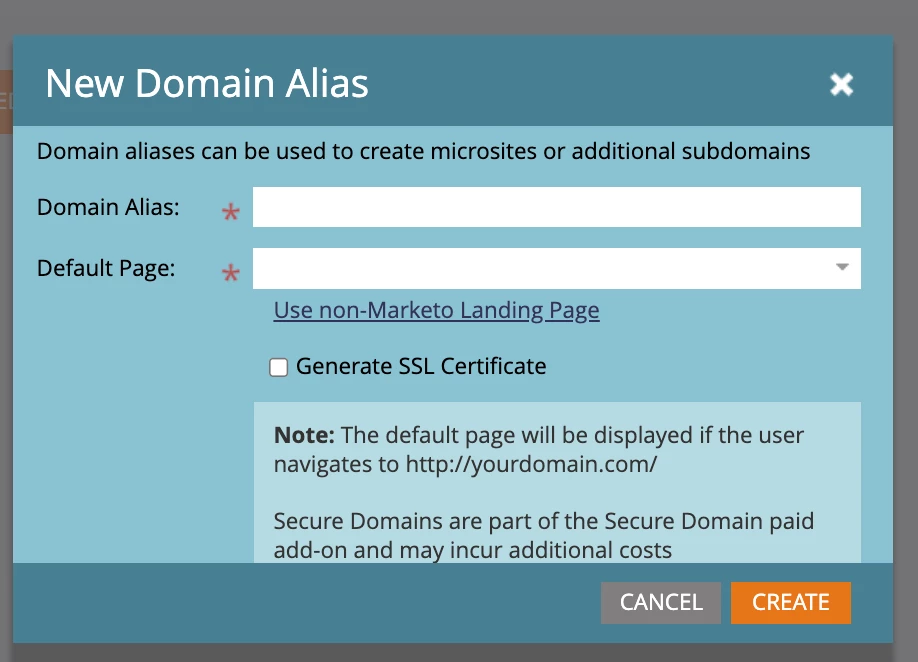
First, navigate to the Admin tab > Landing Pages from the navigation tree. When you click New > Domain Alias, you can now click a checkbox that says "Generate SSL Certificate." After putting in your other details (i.e. Domain Alias, Default Page, etc) and checking the box, click Save.
Once done, navigate to the "Rules" tab and you should see the name of your domain alias and verify that the "SSL Certificate" column says "SSL Setup Complete" for each domain.

And...voila!