The New UI makes the User friendly harder when want to Create a Template | Community
Skip to main content
June 25, 2013
Solved

The New UI makes the User friendly harder when want to Create a Template

  • June 25, 2013
  • 5 replies
  • 1784 views
Normal i don't have the biggest talking when a UI change. 

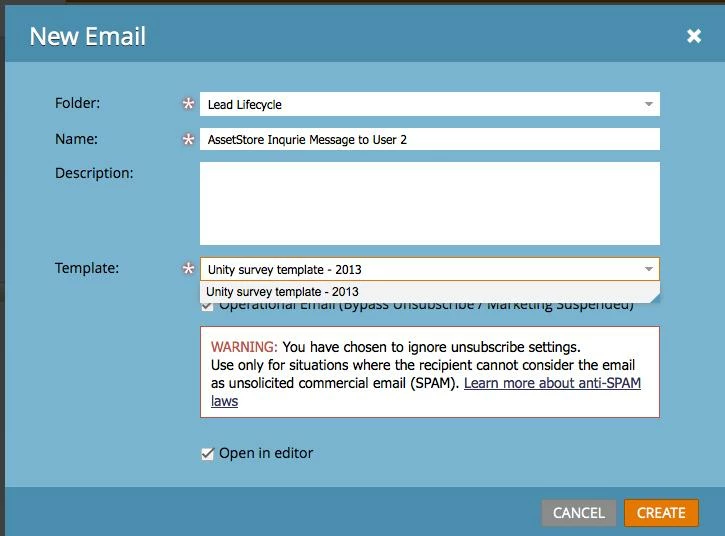
But think the new Marketo UI to createa a local Asset in Marketing Aktivites is not thinking threw probelly. 

Now as a user i need to know what name of a template i want to use. And be surre that this is the one. Since the Preview Buttonis not there. 

This dosen't help that you can undo or change a E-mail template when you first have done it. 

This post is no longer active and is closed to new replies. Need help? Start a new post to ask your question.
Best answer by
Hi Ann.

I Agree with Local Asset. There is a lot of Dobbelt click in the new interface. And the problem you describe dosen't make any sence why a user need to do this.

One of the other Microsoft Trible Click Marketo have is
When you want to Upload to a List you Right click on.
  1. I choice a Static List i want to Upload
  2. Right Click on it and press Import.
  3. Next Picture i choice my CSV file.
  4. Step 2 i say what fields ect i want in
  5. Step 3. I need to Choice the list name ? and some other stuff
I don't under stand if i left click on the list to start with. Should Step 5 not start from this list? Dosen't make any sence why the user need to do 2 click and typing on the keyboard to write the same name?

5 replies

June 25, 2013
I agree that there are some anomalies with the new interface.  The New Landing Page dialog is also missing the preview button.   


Hopefully the missing preview button is just a bug that will be fixed shortly?  Also, hopefuflly the help articles will be updated to reflect the new UI including the new "Folder" field, which allows you to chose any Design Studio folder or Marketing Activities program in which to create the email. 


June 25, 2013
Yes, I think it's a bug.  We need to get that back in there.  Although we might miss a few things, it is our intent NOT to regress any functionality.
June 25, 2013
I also really dislike that when I select "Create a Local Asset" from within a program, I have to select which program, or folder, that I want to put it in. I want it in the program where I selected to create it, which was the case before this new update. 

Hopefully it changes back.
Accepted solution
July 2, 2013
Hi Ann.

I Agree with Local Asset. There is a lot of Dobbelt click in the new interface. And the problem you describe dosen't make any sence why a user need to do this.

One of the other Microsoft Trible Click Marketo have is
When you want to Upload to a List you Right click on.
  1. I choice a Static List i want to Upload
  2. Right Click on it and press Import.
  3. Next Picture i choice my CSV file.
  4. Step 2 i say what fields ect i want in
  5. Step 3. I need to Choice the list name ? and some other stuff
I don't under stand if i left click on the list to start with. Should Step 5 not start from this list? Dosen't make any sence why the user need to do 2 click and typing on the keyboard to write the same name?
August 3, 2013
Good news! The preview button is back.


We're working on the local asset issue.