Text Falling Out of Placeholder Internet Explorer | Community
Skip to main content
October 10, 2014
Question

Text Falling Out of Placeholder Internet Explorer

  • October 10, 2014
  • 3 replies
  • 1324 views

Hello,

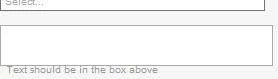
Is anyone else having an issue where their text isn't propperly placed within a field on a form in IE? I'm noticing this issue in IE 8, and IE 11.
 

I created a form, am using hint text as labels for the fields, and had it posted to a staging server. In one of the fields the text actually falls out of the box, and is sitting on the outside, and it looks really sloppy. Is there anybody else having this issue?


This post is no longer active and is closed to new replies. Need help? Start a new post to ask your question.

3 replies

Grant_Booth
Level 9
October 10, 2014
I've never seen this happen before. This was with a Marketo form? Is there anything we would need to do to reproduce it exactly? Is there something different between that hint text and the hint text in the field above it?
Kenny_Elkington
Adobe Employee
Adobe Employee
October 10, 2014
Hey Jason,

Does the console(hit F12) show any Javascript errors when viewing the page?  If there are, could you provide them?  There may also be some issue with IE8 and IE11 compatibility mode and the labels.  IE8 doesn't native support hint text, so it's polyifilled through a label.
October 10, 2014
My mistake guys. It was a little oversite on my part. Making adjustments to the label width fixed this. It's always the little oversites that send you scrambling. Thank you for being so responsive.