Text Editor...Edits Changing HTML? Only seems to be a problem for Mobile...
Hi there,
I noticed this shift Monday when building emails. I would make a change in the text editor (not HTML), whether it'd be in the text version or editing an existing link, and it would alter the HTML of the email. When I send samples, it looks fine on Desktop, but when look on Mobile it's displaying as the larger button (see samples below).
Example: I changed the link in Section 3 embedded in the"Download Now" HTML Button. The Edit Draft went from this:

To this:
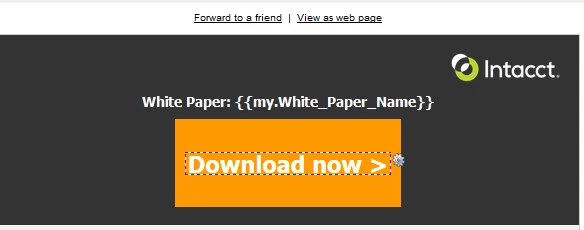
In Preview Draft it looks like this:

to this:

Like I said, the desktop opens look fine, but Mobile look enlarged like the 2nd version, post link edits. This also seems to be happening when I edit the TEXT version. I looked at the code and it seems to be adding a paragraph tag:
PRE EDIT:
<tr ><td style="vertical-align:middle; text-align:left; background-color:#333333; font-family:Tahoma, Geneva, sans-serif; color:#ffffff; font-weight:bold; width:100%; padding:10px 10px 20px 10px; " ><table width="40%" cellpadding="0" cellspacing="0" border="0" style="width:40%; " class="table_responsive" align="center" bgcolor="#FF9900" ><tr ><td style="color:#ffffff; font-weight:bold; font-size:26px; line-height:23px; padding:12px 12px 12px 12px; font-family:Tahoma, Geneva, sans-serif; " class="no_right_pad" ><div class="mktEditable" align="center" ><a style="color: #fff; text-decoration: none;" href="{{my.White_Paper_Registration_URL}}?utm_source=marketo&utm_medium=email&utm_campaign={{my.Tracking_Campaign_ID}}_link_1">Download now ></a></div>
POST EDIT:
<tr ><td style="vertical-align:middle; text-align:left; background-color:#333333; font-family:Tahoma, Geneva, sans-serif; color:#ffffff; font-weight:bold; width:100%; padding:10px 10px 20px 10px; " ><table width="40%" cellpadding="0" cellspacing="0" border="0" style="width:40%; " class="table_responsive" align="center" bgcolor="#FF9900" ><tr ><td style="color:#ffffff; font-weight:bold; font-size:26px; line-height:23px; padding:12px 12px 12px 12px; font-family:Tahoma, Geneva, sans-serif; " class="no_right_pad" ><div class="mktEditable" align="center" ><p><a target="_blank" style="color: #fff; text-decoration: none;" href="{{my.White_Paper_Registration_URL_2}}?utm_source=marketo&utm_medium=email&utm_campaign={{my.Tracking_Campaign_ID}}_link_1">Download now ></a></p></div>
Any one having this issue? Thank you!