Table headings not aligning in Gmail | Community
Skip to main content
Level 2
November 21, 2017
Question

Table headings not aligning in Gmail

  • November 21, 2017
  • 1 reply
  • 3681 views

I have used an email script token to populate a table in an email with three bits of info.
I have experienced this formatting issue only in Gmail where the top heading "The details of..." doesn't go full width, and the top table row is pulling into the first col.
I think this is due to a table from the token being pulled into the email that already uses tables. Has anyone come across this issue?
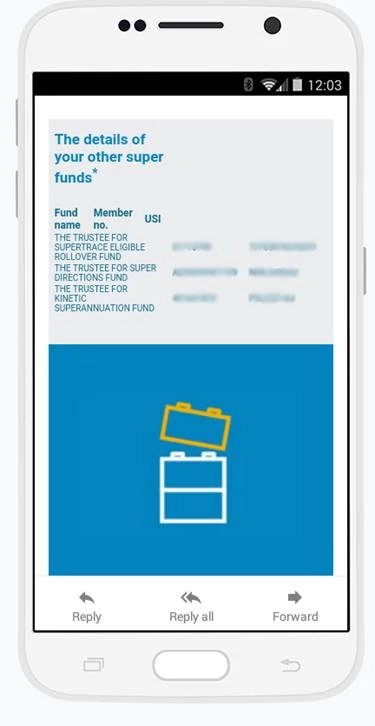
This post is no longer active and is closed to new replies. Need help? Start a new post to ask your question.

1 reply

Akshay_Pant
Level 4
November 21, 2017

Hi @Simone Du Toit​,

Can you please share the HTML code for the email and token ?

Thanks,

Akshay Pant

sdutoit-2Author
Level 2
November 22, 2017

Thanks @Akshay Pant​.

Here is the token code:

#set ($list = '${lead.superFund1}|${lead.otherfundnumber1}|${lead.uSI1}+${lead.otherfundname2}|${lead.otherfundnumber2}|${lead.uSI2}+${lead.otherfundname3}|${lead.otherfundnumber3}|${lead.uSI3}+${lead.otherfundname4}|${lead.otherfundnumber4}|${lead.uSI4}+${lead.otherfundname5}|${lead.otherfundnumber5}|${lead.uSI5}+${lead.otherfundname6}|${lead.otherfundnumber6}|${lead.uSI6}+${lead.otherfundname7}|${lead.otherfundnumber7}|${lead.uSI7}+${lead.otherfundname01}|${lead.otherfundnumber8}|${lead.uSI8}+${lead.otherfundname9}|${lead.otherfundnumber9}|${lead.uSI9}')

<table style="width: 100%;>

<tr style="font-size: 14px;font-family: Arial, sans-serif;color: #006689;">

<td style="text-align: left; color: #006689; font-family: Arial, sans-serif; padding: 5px 20px 5px 0px;">Fund name</td>

<td style="text-align: left; color: #006689; font-family: Arial, sans-serif; padding: 5px 20px 5px 0px;">Member no.</td>

<td style="text-align: left; color: #006689; font-family: Arial, sans-serif; padding: 5px 20px 5px 0px;">USI</td>

  </tr>

#foreach( $part in $list.split("[+]") )

#if( !$part.isEmpty() && $part.split("[|]")[0].trim() != "" )

  <tr style="font-size: 14px;font-family: Arial, sans-serif;color: #006689;">

    #foreach( $value in $part.split("[|]") )

    <td style="padding: 0px 20px 3px 0px;">$value</td>

    #end

  </tr>

#end

#end

</table>

sdutoit-2Author
Level 2
November 22, 2017

Here is the html of the content block:

<table align="center" width="100%" border="0" cellspacing="0" cellpadding="0" bgcolor="#ffffff">

<tbody>

<tr>

<td valign="top" align="center">

<table bgcolor="#ebeced" width="600" border="0" cellspacing="0" cellpadding="0" class="em_wrapper BG4" align="center" style="background-color: #ebeced;">

<tbody>

<tr>

<td valign="top" align="center" class="em_aside1">

<table align="center" width="100%" border="0" cellspacing="0" cellpadding="0">

<tbody>

<tr>

<td valign="top" align="left" class="Txt4" style="font-family: Arial, 'Gotham', Helvetica, sans-serif; font-size: 16px; color: #006689; text-align: left;"><span class="editable_text"><span class="editable_text"></span></span>

<p><span style="font-size: 24px;"><strong><span style="font-family: Arial, sans-serif; color: #0083be;">The details of your other super funds</span></strong><strong><sup><span style="font-family: 'Arial',sans-serif; color: #0083be; mso-fareast-language: EN-GB;">*</span></sup></strong> <br /><br /></span></p>

</td>

</tr>

<tr>

<td valign="top" align="left" class="Txt4" style="font-family: Arial, 'Gotham', Helvetica, sans-serif; font-size: 16px; color: #006689; text-align: left;"><span class="editable_text"><span class="editable_text"></span></span>

<p><span style="font-size: 14px;"><span style="font-family: Arial, sans-serif; color: #0083be;">{{my.Super match:default=No funds could be found}}</span></span></p>

</td>

</tr>

</tbody>

</table>

</td>

</tr>

</tbody>

</table>

</td>

</tr>

</tbody>

</table>