sync and assign a lead from marketo into salesforce | Community
Skip to main content
February 19, 2016
Question

sync and assign a lead from marketo into salesforce

  • February 19, 2016
  • 2 replies
  • 2666 views

I am trying to create a program that anytime a lead is created in Marketo it is assigned to a rep in salesforce based on state.

I have the following set up, but while it creates the lead in salesforce it is not assigning it to the correct rep.
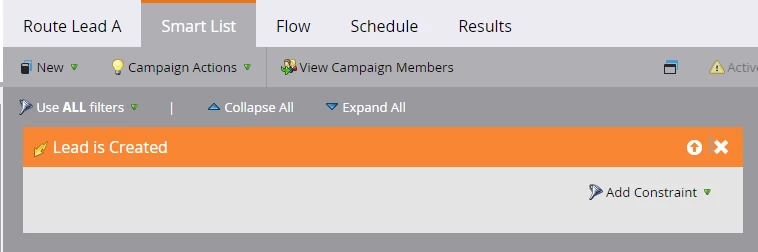
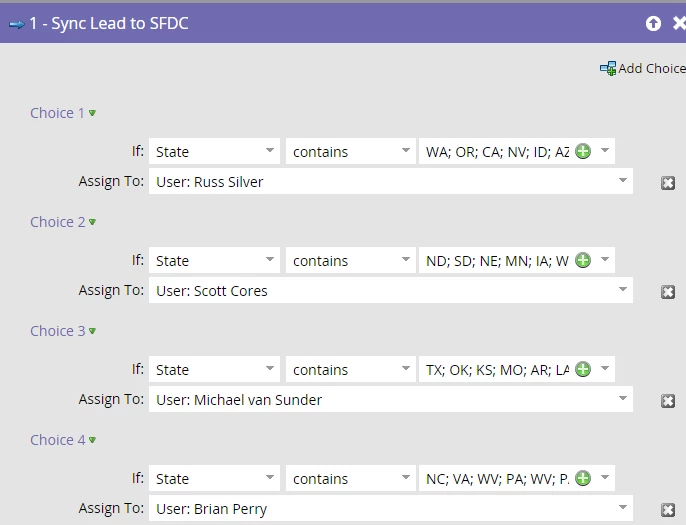
What am I doing wrong?

This post is no longer active and is closed to new replies. Need help? Start a new post to ask your question.

2 replies

Iryna_Zhuravel4
Level 6
February 20, 2016

Who do the leads get assigned to? Someone you specified in your smart campaign or some else altogether?

Hard to say what exactly throws the assignment off from the info you provided, but here are a few things to consider:

1. Data standardization - Do you have your state names standardized on all your forms?

For your set up to work all your incoming leads must have state name in the 2 letter format; let's say if a lead has "Pennsylvania" as a state instead of "PA", none of your constraints will apply and this lead will get assigned to whoever you have in the default choice.

2. Lead assignment rules in SFDC - check what you have on SFDC side

It is usually a better practice to set up lead assignment rules in the SFDC, so that no matter how leads get into your CRM they all run through the same assignment process

Josh_Hill13
Level 10
February 20, 2016

You need to use IS,

CONTAINS is going to screw it up.

Grégoire_Miche2
Level 10
February 20, 2016

+1 for "Is" instead of "contains". If necessary revisit your forms to make sure that the "state" picklist is correctly configured to store the 2 letters acronyms for states.

You can also run data quality smart campaigns that fix the values and have you smart campaign above to react also on "change data value" on the state field.

-Greg

February 21, 2016

To avoid complications, you can configure your assignment rules in salesforce and sync your leads using auto-assignment rules.You can configure this in salesforce setup area. In the search bar, type Lead assignment rules and make the necessary changes there.

And the "contains" has to be changed to "is"

On your marketo system, you can create a trigger that assigns the right state codes to different states so that you are pushing the right codes to salesforce when you sync. I really hope this helps.

Grégoire_Miche2
Level 10
February 21, 2016

Hi Kenneth,

There is a strong limitation with the use of assignment rules in SFDC: they only trigger at lead creation, not at lead update. So, it will work for "lead is created" (which is the case here) but if you enter or correct the state later, SFDC will not reassign the lead.

Vote here:

-Greg

February 24, 2016

I agree. It wouldn't work for already existing leads. Thanks Greg