Subscription Preferences Form | Community
Skip to main content
September 20, 2016
Solved

Subscription Preferences Form

  • September 20, 2016
  • 2 replies
  • 2188 views

Hi! I have a few subscription preferences form questions. When I visit Marketo's subscription preferences page for reference, there are a few things that they do that I'm looking to replicate:

  1. The email address is not editable, meaning I cannot update it. When I created my form, that wasn't an option. How do I enable that?
  2. When I want to suspend my email for 90 days, it freezes (or doesn't make any of the email types editable). How do I enable that? Also, I want to more options (i.e. 15 days, 30 days and 90 days). How do I make it the same for all 3 and is there also a way to make it so that if you click one, you cannot click the others (i.e. I click "pause for 15 days" I cannot also click "pause for 30 days")?
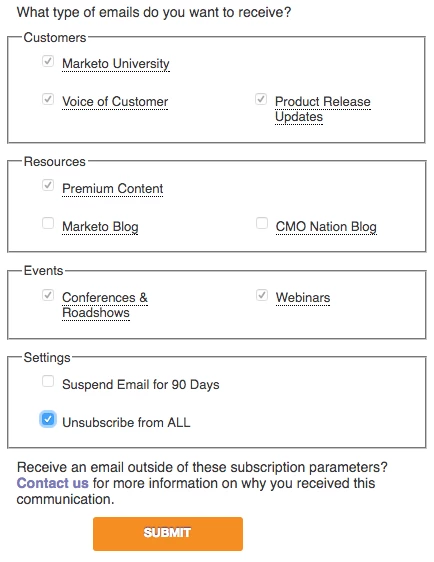
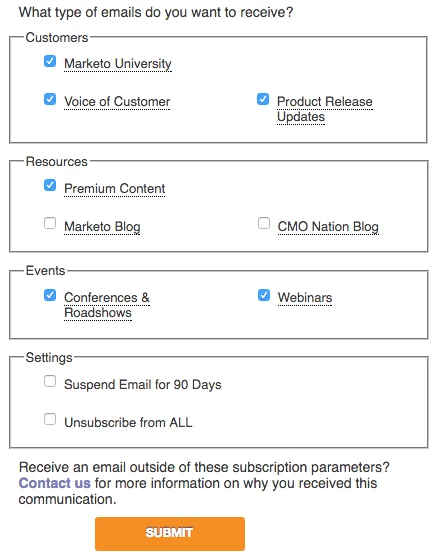
  3. Same for "Unsubscribe from all" button, if I click that, how do I freeze (or gray out and make every other button uneditable)? Check out the images for reference.

Thanks for your help!

Other options grayed outNot grayed out
This post is no longer active and is closed to new replies. Need help? Start a new post to ask your question.
Best answer by Josh_Hill13

Steve,

Most of the functions you want require custom javascript. Please hire a developer to do that.

  • non editable email - I personally hate this and there are threads here that denounce that. Instead, use the Not You? option to give the lead an option to go to a non prefill page+form.
  • Suspend 90 days - this requires extra fields or picklists and a workflow in Marketo. I've found that this is often challenging to pull off without some thought into wait steps and Suspended.
  • Unsubscribe All+gray out - custom dev, but honestly not really a big need. They unsubscribe, then your workflows will opt out on the other fields.

Please do a search here for lots of material on how to do this. I also have 3 articles on my site marketingrockstarguides.com.

2 replies

Josh_Hill13
Josh_Hill13Accepted solution
Level 10
September 20, 2016

Steve,

Most of the functions you want require custom javascript. Please hire a developer to do that.

  • non editable email - I personally hate this and there are threads here that denounce that. Instead, use the Not You? option to give the lead an option to go to a non prefill page+form.
  • Suspend 90 days - this requires extra fields or picklists and a workflow in Marketo. I've found that this is often challenging to pull off without some thought into wait steps and Suspended.
  • Unsubscribe All+gray out - custom dev, but honestly not really a big need. They unsubscribe, then your workflows will opt out on the other fields.

Please do a search here for lots of material on how to do this. I also have 3 articles on my site marketingrockstarguides.com.

September 20, 2016

Thank you Josh. I appreciate the quick feedback!