Submit Button is ALIVVVEEEEE relocating Submit Button Forms 2.0 | Community
Skip to main content
May 20, 2014
Solved

Submit Button is ALIVVVEEEEE relocating Submit Button Forms 2.0

  • May 20, 2014
  • 3 replies
  • 1132 views
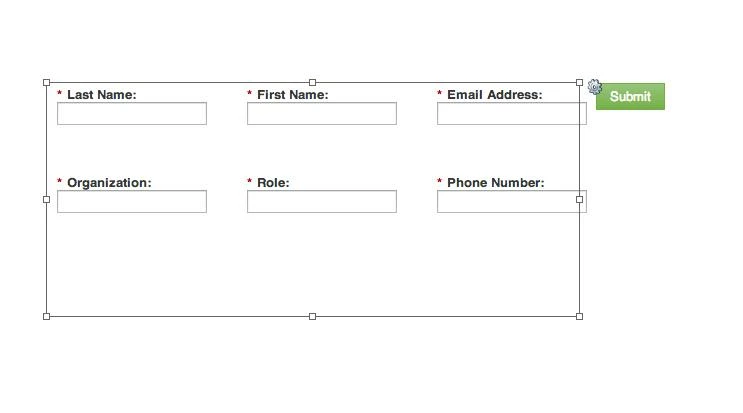
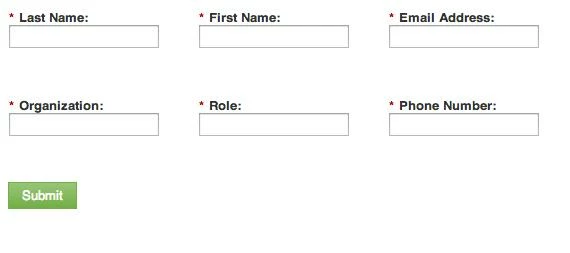
I'm trying to get my "Submit" button to sit under my horizontal rows and no matter what it previews like, it just hangs out to the right of my form on the actual page!

Attaching screen shots. Any ideas folks?

Thanks so much!

how it looks on my page
how it looks in preview/how I want it to look

This post is no longer active and is closed to new replies. Need help? Start a new post to ask your question.
Best answer by Matt_Stone2
Try adding some custom css... it looks like it probably has a float: right on it.

Maybe do something like: .mktoButton { display: block }

3 replies

Matt_Stone2
Matt_Stone2Accepted solution
Level 9
May 20, 2014
Try adding some custom css... it looks like it probably has a float: right on it.

Maybe do something like: .mktoButton { display: block }
May 20, 2014
Or if you want to you can also link the page, would be easier to modify the css?

Best regards

Steffen
May 21, 2014
It was definitely something in the CSS of the landing page. Thanks so much!