Subject Line Test Question | Community
Skip to main content
Rick_Gonedes
Level 2
June 12, 2018
Question

Subject Line Test Question

  • June 12, 2018
  • 1 reply
  • 4388 views

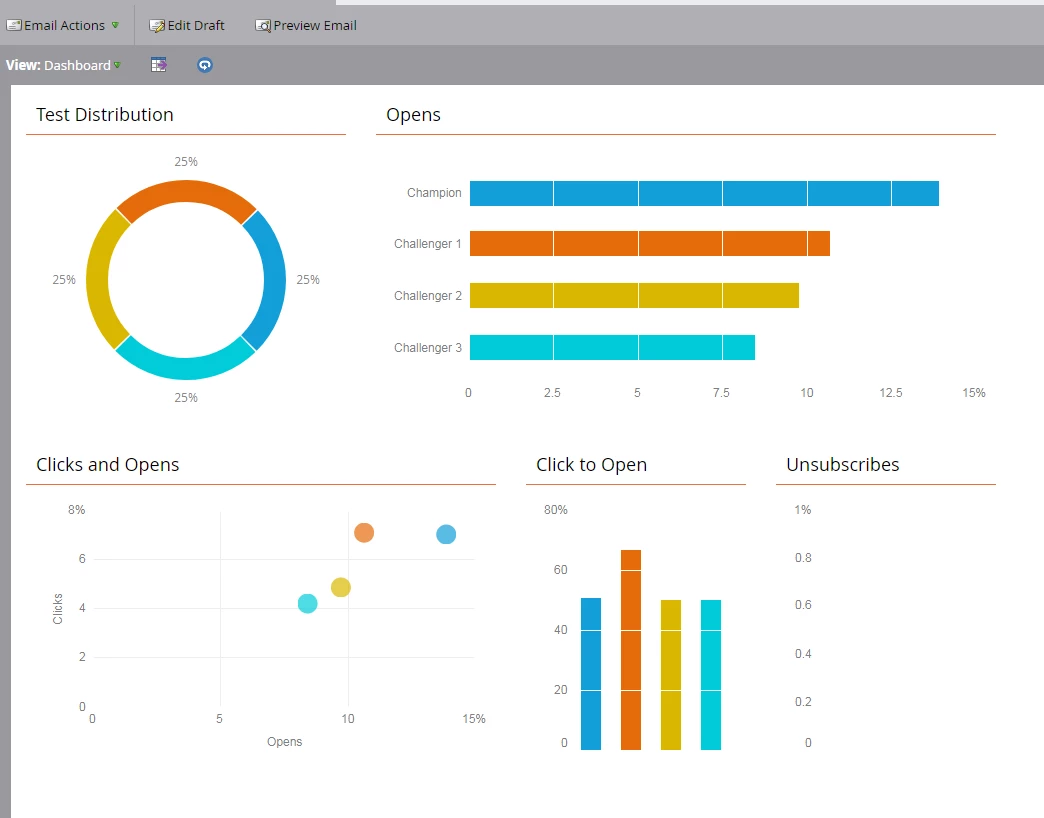
I was curious, I am running a subject line test and I wanted to determine how many emails each subject line was sent to. For example, the champion was sent to 125 people, Challenger 1 was sent to 100 and so forth. Is there a place in the below where you can see that? The reason I am asking is that seems that the champion has a lot more opens and clicks than the challengers but I have the test distribution setup for 25% each so really confused. The Champion has 79 opens vs the other which around 10-12 opens. Thank You, Rick
This post is no longer active and is closed to new replies. Need help? Start a new post to ask your question.

1 reply

Nicholas_Hajdin
Level 5
June 12, 2018

Hi Rick,

There should be a "Delivered" number under the Test Distribution to let you know the volume of delivered emails. Based on your distribution, you should assume send numbers to be equal. You can create an Email Performance Report to review that stats of each email.

As for the discrepancies in Opens, it would be expected to be higher for the Champion email - although perhaps not that much higher. Confirm the opens that are being tracked are unique. Again, Email Performance Report should help you here.

Rick_Gonedes
Level 2
June 12, 2018

Thanks Nick, under email performance do you know how to separate by subject line? I am just seeing the below

Nicholas_Hajdin
Level 5
June 12, 2018

Marketo doesn't make it easy. It will require building multiple reports with smart list filter criteria "Was Sent Email" with the constraint of your
"Test Variant". More details here: Can you get a breakdown of A/B results in email performance report?