Styling the dropdown field | Community
Skip to main content
Level 2
March 9, 2023
Solved

Styling the dropdown field

  • March 9, 2023
  • 1 reply
  • 4067 views

Hello everyone,


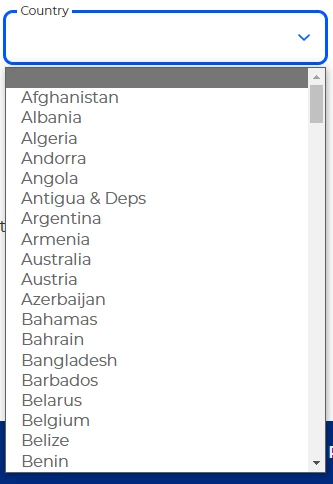
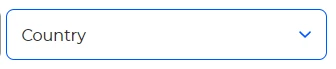
Our forms are being embedded on our page. Now we are wanting to change the style of the marketo dropdown field to follow out Brand design scheme. We have partially been successful, as we were able to change the field. The issue that we are facing right now is when the dropdown field is in an open state, the container around the <option> tags look different. We have tried many ways to change this, is there any suggestions how to tackle this issue?


Below are images viewed on a desktop and on Edge:


This post is no longer active and is closed to new replies. Need help? Start a new post to ask your question.
Best answer by SanfordWhiteman

Hey @sanfordwhiteman,


Apologies, here you go (click on the contact-us button): <link removed>


Well, that isn’t an HTML <select>!


It’s a custom set of <div>s created from the HTML <select> (which is then hidden) using your site’s custom JS. So naturally it has a lot more styleability. Although it also doesn’t function exactly like a real Select (it lacks typeahead, for example).

1 reply

SanfordWhiteman
Level 10
March 9, 2023

Please link to your page so we can inspect your code. Can't troubleshoot a screenshot.

Level 2
March 9, 2023

Hey @sanfordwhiteman,


Here you go:  <link removed>.

SanfordWhiteman
Level 10
March 9, 2023

Not sure what you mean by "different"? Is it that the options go bottom-up? That's because of the height of the page, the browser chooses the best direction automatically.


The custom fieldset-style look of the <select> label vs. the <input type="text"> labels looks to be the same.


Or are you referring to the fact that your JS leaves the top option's inner text empty when it's open? Please be specific about the discrepancy.