July 31, 2015
Question

Static content in emails

  • July 31, 2015
  • 1 reply
  • 1941 views

I am trying to work out how to create a new dynamic newsletter - I have created the segments and snippets needed but I can't work out how I add the static content to the email in order to drag them into the segments.

In the print screen below you can see that the static content only has 'section 1' which contains the whole body of the email. How would I break this up into multiple sections (to have section 2, 3, 4 etc.) in order to drag and drop them into the dynamic content?
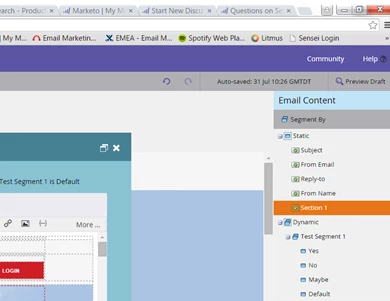
Thanks!

This post is no longer active and is closed to new replies. Need help? Start a new post to ask your question.

1 reply

Tim_Langlois1
Level 4
July 31, 2015

Hi Milly - You'll need to drag "section 1" down into the Dynamic area.

See Make Element Dyjamic 2.1 here: Using Dynamic Content in a Email - Marketo Docs - Product Docs

If you want parts of "section 1" to be dynamic instead of the whole section, then you'll need to create editable areas in the HTML of your email template. To do that, you'll need to add a div class mkteditable to each content section (e.g. paragraph, header) of your email template.

Add Editable Sections to an Email Template - Marketo Docs - Product Docs

Hope this helps

July 31, 2015

This has been very helpful, thank you Tim!