Question
State "first value" will not appear using Visibility Rules in Forms 2.0?
Heya..
I'm using Visibility Rules to show/hide State/rProvince fields dynamically in my form. They are hidden until the user selects United States or Canada . If one of those is selected, the appropriate State/Province appears.. but the default "blank value" option does not come thorugh.
Since I'm using Inline Label Placeholders on this form, it is important that my first "blank value" option shows in these picklists to inform the user that this is required (and my Label tags are hidden).
Here are the Visibility Rules..
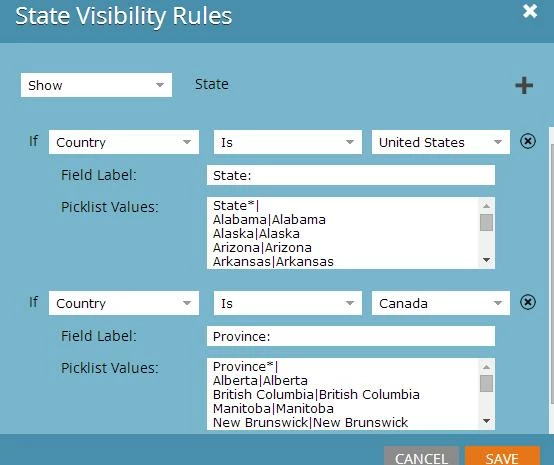
Here's the preview from within Marketo - so its not any of my JS..
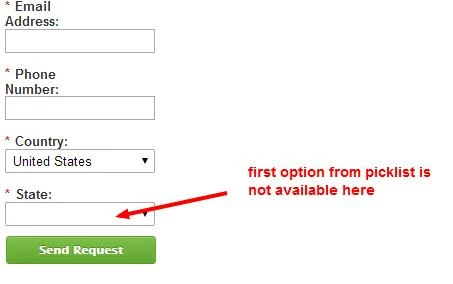
and here's how things will look on the LP with the Inline Labels..
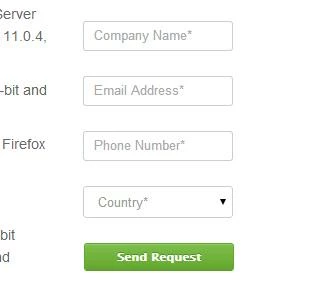
and once US/CAN are selected.. the blank State/Prov value really becomes an issue:
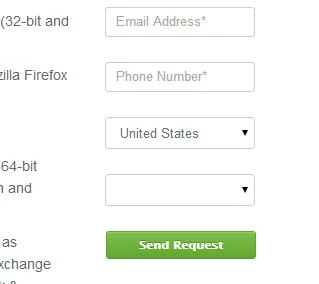
Any thoughts on this? Thanks!
I'm using Visibility Rules to show/hide State/rProvince fields dynamically in my form. They are hidden until the user selects United States or Canada . If one of those is selected, the appropriate State/Province appears.. but the default "blank value" option does not come thorugh.
Since I'm using Inline Label Placeholders on this form, it is important that my first "blank value" option shows in these picklists to inform the user that this is required (and my Label tags are hidden).
Here are the Visibility Rules..
Here's the preview from within Marketo - so its not any of my JS..
and here's how things will look on the LP with the Inline Labels..
and once US/CAN are selected.. the blank State/Prov value really becomes an issue:
Any thoughts on this? Thanks!