
Source and Lead Source fields
We have a custom SFDC field called Source and Marketo's change of 'Leads' to 'People' has seemingly caused an unforeseen problem. With this change, we now have two Marketo fields called Source. The issue is when I try to run a Smart Campaign to update SFDC Lead Source, I only have one option for Source in Marketo, and it will make updates to our custom SFDC field, not Lead Source.
As you can see, there are two Source fields in our instance:
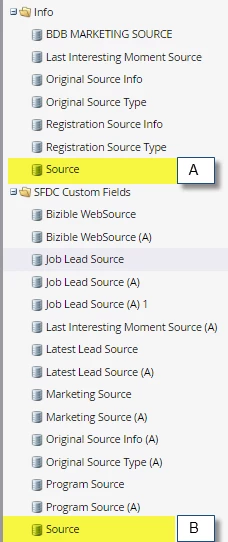
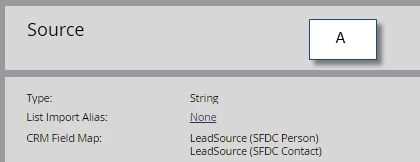
The Source located under Info (labeled A) is the SFDC standard field Lead Source:
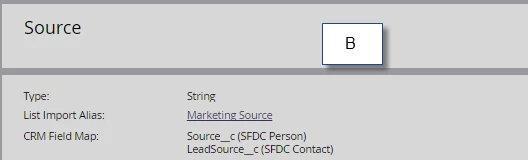
The other Source under SFDC Custom Fields is the SFDC field we created:
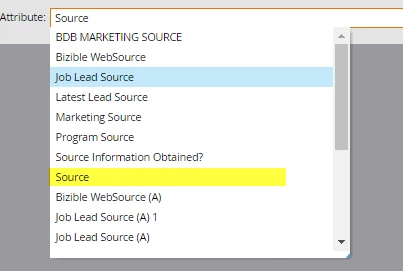
If I try to use Source in the flow of a Smart Campaign, only one Source appears:
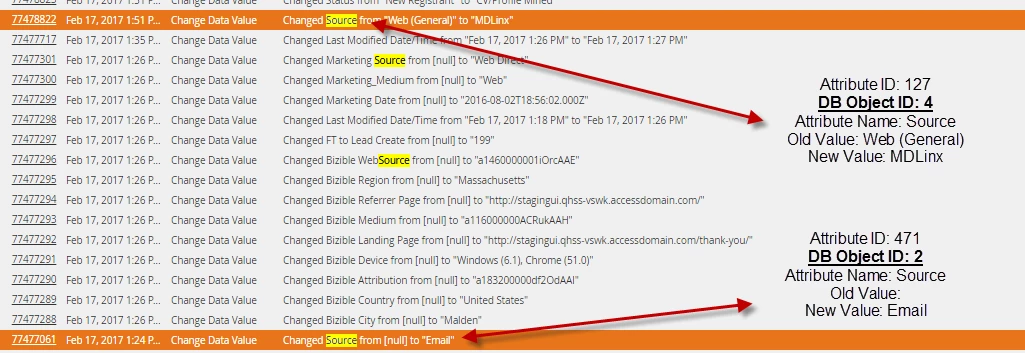
I created a SFDC lead and updated both the Lead Source and Source fields, and in both cases the Activity Log says 'Changed Source', but the DB Object IDs are different:
I was told by Marketo that I need to update the mapping in SFDC, but I can't change the mapping on a standard SFDC field (Lead Source).