Snippet in Text Version | Community
Skip to main content
December 30, 2014
Solved

Snippet in Text Version

  • December 30, 2014
  • 2 replies
  • 1332 views
Hello,

My text version of an email is missing the snippet I added. How do I make the snippet appear in the text version of the email?

Any suggestions would be extremely helpful! Thank you!
This post is no longer active and is closed to new replies. Need help? Start a new post to ask your question.
Best answer by Valerie_Armstro
Hi Erica,

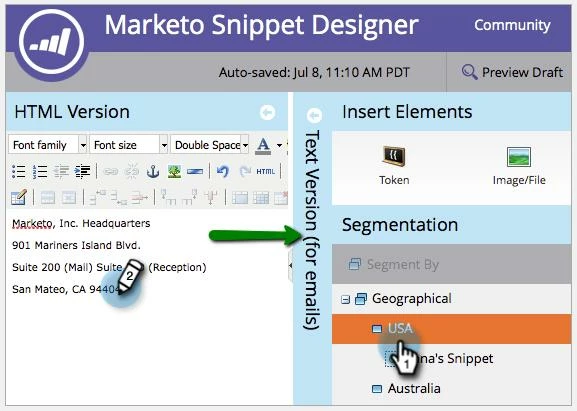
When you are in the Snippet editor you should see a vertical bar on the left that says "Text Version (for emails)".   If you click on it, it will expand and allow you to enter what you want to appear in text emails.

2 replies

Valerie_Armstro
Valerie_ArmstroAccepted solution
Level 9
December 30, 2014
Hi Erica,

When you are in the Snippet editor you should see a vertical bar on the left that says "Text Version (for emails)".   If you click on it, it will expand and allow you to enter what you want to appear in text emails.

December 30, 2014
Thank you very much Val. I completely overlooked that bar.

Thanks!