Snippet Format | Community
Skip to main content
January 16, 2018
Solved

Snippet Format

  • January 16, 2018
  • 2 replies
  • 2787 views

Hi all,

I have a fairly simple problem which I can't for the life seem to figure out properly! I also can not seem to find any more information about it.

I am currently trying to use a snippet for an 'Address' at the bottom of the footer in an email. I just want the address to change depending on the geo location.

Was very easy to set up the snippet and everything, its just when it comes to using it, the snippet seems to join all in one line with no formats.
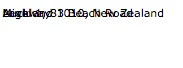
The above image is how it appears when a snippet is used.

Otherwise I need the format to be like:
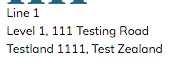
I have set it up the same way in the snippet and made sure I was converting to text also!

Could anyone be able to point me in the right direction?

Thanks,

Andrew

This post is no longer active and is closed to new replies. Need help? Start a new post to ask your question.
Best answer by SanfordWhiteman

You surely have some kind of table formatting (can't tell more without more info) in the enclosing email. that's causing this. You could even have a style that displays when there's full HTML5 support (i.e. in Preview) but which looks different in the rendered HTML4(ish) email.

Try it in an email based on a blank template, with no other formatting.

2 replies

SanfordWhiteman
SanfordWhitemanAccepted solution
Level 10
January 16, 2018

You surely have some kind of table formatting (can't tell more without more info) in the enclosing email. that's causing this. You could even have a style that displays when there's full HTML5 support (i.e. in Preview) but which looks different in the rendered HTML4(ish) email.

Try it in an email based on a blank template, with no other formatting.

January 21, 2018

Hi Sanford,

I have tested it in a blank template and it works there. It seems to be the table formatting which is causing this, thank you so much!

keithnyberg
Level 7
January 16, 2018

Hey Andrew,

Can you also tell us if you are changing the location displayed by making the snippet dynamic (based on a segmentation) or via other means?

Never seen this before so just curious on the steps you took so we can try to re-produce the issue. Maybe providing the HTML code of your snippet could help?

Sincerely,

Keith Nyberg

January 21, 2018

Hi Keith,

Thanks for your help, but I believe it was my template which was causing the issue!