Smart List isn't available when "Member of a Smart List" is selected | Community
Skip to main content
Level 2
January 21, 2026
Question

Smart List isn't available when "Member of a Smart List" is selected

  • January 21, 2026
  • 4 replies
  • 103 views

I am attempting to build a new Smart List that targets members of two other existing Smart Lists (e.g., "Is a member of Smart List A AND Smart List B”). Everything in the Marketo documentation I've found suggests this is completely fine to do. However, The Smart Lists I'm attempting to target do not show up as options in the drop down. I have tried restarting Marketo, restarting my browser, etc. and nothing changes.


I have built:

Smart List A

Smart List B


And I want Smart List C to consist of members of BOTH Smart List A and Smart List B.


Smart List A and Smart List B do not show up as options to select in Smart List C filtering criteria. Do I need to do something to "Activate" these lists in order to get them to show up?

4 replies

SanfordWhiteman
Level 10
January 21, 2026

Are the SLs in different workspaces?

Level 2
January 21, 2026

Nope, they are in the same workspace, and even in the same program.

SanfordWhiteman
Level 10
January 21, 2026

To be crystal: are they all standalone Smart Lists? (Not Smart Campaigns, which also have Smart List components.)


As you mention, this is bog standard behavior for Smart Lists. Even a Smart List with errors is still selectable in Member of Smart List filters.

Sant_Singh_Rath
Adobe Champion
Adobe Champion
January 21, 2026

@Lynette.Holden, in principle there should be no issue using Member of Smart List, and Smart List A and B should be selectable in Smart List C.

If they are not appearing, it usually means something in their setup is making them ineligible. Could you please share a screenshot of the filters used in Smart List A and B? That will help identify what is blocking them from showing up.

~ Sant Singh Rathaur
uditmathur
Community Advisor
Community Advisor
January 21, 2026

HI ​@Lynette.Holden ,

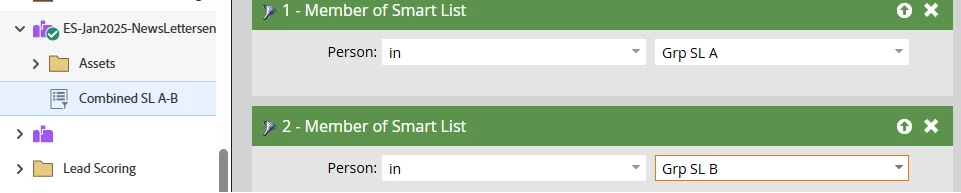
There should not be any issues with this simple task as there is no activating of SL, it should just appear & it does for me.


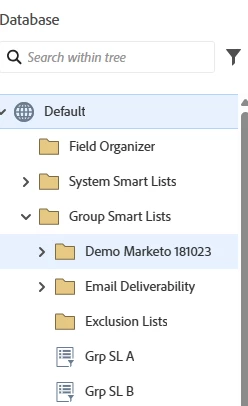
Can you try creating SL in Database Group SL & check.


Level 2
January 21, 2026

Solved! When I create the list in the database, rather than within the marketing program, I can query against it. Any idea why this would be? From my understanding I should be able to have the lists built out within the Marketing Activities tab (as you have shown in your screenshots above) rather than built within the Database tab…


Thank you for the help on this!

uditmathur
Community Advisor
Community Advisor
January 22, 2026

HI ​@Lynette.Holden ,

Yes, you should be able to make the SL within program itself & that should be visible in the drop down.

As ​@SanfordWhiteman said make sure the SL in program are also stand alone SL same as you made in DB.

Michael_Florin-2
Level 10
January 21, 2026

Try to search them under the program name they are in.