Smart campaign not working: "send email when added to program in last hour" | Community
Skip to main content
October 19, 2017
Question

Smart campaign not working: "send email when added to program in last hour"

  • October 19, 2017
  • 3 replies
  • 5738 views

Hi,

I'm trying to send a recurring email to new leads upon submission of a form. Here's what I've got set up:

  • I've created an engagement program
  • Added members to the program by upload.
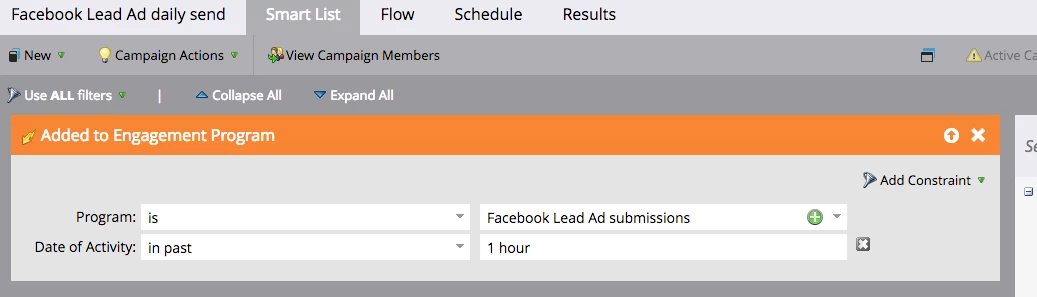
  • Created a smart campaign using
    • trigger: Added to Engagement Program
    • constraint: In the last 1 hour
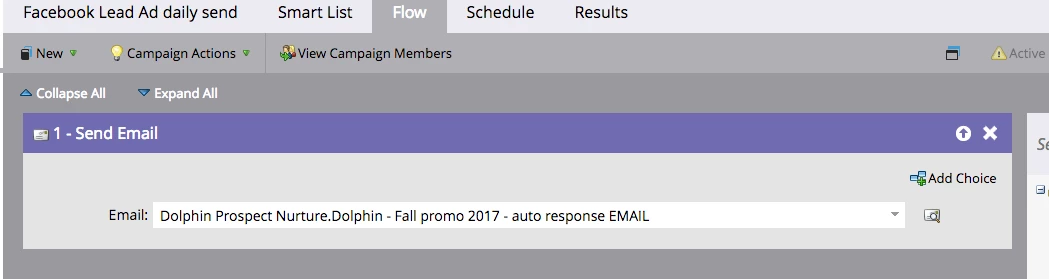
    • flow step: Send email (email selected).

I've activated the campaign, but no email is sent. 

Here's the larger scenario:

  • Our Facebook Lead ad integration is not working (separate issue, logged a ticket).
  • I'm getting a daily spreadsheet of leads, which I have to upload to Marketo.
  • These leads are supposed to get a response email upon submission of the form.

I want to be able to add the leads to the program by upload when I get them, and have the email go automatically to just the new contacts (hence the "In the last 1 hour" consraint).

For my first pass at this I used an Email Program, but I can't set up an email program for every uploaded list. I want one I can just add to as needed.

Any help with this would be appreciated!

This post is no longer active and is closed to new replies. Need help? Start a new post to ask your question.

3 replies

Level 4
October 19, 2017

Hi Peter,

Triggers listen for something to happen in real-time, so if you added people to the program before activating the smart campaign, the flow will not execute.

If you would like to manually send the email, you can use a Filter instead (they are green) for Was Added to Engagement Program.

Lauren

October 19, 2017

Thanks so much Lauren. I made the change you suggested.

However, now the lightbulb for the smart campaign has gone off.

How do I turn it back on?

Thanks again!

Josh_Hill13
Level 10
October 19, 2017

If you want to push in people who already exist, you need two flows:

  • Batch (which is what Lauren is suggesting)
  • Trigger (which is what you built)
    • go to Schedule > Activate once you place the Trigger (orange) back in.
October 19, 2017

I deleted and rebuilt the exact thing I started with:

Created a smart campaign using

  • trigger: Added to Engagement Program
  • constraint: In the last 1 hour
  • flow step: Send email (email selected).

But this time I uploaded the list after the campaign was activated.

Still no email.

Any ideas?

Level 4
October 19, 2017

Hey Peter,

I don't think you need a constraint on the trigger. It may not have fired again if the People were already members of the engagement program - they would not have been re-added.

If I were you, I would probably just schedule the campaign to go out daily at a certain time, or manually run it. I would probably create a list, and set the smart campaign up this way:

Smart list: Member of List = Facebook Lead Ads

Flow: Send Email

Schedule: Schedule Recurrence: Daily

And then leave the smart campaign settings that someone can only flow through once.

If you would like to have it run more often than daily, you could probably just upload to a list and then manually run each time you were in Marketo uploading the People anyway (or use the trigger "Added to List")

October 19, 2017

Thanks again, Lauren.

How would I manually run the email send?

Matt_De_Palm
Level 2
October 19, 2017

Hi Peter,

On the "Schedule" tab of the of the campaign, you would click "Run Once" and then either "Run Now" or schedule the send for a later time and date.