Skipping Content in Engagement Programs | Community
Skip to main content
January 7, 2016
Solved

Skipping Content in Engagement Programs

  • January 7, 2016
  • 7 replies
  • 10534 views

Hi all,

I've read quite a bit about engagement programs over the past few days and am struggling with just one sticking point. If a lead doesn't qualify for a given piece of content (due to program exclusions) it waits until the next cast to receive the next piece of content. Has anyone put together a successful workaround to move a lead to the next piece of content in a singular cast?

Thanks!

This post is no longer active and is closed to new replies. Need help? Start a new post to ask your question.
Best answer by Edward_Unthank_

Hey Racquel!

I gave a presentation at Marketo Summit 2014 on how to do this!

We use email cast programs for this, add people to the email cast program with an "Exclusion" progression status, and have the individual casts in the engagement program call the "Send Email" smart campaign within each email cast program:

This is specifically if you're looking to have programs within engagement programs, for the use case (for example) of having multiple emails promoting the same content and skipping that cast based on the business rules you set up.

Exclusion (Batch): The people who you want to exclude form this email cast. If the CTA points to a blog post, for example, you'd have a filter which says "anyone who has visited page [INSERT BLOG POST URL HERE]" and then adds them to the program as an "Exclusion" status.
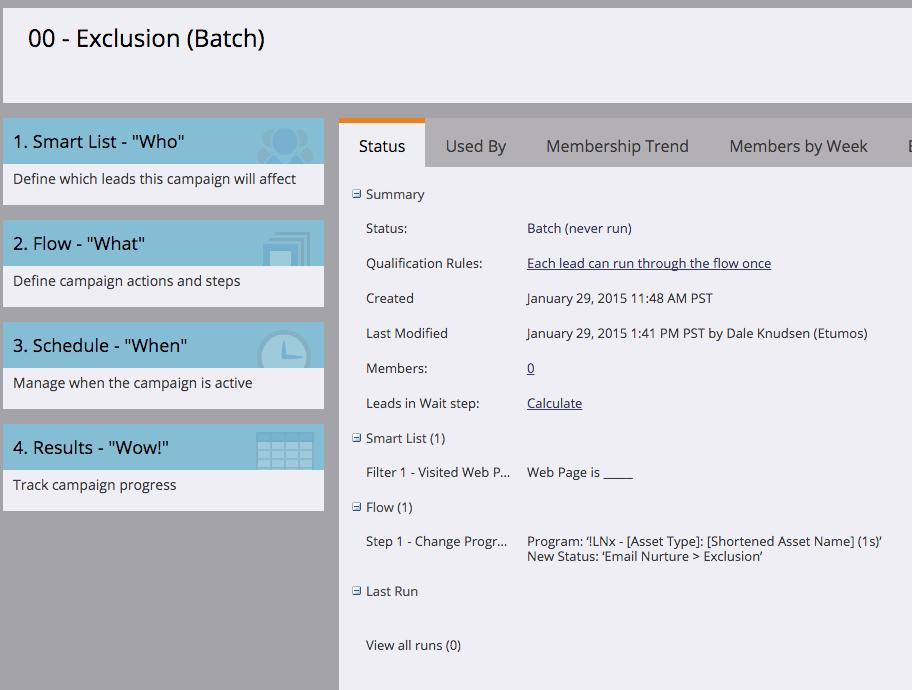
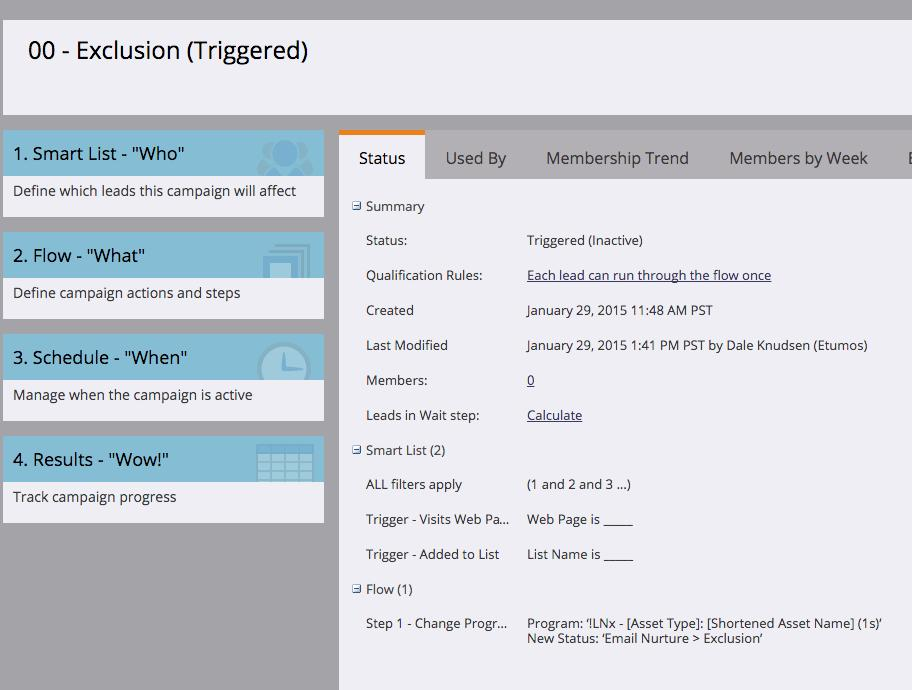
Exclusion (Triggered): The on-going people who you want to exclude from the email cast. In the case of a blog post, it'd be a trigger which is "visit web page [insert blog post url here]." In the case of a content download, it'd be watching that leads are "added to list [insert name of list that holds people who download that asset."

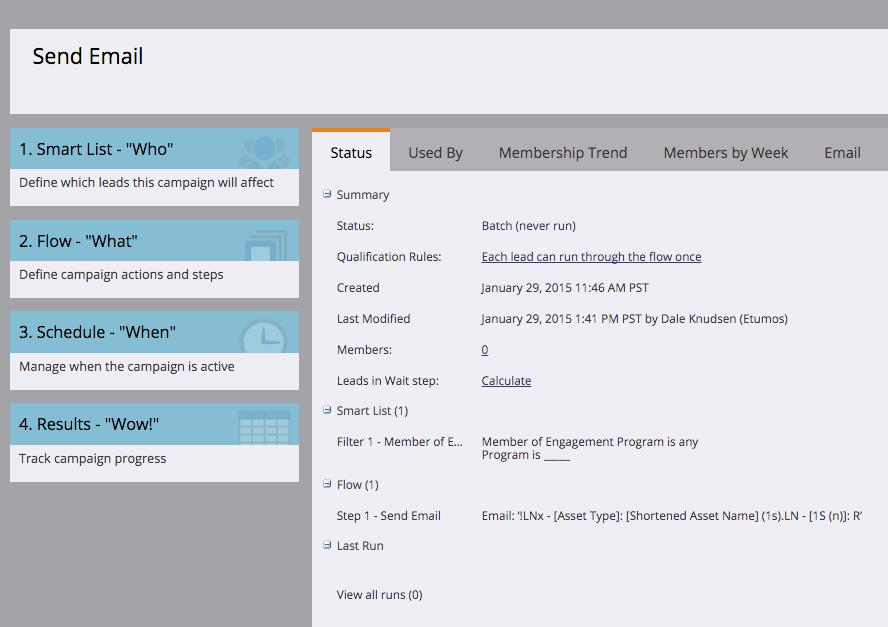
Send Email: This is the smart campaign that will actually send the email in the engagement program. It just has a filter of "is member of any engagement program" and then as a flow step, sends the actual email.
The reason for this is that engagement programs skip a cast for two reasons:

1) Someone has received an that specific email before

2) Someone is already a member of that program


If a person has received a specific email before isn't always the best (or most robust) option, so the way to add robustness is through an "Exclusion" program status on that type of program. That way you can add them to the program so the Engagement cast will skip them, and they won't interfere with your major success metrics.

Cheers,

Edward Unthank | Founder, Etumos

7 replies

January 7, 2016

The way I have done this is by using a program and making that decision in the flow.

Edward_Unthank_
Edward_Unthank_Accepted solution
Level 7
January 7, 2016

Hey Racquel!

I gave a presentation at Marketo Summit 2014 on how to do this!

We use email cast programs for this, add people to the email cast program with an "Exclusion" progression status, and have the individual casts in the engagement program call the "Send Email" smart campaign within each email cast program:

This is specifically if you're looking to have programs within engagement programs, for the use case (for example) of having multiple emails promoting the same content and skipping that cast based on the business rules you set up.

Exclusion (Batch): The people who you want to exclude form this email cast. If the CTA points to a blog post, for example, you'd have a filter which says "anyone who has visited page [INSERT BLOG POST URL HERE]" and then adds them to the program as an "Exclusion" status.

Exclusion (Triggered): The on-going people who you want to exclude from the email cast. In the case of a blog post, it'd be a trigger which is "visit web page [insert blog post url here]." In the case of a content download, it'd be watching that leads are "added to list [insert name of list that holds people who download that asset."


Send Email: This is the smart campaign that will actually send the email in the engagement program. It just has a filter of "is member of any engagement program" and then as a flow step, sends the actual email.

The reason for this is that engagement programs skip a cast for two reasons:

1) Someone has received an that specific email before

2) Someone is already a member of that program


If a person has received a specific email before isn't always the best (or most robust) option, so the way to add robustness is through an "Exclusion" program status on that type of program. That way you can add them to the program so the Engagement cast will skip them, and they won't interfere with your major success metrics.

Cheers,

Edward Unthank | Founder, Etumos

Ibrahim_Burhani
Level 2
January 7, 2016

Thanks Edward, this really helped me too

Regards,

Ibrahim

Andy_Varshneya1
Level 7
January 7, 2016

To further elaborate on what Jamie is saying, instead of creating just emails, you'll want to create a program for each email in the nurture program and the program should have that email as well as a smart campaign and any smart lists you may need.

In the smart list for the smart campaign, you should include filters that fulfill the requirements of who to opt into the email. For example, the filters I use for this are:

  • Is a member of the engagement program
  • Has not received this email or any other email that would be ahead of this email in the nurture flow
  • Has not already viewed the asset in the email

The flow step will be "send this email"

Then in the engagement stream, you'll add the program instead of the email.

February 4, 2016

Andy - Does each program in the engagement program have to have the second two filters you listed out?

  • Has not received this email or any other email that would be ahead of this email in the nurture flow
  • Has not already viewed the asset in the email

Doesn't the engagement program already take that into account as it's pushing lead through the stream?

Thanks in advance for clarifying!

Andy_Varshneya1
Level 7
February 5, 2016

Hi Lisa,

No, technically the way engagement programs work is that they go down the list from Asset 1 to Asset n and find the first one email/smart campaign that the lead is not a part of and push them through that. Because of that, say you had them skip Asset 4-5 and go straight to Asset 6, if you don't have those filters in place, they'll get Asset 4 the next week.

As for the has not viewed the asset in the email filter already, that is more as a precaution if you have the same asset in multiple emails. For example, if you have a webinar invite in emails 1-3, you want to make sure you don't promote it to them if they've already registered for the webinar.

Make sense?

January 7, 2016

Thank you Jamie Lewis​ and @Andy Varshneya​! This is exactly the system I have been building this morning based on the info I got from Edward Unthank​'s presentation (linked above). I am glad we're interpreting it the same way - feel validated!

Edward Unthank​, I appreciate the breakdown - very helpful. Can you confirm that if I follow these steps to exclude the lead (who previously downloaded asset) they would receive the next piece of content? What I'm trying to avoid is a lead skipping a week of nurture because they don't qualify for one of the pieces of content. Thanks!

Edward_Unthank_
Level 7
January 7, 2016

So long as you add the leads to be excluded to the program as "Exclusion" status, that piece of content will be skipped in the cast, so you won't waste a week of nurture!

January 7, 2016

Perfect! Thank you for confirming and putting together your presentation as such a great guide.

Robb_Barrett
Level 10
December 14, 2016

Here's my method.  Works well for me and it's quite extendable.

Length Matters: Engagement Programs that Don't Finish Too Quickly...

Robb Barrett
Morgan_Corbett
Level 3
January 5, 2017

@Edward Unthank (Etumos)​ Do you have a link to your original presentation? The one you provided last January no longer exists.

What do you recommend for progression statuses for both the Nurture channel and the Nurture Email?

Thanks,

Morgan

Edward_Unthank_
Level 7
January 5, 2017

Hey @Morgan Corbett​, I just updated that post with the correct link, if you check the above again.

For Nurture channel, I go with:

  • Member
  • Influenced

For Nurture Email (or "Nurture Cast," as I've refined it later):

  • Exclusion
  • Sent
  • Opened
  • Clicked
  • Converted
  • Unsubscribed

Cheers,

Edward Unthank

Heather_Van_Sch
Level 2
October 24, 2017

Hi @Edward Unthank​,

For your Nurture Casts, how are you using the progression statuses - i.e., for reporting; directing leads; other?

Thanks, Heather

Natasa_Dukic
Level 2
January 23, 2019

Do you have to include the send campaign & exclusion in the stream? Or, do you include only the send campaign?

Natasa_Dukic
Level 2
January 23, 2019

I have 9 emails with varying pieces of content in each email so does that mean I need: 9 programs, 9 emails, 9 smart campaigns, and 9 exclusion lists?

This is how I've set it up so far.. I need guidance if this isn't right.

Grace_Brebner3
Level 10
January 23, 2019

Hey Natasa - this thread is three years old, & marked as resolved. You might want to create a new thread to get your questions answered