Simple: Change Program Name | Community
Skip to main content
Sherry_Hale
Level 4
December 16, 2014
Solved

Simple: Change Program Name

  • December 16, 2014
  • 4 replies
  • 2214 views
With all of the changes, this seems to be difficult for some reason.  Where do I change the name of a program?  Everytime I click on the name, it takes me to the calendar and nowhere to edit the name of the program.
This post is no longer active and is closed to new replies. Need help? Start a new post to ask your question.
Best answer by Sherry_Hale
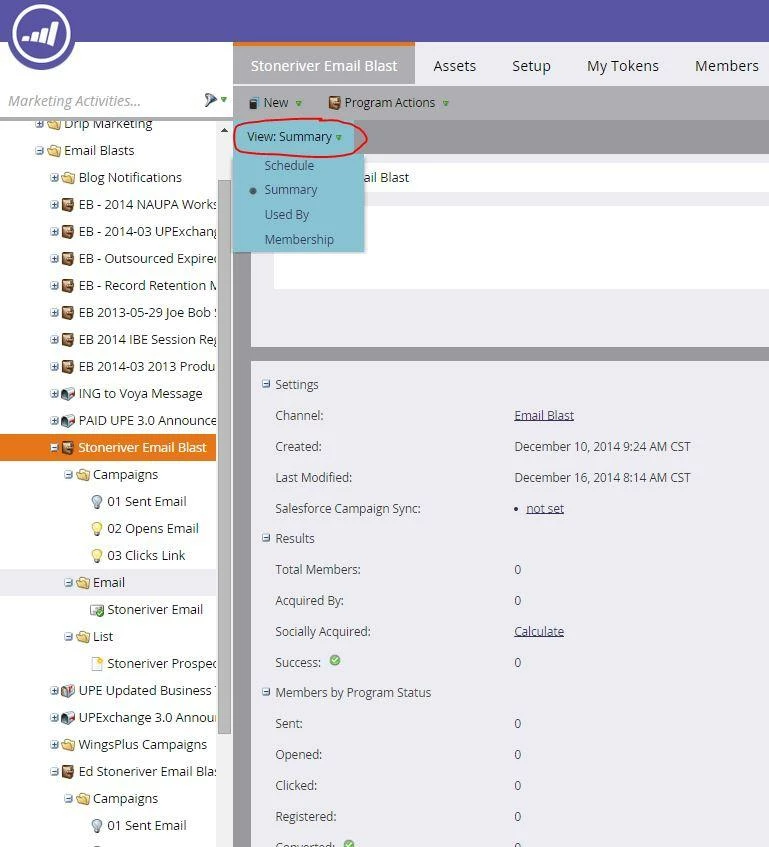
Ahhhh I just figured it out!  I have to change "view summary" to "Summary" instead of the defaut which was "schedule" as shown in the attached screen shot.

4 replies

Adam_Vavrek1
Level 8
December 16, 2014
Hi Sherry,

Click the name of the program and then edit it on the right and press Save. Here's a screenshot:

Sherry_Hale
Level 4
December 16, 2014
Hi Adam!!!

When I click on the program, I don't get what this screen shot shows me.  Here's what I get.
Sherry_Hale
Sherry_HaleAuthorAccepted solution
Level 4
December 16, 2014
Ahhhh I just figured it out!  I have to change "view summary" to "Summary" instead of the defaut which was "schedule" as shown in the attached screen shot.
Adam_Vavrek1
Level 8
December 16, 2014
Ah, I see! Yes, that confused me at first, too!